22
MultIJaCk ConfIguratIon
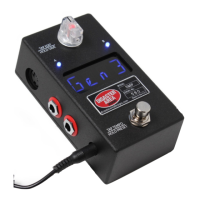
The 1/4” jack on the back of the DMC.micro is our amazing MultiJack. It does a ton of
stu, depending on your needs it can be a MIDI output, an expression pedal input, even a
programmable footswitch input!
To congure the MultiJack, enter Setup and navigate to MULTIJACK / JACK. Choose one of
the following options:
EXP: Jack connects to expression pedal (TRS type required)
FT.SW: Jack connects to single foot switch for tap tempo
N-O: Jack functions as normally-open tap tempo output*
MIDI TIP / MID.T: Jack sends MIDI from tip
MIDI RNG / MID.R: Jack sends MIDI from ring
MIDI T&R / MD.TR: Jack sends MIDI from both tip and ring
MIDI I/O / MD.IO: Jack sends MIDI from tip, receives MIDI from ring
UTIL: Connect dual footswitch to jack OR expression pedal, control functions
programmable using UTIL J TIP and RING functions
N-C: Jack functions as normally-closed tap tempo output*
Then congure JACK CHAN / J CH to match the device channels you want the MultiJack to
aect.
Examples:
Expression pedal for all devices: MULTIJACK = EXP, JACK CHAN = CH A B C D
MIDI output to device A: MULTIJACK = MIDI TIP, JACK CHAN = CH A
Send tap tempo to a non-MIDI device: MULTIJACK = N-O (most devices)
or N-C (Boss pedals)
The MultiJack can also be congured like the Utility Modes, by setting MULTIJACK = UTIL. This
will unlock several new setup menu items that correspond to the functions that the jack can
perform. We’ve shown the controls for the tip, the ring has identical values. If you congure
J TIP TYP = EXP, the jack will only work as an expression input and the ring will be disabled.
Connect a dual momentary footswitch to the jack with a TRS cable, or a standard TRS
expression pedal to use the UTIL conguration.
J TIP TYP / J TT: Congures the MultiJack tip in UTIL mode.
ONE: one-shot, message send the HI value each time the button is pressed.
TOG: toggle, message toggles between high and low when the button is pressed.
RTN: sends the HI value followed by the LO value when the button is pressed.
NOTE: sends a MIDI note when the button is pressed.
B UP: sends the bank up command for Strymon devices
B DN: sends the bank down command for Strymon devices
TAP: sends tap tempo commands or controls the Clock mode rate
EXP: turns the MultiJack into a programmable expression pedal input
J TIP NUM / J TN: sets the MIDI CC number the jack sends
J TIP LOW / J TL: sets the low value the jack will send
J TIP HI / J TH: sets the high value the jack button will send
J TIP CH / J TC: sets the device slots the button / pedal will send on
Example:
Expression pedal sends CC17 to Device A: MULTIJACK = UTIL, J TIP TYP = EXP, J TIP
NUM = 17, J TIP LOW = 0, J TIP HI = 127, J TIP CH = CH A.


 To Previous Page