2
setup Menu
All of the conguration and customization options are contained within the Setup Menu. Any
changes you make in this menu are saved in the memory of the DMC.micro for future use.
Throughout this manual we’ll indicate Setup Menu options as MENU = OPTION, meaning we’d
like you to navigate to that item in the Setup Menu and set its value to match.
HOLD TO
EDIT
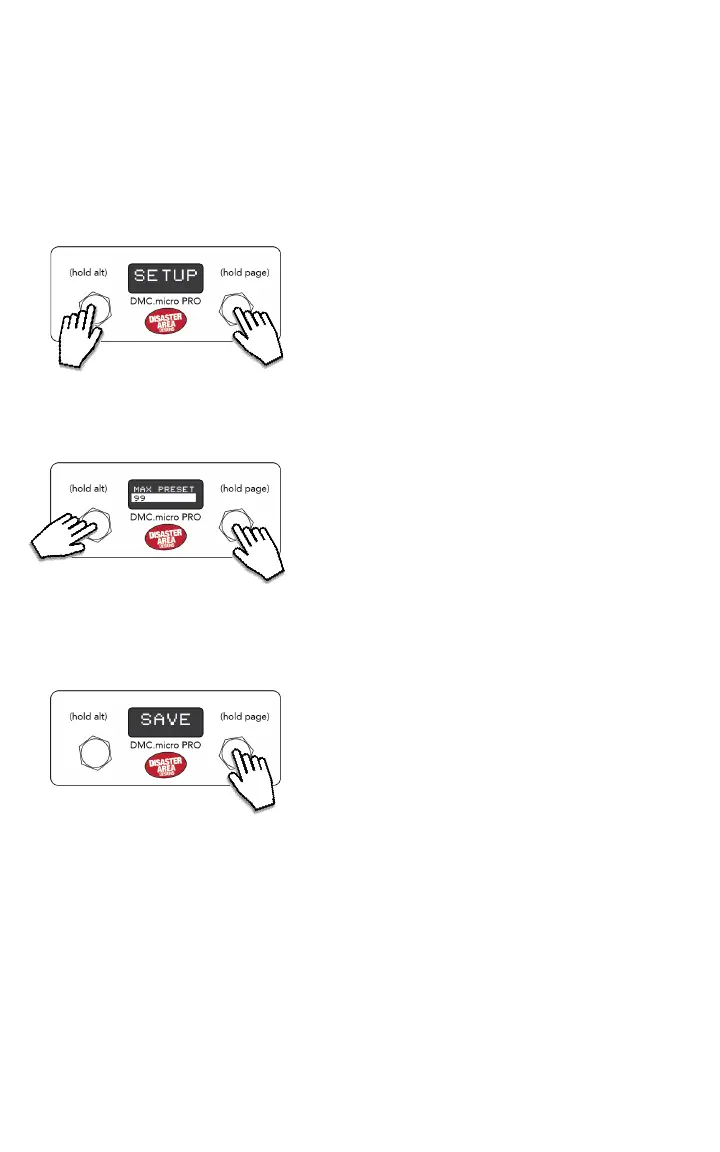
NAVIGATING THE SETUP MENU:
Tap left or right to choose an item to edit.
Hold left to edit the item, then tap left or right to
change its value. PRO will highlight the menu item,
LED4 will ash the menu value.
Hold left to return to the main menu.
ENTERING THE SETUP MENU:
Press and hold both buttons after the DMC boots.
Release the buttons when you see SETUP on the
display.
HOLD TO
ENTER
Hold the right footswitch to save the settings and
exit.
If you have changed any of the port congurations,
be sure to power-cycle the DMC.micro.
TAP TO
MOVE
HOLD TO
SAVE
IMPORTANT NOTE: You must SAVE your changes from the Setup Menu before they will
take eect!


 To Next Page