16
preset Mode
Preset mode is the heart of the DMC.micro. You’ll probably spend most of your time here, so
we should get to know it!
If your DMC.micro doesn’t show “P” plus a number on the display, then long-hold the right
button to return to preset mode.
Now that you’re in preset mode, try tapping the left and right buttons. You should see the
display change to show that you’ve selected new presets and your connected devices are
probably changing their sounds, too! So far, so good, so what’s the point?
The point is that preset mode allows you to access any sound on any device, in any
combination, all with a single tap of your foot!
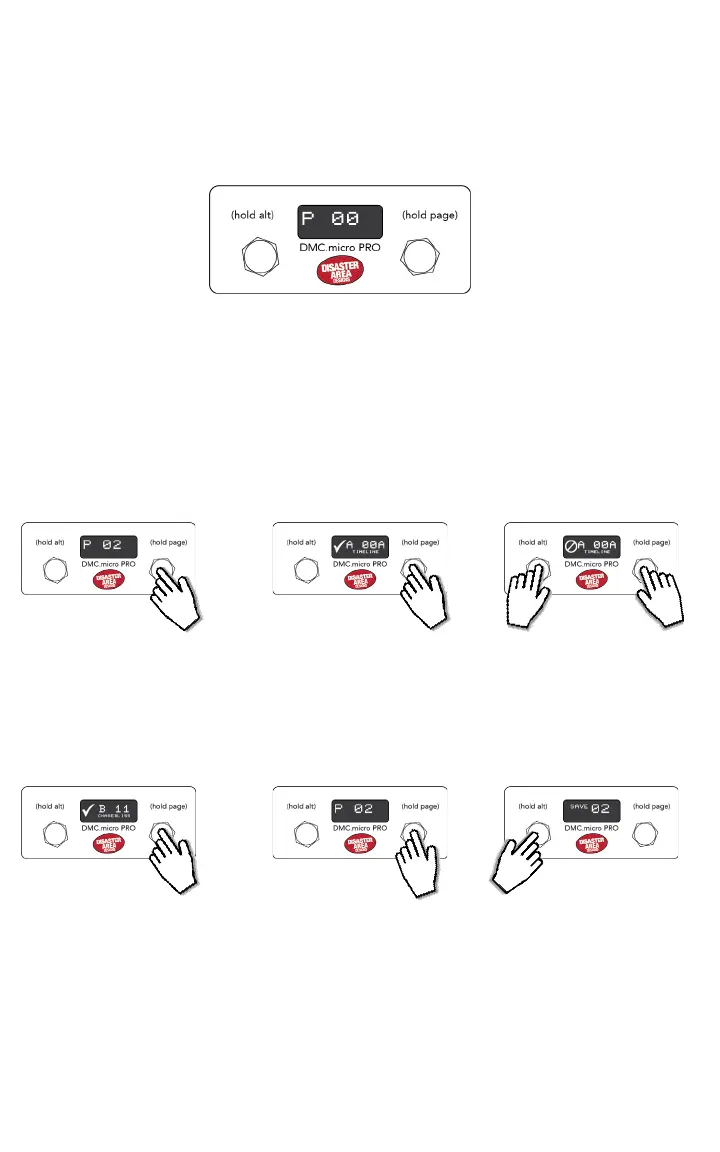
To edit and save a preset, just follow these simple steps:
TAP
HOLD
TAP
Tap the left or right buttons to
select the preset you would
like to edit.
Hold the right button to
advance to the rst device
mode (Dev A).
Tap the left or right buttons to
select the sound you want to
use on the selected device.
If you want to bypass this
device, hold the left button.
HOLD TO
BYPASS
HOLD
LONG
HOLD
Hold the right button to
advance to the next device
mode and select a new sound.
Repeat until you return to
preset mode, or long-hold
the right button to go back
immediately.
Hold the left button to save the
preset!
HOLD TO
SAVE


 To Next Page