9
Checking the Media and Printing
Status
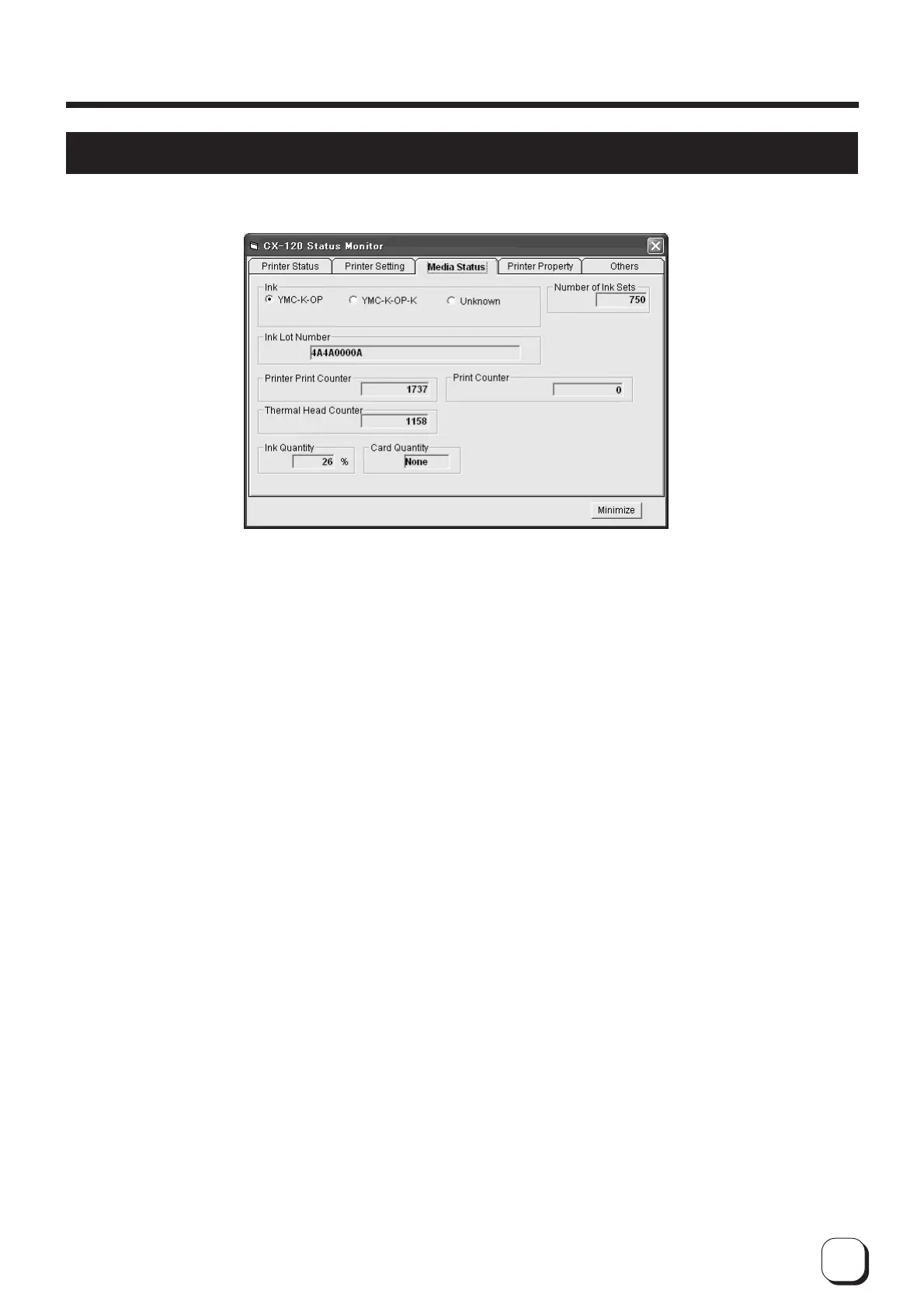
Check the status of the printer media and printing on the media information display screen.
1 Ink : Displays the installed ink ribbon. "Unknown" when ink ribbon cannot be recognized correctly.
Printing may not be performed properly in such a case.
2 Number of Rounds : Displays the number of rounds that the installed ink ribbon is capable of winding. In the
example on the screen, a YMC-K-OP ink ribbon with 750 rounds are installed. A YMC-K-P
cycle is counted as 1. The display will be blank when ink ribbon in use is unknown.
3 Ink Lot Number : Displays the lot number of ink ribbon installed. The display will be blank when ink ribbon in
use is unknown.
4
Pieces Issued by Printer
: Displays number of cards issued. This figure can be set to 0.
5 Pieces issued : Displays number of cards printed by the printer.
6
Number of Head Prints
: Displays number of printing ink panels of the thermal head. For example, 5 is added when all
YMCK-OP inks are used for printing.
7 Ink volume : Displays remaining quantity of the ink ribbon.
8 Card volume : Indicates whether cards are present.
How to Use the Status Monitor



 To Next Page