Dai Nippon Printing Co.,Ltd
[DP-DS80D Printer Driver] Instruction Manual for Windows 7,8
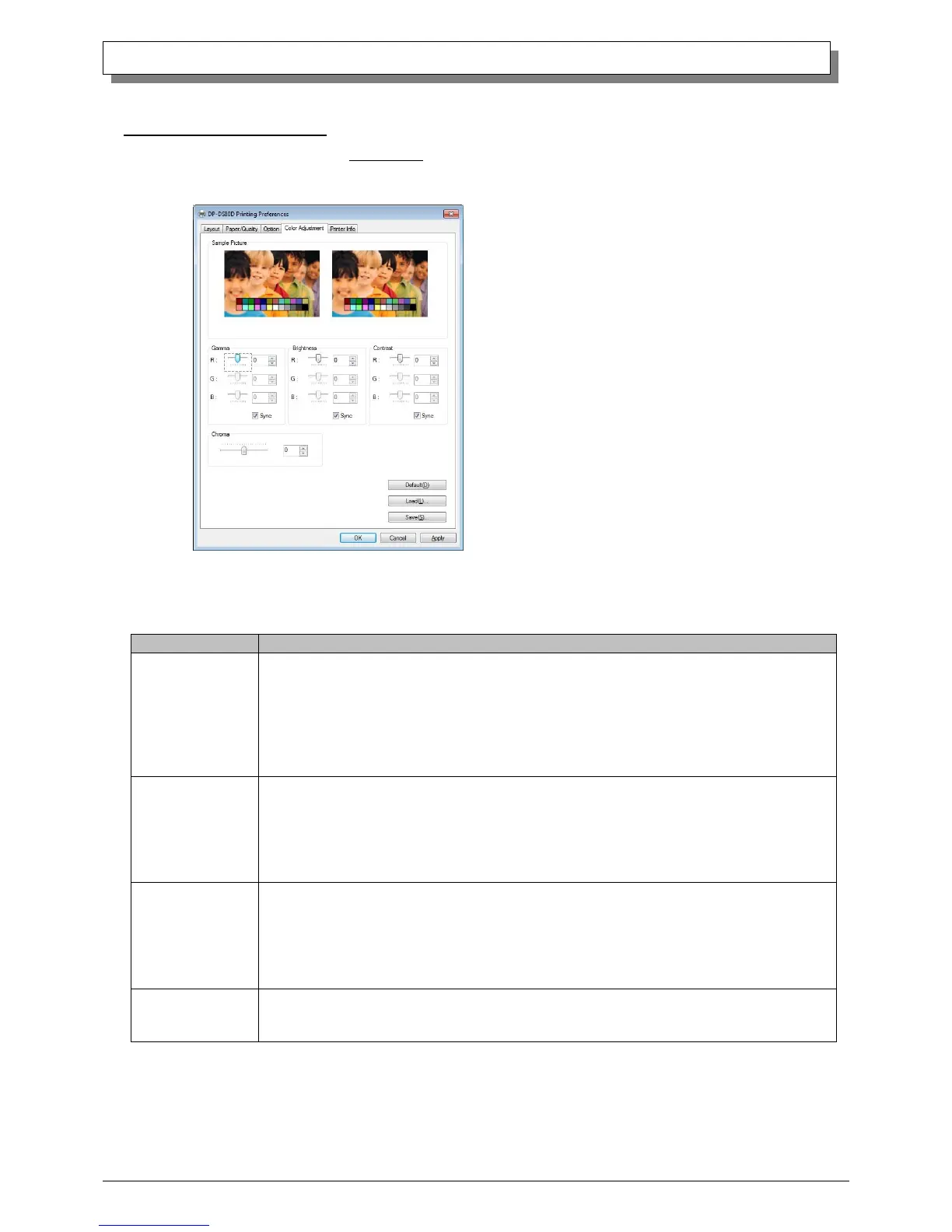
2.2.5 Color Adjustment
If you check Handled by Driver in 2.2.4 Option, the respective color adjustment values in the Color Adjustment tab
are reflected in the image.
Setting ranges in the Color Adjustment tab are as follows:
-100(dark) ~ 100(light) (0 means no adjustment, Gamma 2.0 ~ 0.5)
Adjusts the density of the highlights in the image. The greater the gamma value, the brighter the
highlights.
Synchronous check box
ON : Sets RGB at the same value
OFF:Sets RGB at a different value
-100(dark) ~ 100(light) (0 means no adjustment)
Adjusts the brightness of the image. The larger the value, the greater the overall brightness of the image.
Synchronous check box
ON :Sets RGB at the same value
OFF:Sets RGB at a different value
-100(weak) ~ 100(strong) (0 means no adjustment)
Adjusts the contrast of the image. The larger the value, the greater the contrast.
Synchronous check box
ON : Sets RGB at the same value
OFF: Sets RGB at a different value
-100(weak) ~ 100(strong) (0 means no adjustment)
Adjusts the color saturation of the image.
Fig 2.2.5 Color Adjustment tab



 To Next Page