Dai Nippon Printing Co.,Ltd
[DP-DS80D Printer Driver] Instruction Manual for Windows 7,8
C
C
h
h
a
a
p
p
t
t
e
e
r
r
2
2
P
P
r
r
o
o
p
p
e
e
r
r
t
t
i
i
e
e
s
s
Various printer settings can be made using the DP-DS80D Driver properties. Before operation, be sure to have a good
understanding of the contents. Login by administrator authority is required for operation. Depending on application of the use,
operation from print setting of the application is necessary.
2
2
.
.
1
1
O
O
p
p
e
e
n
n
i
i
n
n
g
g
P
P
r
r
i
i
n
n
t
t
e
e
r
r
P
P
r
r
o
o
p
p
e
e
r
r
t
t
i
i
e
e
s
s
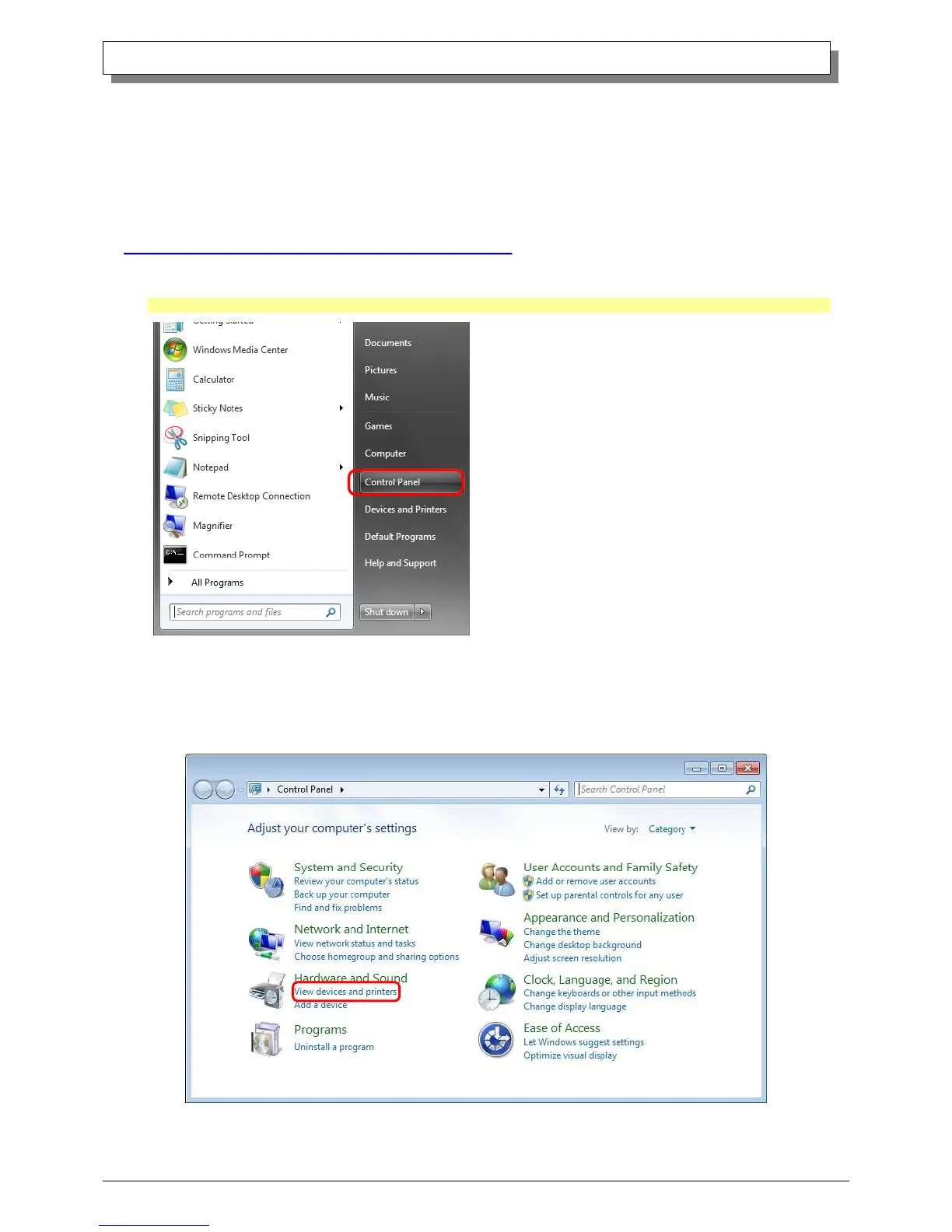
1. Click Start ⇒ Control Panel ⇒ open the control panel
In Windows 8, Right click on the Start screen => All apps => Control Panel => open the control panel
2. In the control panel, select View devices and printers ⇒ open the Devices and Printers window



 To Next Page