SYSTEM MALFUNCTION
If there is a malfunction in the Stop/Start system, the
system will not shut down the engine. A “Service Stop/
Start System” message and a yellow Stop/Start telltale
will appear in the instrument cluster display
page 75.
If the “Service Stop/Start System” message appears in
the instrument cluster display, have the system
checked by an authorized dealer.
CRUISE CONTROL SYSTEMS —
IF EQUIPPED
Your vehicle may be equipped with the Cruise Control
system, or the Adaptive Cruise Control (ACC) system:
•
Cruise Control will keep your vehicle at a constant
preset speed.
•
Adaptive Cruise Control (ACC) will adjust the vehicle
speed up to the preset speed to maintain a distance
with the vehicle ahead.
NOTE:
•
In vehicles equipped with ACC, if ACC is not enabled,
Fixed Speed Cruise Control will not detect vehicles
directly ahead of you. Always be aware of the fea-
ture selected.
•
Only one Cruise Control feature can operate at a
time. For example, if Fixed Speed Cruise Control is
enabled, Adaptive Cruise Control will be unavailable,
and vice versa.
CRUISE CONTROL
When engaged, the Cruise Control takes over accelera-
tor operations at speeds greater than 20 mph
(32 km/h).
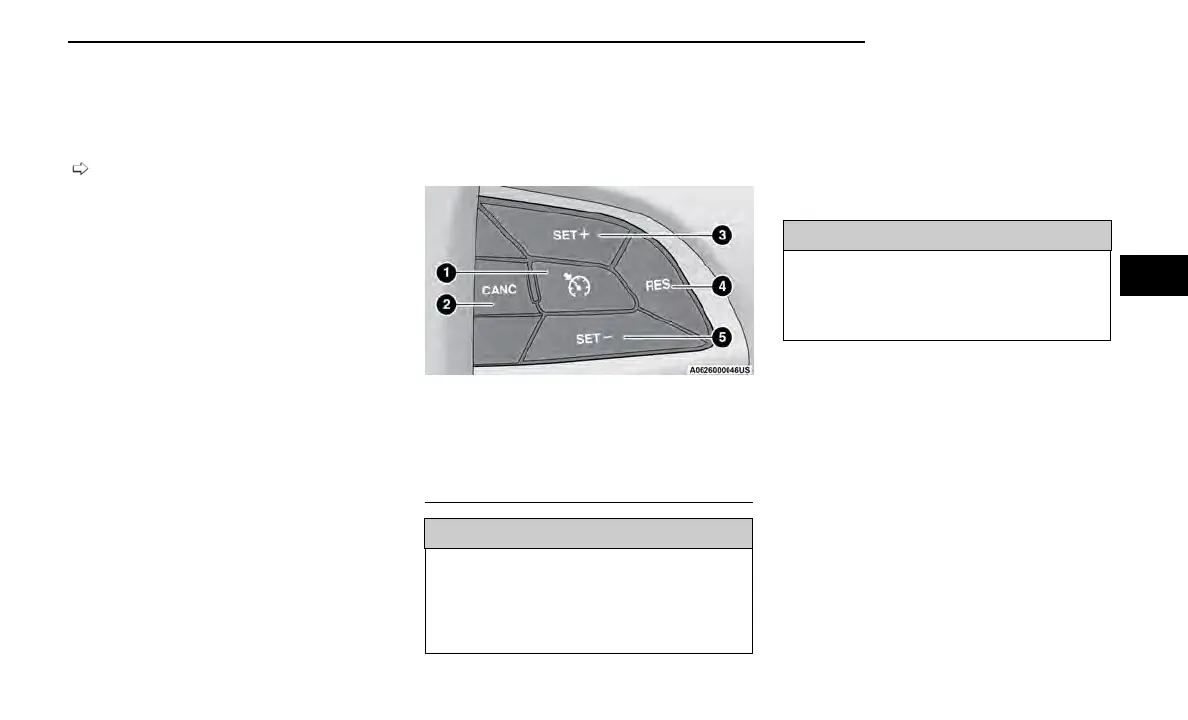
The Cruise Control buttons are located on the right side
of the steering wheel.
WARNING!
Cruise Control can be dangerous where the system
cannot maintain a constant speed. Your vehicle could
go too fast for the conditions, and you could lose con-
trol and have an accident. Do not use Cruise Control
in heavy traffic or on roads that are winding, icy,
snow-covered or slippery.
To Activate
Push the on/off button to activate the Cruise Control.
“CRUISE CONTROL READY” will appear in the instru-
ment cluster display to indicate the Cruise Control is on.
To turn the system off, push the on/off button a second
time. “CRUISE CONTROL OFF” will appear in the instru-
ment cluster display to indicate the Cruise Control is off.
The system should be turned off when not in use.
WARNING!
Leaving the Cruise Control system on when not in use
is dangerous. You could accidentally set the system
or cause it to go faster than you want. You could lose
control and have an accident. Always leave the sys-
tem OFF when you are not using it.
To Set A Desired Speed
Turn the Cruise Control on. When the vehicle has
reached the desired speed, push the SET (+) or SET (-)
button and release. Release the accelerator and the
vehicle will operate at the selected speed. Once a
speed has been set, a message “CRUISE CONTROL SET
TO MPH (km/h)” will appear indicating what speed was
set. A cruise indicator lamp, along with the set speed,
will also appear and stay on in the instrument cluster
when the speed is set.
Cruise Control Buttons
1 — On/Off
2 — CANC/Cancel
3 — SET (+)/Accel
4 — RES/Resume
5 — SET (-)/Decel
STARTING AND OPERATING 97
4















 To Next Page