EasyManua.ls Logo

Dometic Smart Touch Cabin Control - User Manual

Dometic Smart Touch Cabin Control
44 pages
Print Icon
To Next Page IconTo Next Page
Loading...
COPYRIGHT © 2011-2018 Dometic Corporation. All Rights Reserved.
No part of this publication may be reproduced, translated, stored in a retrieval system, or transmitted in any form or by any means
electronic, mechanical, photocopying, recording or otherwise without prior written consent by Dometic Corporation. Every precaution
has been taken in the preparation of this manual to insure its accuracy. However, Dometic Corporation assumes no responsibility for
errors and omission. Neither is any liability assumed for damages resulting from the use of this product and information contained
herein.
Smart Touch Cabin Control
Installation & Operations Manual
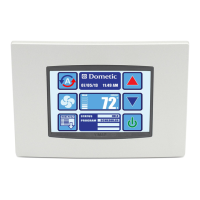
Smart Touch Cabin Control
(shown without bezel)
Dometic Corporation
Rev. 20180628
L-3380 English
P/N 337767

Questions and Answers

  • M
    Michele OrrSep 15, 2025
    What does “Filter Reminder” flashing mean on my Dometic Control Unit?
    • R
      reneepierceSep 16, 2025
      If the “Filter Reminder” is flashing on your Dometic Control Unit, it means the filter needs cleaning or replacement. Clean or replace the filter and reset “Filter Hours Reset”.
  • A
    Amanda FergusonSep 18, 2025
    What to do if my Dometic Control Unit has no heat and water coil is iced in the Heating Mode?
    • S
      Sarah KingSep 18, 2025
      If your Dometic Control Unit has no heat and the water coil is iced in the Heating Mode, it is because the seawater temperature is below 40°F (4.4°C). Shut down the system to prevent damage to the condenser and allow the coil to defrost.
  • A
    Anne MendezNov 23, 2025
    Why is my Dometic Control Unit not cooling or heating?
    • A
      Alex WolfNov 23, 2025
      If your Dometic Control Unit isn't cooling or heating, you can try the following: Lower or raise the set point. Clean the seawater strainer and check for obstructions at the speed scoop thru-hull inlet, ensuring a good steady flow from the overboard discharge. Remove the hose from the pump discharge to purge air from the line. Check the air conditioning unit for refrigerant oil leakage and call a service technician if needed. Ensure that the seawater plumbing is installed according to the guidelines. If needed, see the digital control manual for reprogramming. Press the Mode icon to achieve the desired mode. If the air handler system is equipped with water-temperature sensors, check the water temperature at the digital control. If the water temperature is not at least 15°F warmer (for heat...
  • M
    Marisa DominguezNov 25, 2025
    What to do if my Dometic Control Unit fan coil is iced?
    • R
      richardjohnsonNov 25, 2025
      If your Dometic Control Unit's fan coil is iced, try these steps: Raise the set point. Remove any obstructions in the return air stream, clean the return air filter and grille, and check for crushed or restricted ducting, ensuring it's as straight, smooth, and taut as possible. Redirect the supply air to prevent it from blowing into the return air stream, and seal any air leaks on the duct. Close hatches and doors. If all else fails, switch the air conditioning unit to heat until the ice melts, or use a hair dryer to melt it. For improper airflow, see the General Troubleshooting section first, before reprogramming the digital control. Reprogram the De-Ice Cycle under the DX settings to enable de-icing. If the de-icing cycle does not melt the ice, switch the air conditioning unit to heat un...
  • K
    Kevin MorseDec 1, 2025
    What does “High Pressure Fault” mean on my Dometic Control Unit?
    • B
      Brad CooleyDec 1, 2025
      If your Dometic Control Unit displays a “High Pressure Fault”, it indicates the high-pressure switch is open. In cooling mode, this is due to improper seawater flow, so check if the strainer or intake is plugged, the seacock is closed, or the seawater hose has kinks or collapses. Verify the pump operation and check the pump circuit breaker if applicable. In heating mode, it's due to improper airflow; remove obstructions in the return air stream, clean the air filter and grille, and check for crushed or restricted ducting, ensuring it's straight, smooth, and taut. If the problem persists, reprogram the Low Fan Speed Limit for maximum value (set to 75), and adjust the reverse fan speeds during Heating Mode by changing the Reverses Fan Speed in Heat under General Settings, or manually set the...

Summary

IMPORTANT PROGRAMMING NOTES TO INSTALLER AND END USER

INSTALLING THE DISPLAY PANEL

CHOOSING THE LOCATION

MOUNTING THE DISPLAY

Provides instructions and dimensions for mounting the display panel.

RECHARGEABLE BATTERY BACKUP

MOUNTING THE OPTIONAL SENSORS

Details the installation of optional remote, outside, service, water, and humidity sensors.

OPERATION

HOME SCREEN ICON FUNCTIONS

Details the specific functions of each icon on the Smart Touch Home Screen.

MODES OF OPERATION

MAIN MENU

CONTROL PARAMETERS

General Settings

Accesses parameters for fan speed, calibration, units, and heat options.

Inside Temp Calibration

Calibrates the ambient sensor within a ±10°F range.

CAN Bus Group ID

Set Point Temperature Differential

Sets the temperature differential for mode switching (1°F or 2°F).

Supply Air Temp Limit

Humidity Sensor Limit Adjustment

Adjusts humidity control set point for DX and CW applications.

DX OPERATIONAL SETTINGS

Compressor Start Delay

Sets compressor staging delay for multi-system installations.

Failsafe Level

Configures protection levels for various fault conditions.

Low Voltage Monitor

Monitors AC input voltage and prevents compressor start if too low.

De-Ice Cycle

Configures the de-icing cycle to prevent evaporator coil icing.

Pump Sentry

Seawater Low Limit Adjustment

Sets the seawater temperature limit for switching to electric heat.

CW OPERATIONAL SETTINGS

PROGRAM SCHEDULER

Display Lock

Set Access Locked by Pin

Sets a security PIN to access different display levels.

TROUBLESHOOTING;COMMISSIONING

System Status

Displays live sensor readings, voltage, frequency, and status.

Help & Information

Provides fault descriptions and QR code for website help.

Commission Procedure

Guides through testing unit inputs and outputs step-by-step.

FAULT HANDLING, HISTORY & RUN HOURS

Fault Help Lookup

Provides help and descriptions for specific fault codes.

QUICK-START OPERATIONS CHECKLIST

MAIN MENU PROGRAMMABLE PARAMETERS

HVAC Control Settings

Lists programmable parameters for HVAC control, including general settings.

DX Operational Settings

CW Operational Settings

Details programmable parameters specific to CW operational settings.

Program Scheduler & Date Time Menu

System Menu, Troubleshooting, Faults & History

TROUBLESHOOTING

GENERAL TROUBLESHOOTING

Provides common problems and their solutions for system operation.

No cooling or heating

DIGITAL CONTROLS TROUBLESHOOTING

FIL (Filter Reminder) is flashing

HPF (High Pressure Fault) is displayed

Details causes and solutions for high-pressure faults.

LAC (Low AC Voltage) is displayed

Explains low AC voltage faults and calibration.

LPF (Low Pressure Fault) is displayed

Addresses low-pressure faults and their troubleshooting.

PLF (Low Pump Flow) is displayed

Explains low pump flow faults and their causes.

Fan is not running

Fan coil is iced

Troubleshoots fan coil icing issues and solutions.

ASF (Air Sensor Failure) is displayed

Explains air sensor failure faults and troubleshooting steps.

MAINTENANCE

SPECIFICATIONS

DIAGRAMS

WIRING DIAGRAMS FOR DX AND CW SYSTEMS

Provides wiring diagrams for DX and CW system configurations.

Dometic Smart Touch Cabin Control Specifications

General IconGeneral
BrandDometic
ModelSmart Touch Cabin Control
CategoryControl Systems
LanguageEnglish

Related product manuals