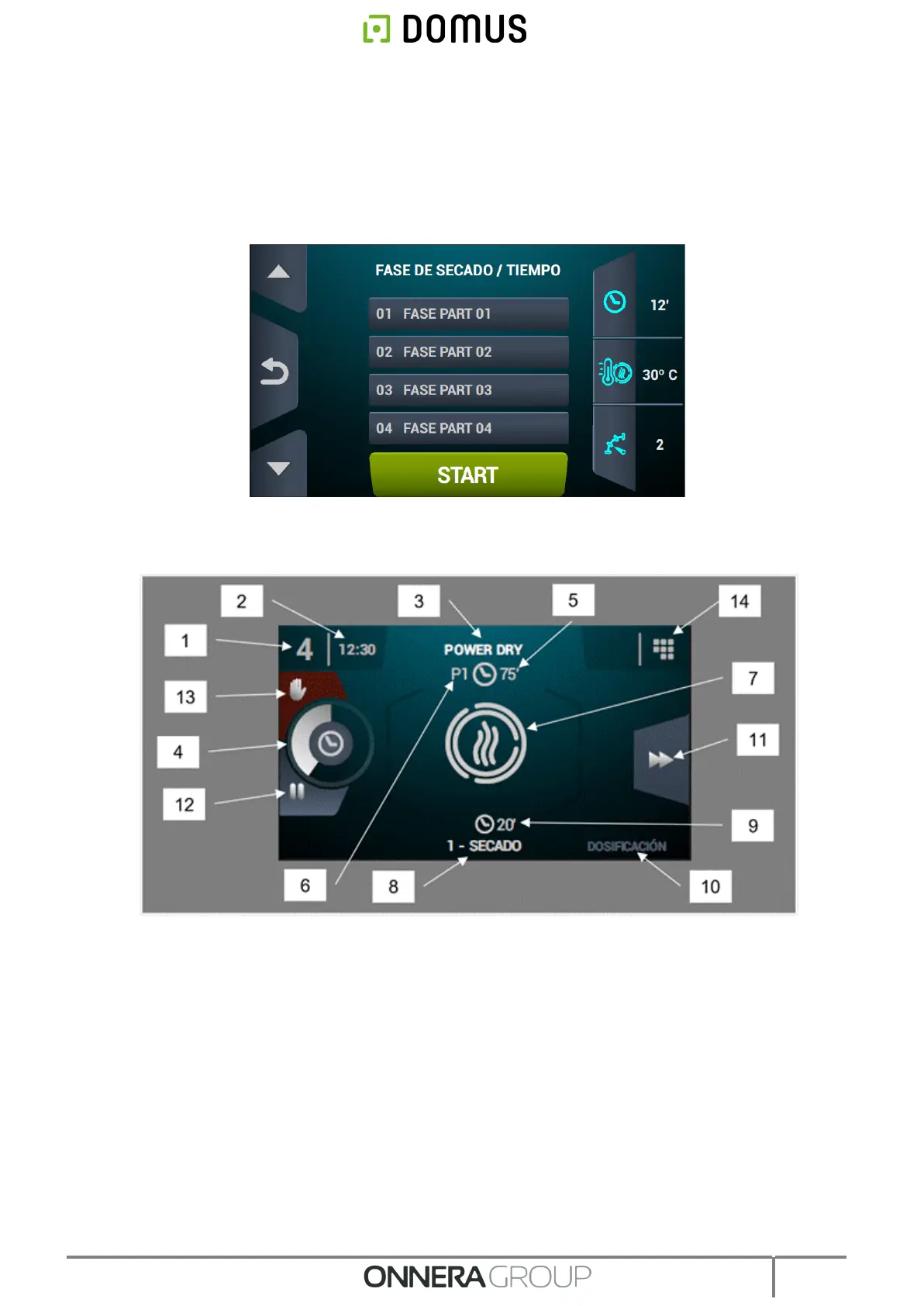
8. Increase/decrease programme number permits user to scroll up or down the list of selected
programmes.
9. Start: button to start the central programme on screen.
10. Programme cycles: press on the selected programme icon, the phases of the programme
will be displayed. Press on the icons in the right-hand vertical column to modify the different
parameters in each phase one by one. The modified values will not be saved for future
operations.
6.3. OPL: RUN SCREEN
1. Machine identifier
2. Time
3. Name of currently running programme
4. Programme progress indicator.
5. Programme end value (time or humidity)
6. Programme number: this indicates the position of the programme in the list of selected
programmes (My Programmes).
7. State (drawing): animated illustration which shows what the dryer is doing.
8. Number and name of currently running cycle.
9. Remaining cycle time
10. Next cycle: if the currently running cycle is the last, nothing is displayed.
11. Advance cycle: button which allows you to advance to the next cycle.
12. Pause programme: once the programme has been paused, the button turns into an icon to
restart the programme (play).
13. Stop (stop/cancel programme)



 To Next Page