2.1.3 Dimension-3D Front Panel
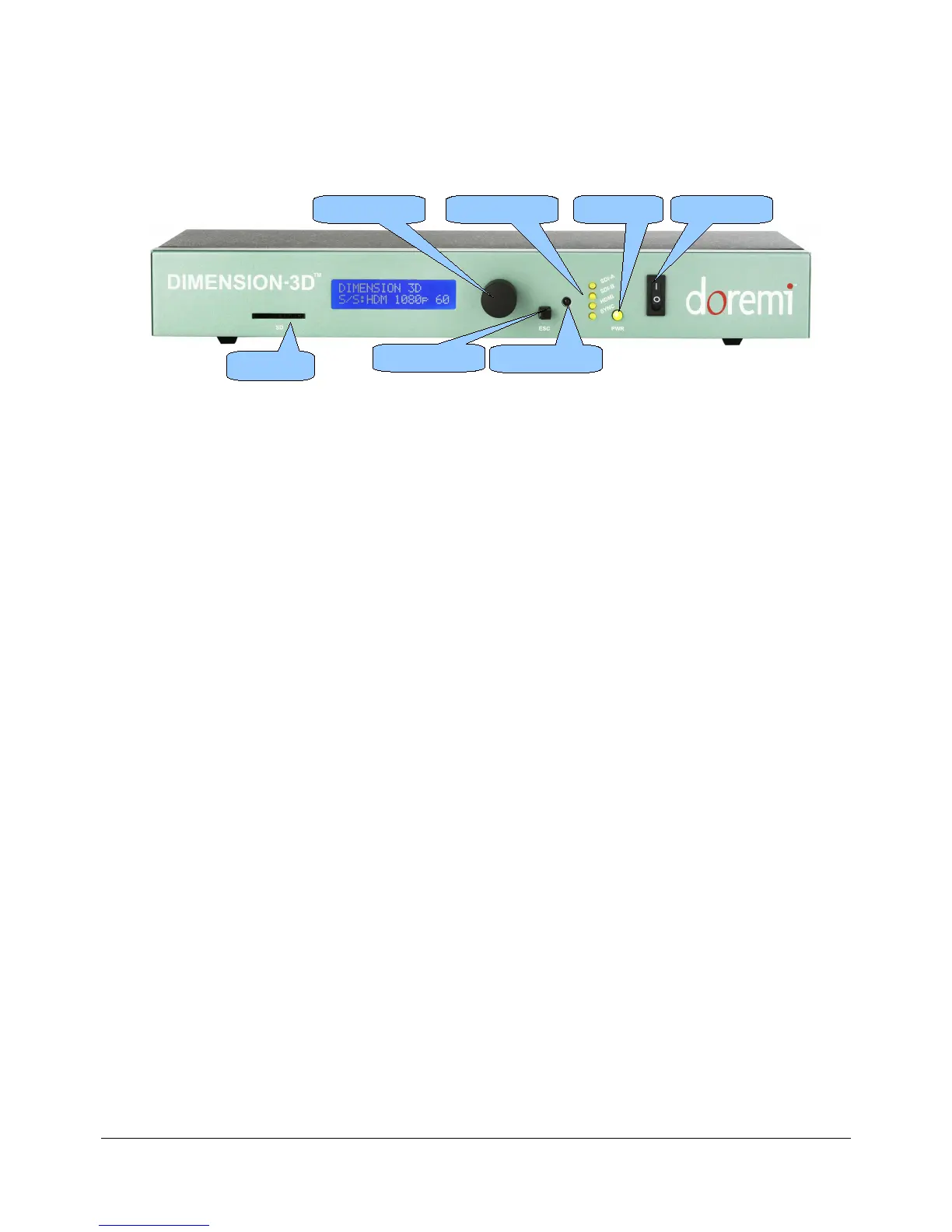
• A snap shot of the front panel is illustrated below:
Figure 2: Dimension3D Front Panel View
• The front panel LCD screen shows the status of the Dimension-3D. It can also be used in
conjunction with the scroll wheel to modify the device settings.
• The scroll wheel with built in "Select" button and the "ESC" (escape) button can be used to
navigate the menu structure and modify the settings (Figure 2).
• The four LED indicators reflect the status of the various input signals.
1) SDI-A LED
2) SDI-B LED
3) HDMI LED
4) SYNC LED
• The “PWR” (power) button LED lights up when the Dimension-3D is powered on.
• The infra-red sensor can be used to remotely control the Dimension-3D (Section 4).
• A SD memory connector is available and can be used to perform firmware updates
(see Section 6 for details).
DM3.OM.001026.DRM Page 11 Version 1.4
Doremi Labs Inc.
Menu Wheel Status LEDs Power LED Power Switch
SD Card
Escape Button
Infrared Sensor



 To Next Page