5 Doremi Universal Interface Software (DUIs)
5.1 Doremi Universal Interface Installation
• To install the Doremi Universal Interface software follow the steps below:
• Plug the provided USB cable between the Dimension-3D and an available USB port on the
PC. See Figure 3 for the USB connector location.
• Power on the Dimension-3D.
• If the "Found New Hardware Wizard" window appears, at this stage, click “Cancel”.
• Run the installation package by double-clicking on a file
“Doremi_Universal_Interface_Software-1.4.0.exe”, which can be downloaded from
http://www.doremilabs.com/
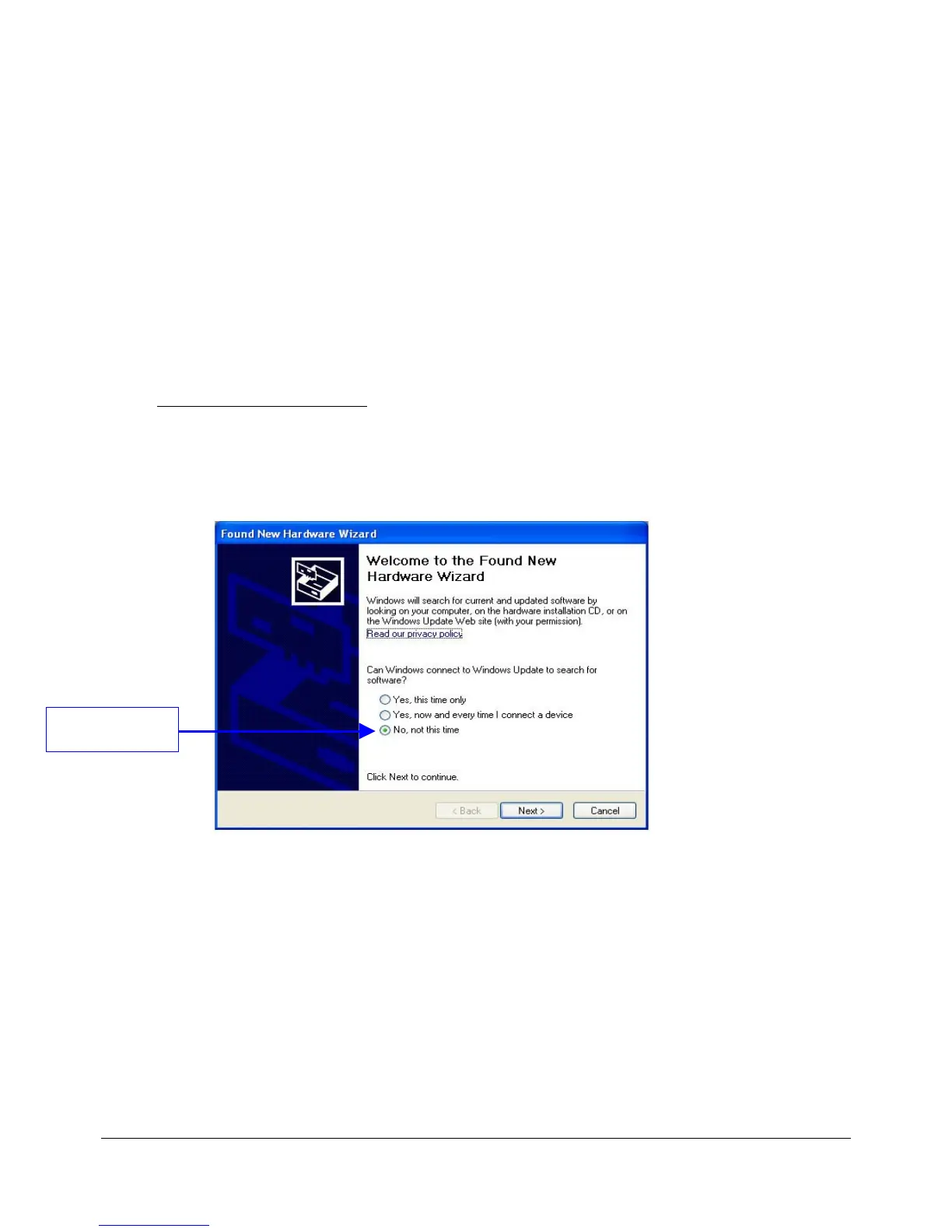
• After the installation is over the "Found New Hardware Wizard" window will appear.
• Go through all the steps as written below:
• Select the “No, not this time” option and click on “Next >” (Figure 6).
Figure 6: "Found New Hardware Wizard” Window – Step 1
• When asked for the type of software installation, choose the option “Install the software
automatically (Recommended)” (Figure 7).
DM3.OM.001026.DRM Page 30 Version 1.4
Doremi Labs Inc.
Click The "No, not
this time" Option



 To Next Page