5.4.7 System Tab
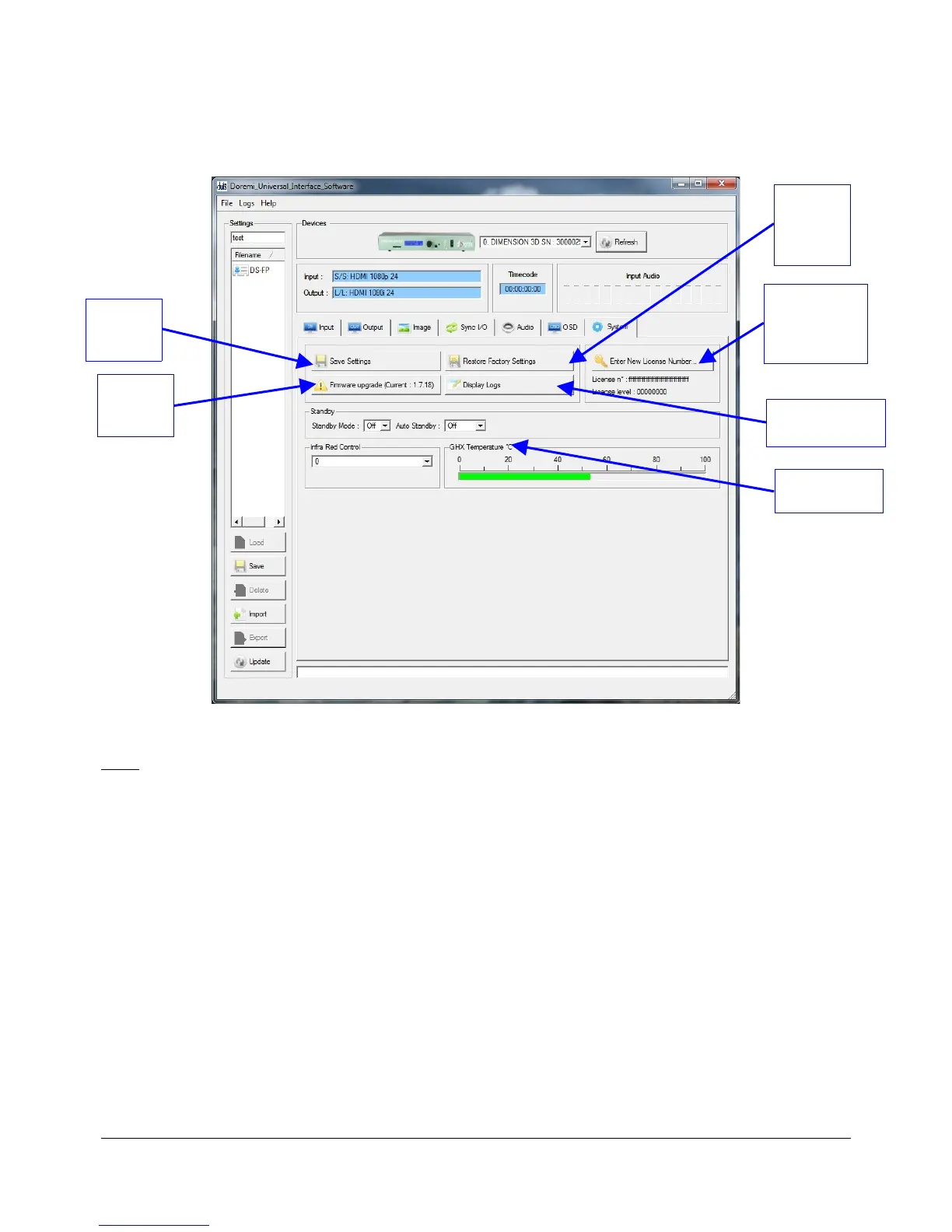
• The "System" tab is illustrated below:
Figure 19: Doremi Universal Interface GUI – System Tab
Note: All parameters are explained in this manual in Section 3 “Dimension-3D Front Panel
Controller.”
• In addition, the "System" tab can be used to perform the following actions:
• Save: To save the current settings to flash, click on the “Save Settings” button (Figure 19).
• Restore: To restore the Dimension-3D back to the factory default settings, click on the
“Restore Default Settings” button (Figure 19).
• License Number: To enter a new license number, click on the “Enter New License
Number ...” button and type the new license number in the pop-up window (Figure 19).
• Firmware Upgrade: To perform a firmware upgrade, click on the “Firmware upgrade
(Current: x.yy)” button (Figure 19).
DM3.OM.001026.DRM Page 43 Version 1.4
Doremi Labs Inc.
"Save
Settings"
Button
"Firmware
upgrade"
Button
Dimension-3D
Temperature
"Display Logs"
Button
"Enter New
License
Number..."
Button
"Restore
Factory
Settings"
Button



 To Next Page