3.4.1 Setting the Output Interface
• Since all formats are not common between SDI and HDMI, the output interface must be
selected.
• If the output interface is set to SDI and if the selected output format is a valid HDMI
resolution, both SDI and HDMI outputs will be active with proper colors on both outputs.
This is due to the presence of a dedicated color space converter on the HDMI output.
• If the output interface is set to HDMI and if the selected output format is a valid SDI
resolution, both HDMI and SDI outputs will be active but the SDI output colors might be
wrong. This is due to the absence of a dedicated color space converter on the SDI output
(this might change in future releases).
3.4.2 Color Space
• The ITU-R BT.709-5 (HD formats) and ITU-R BT.601-5 (SD formats) standards define the
range of color values in a digital signal to be:
• 16 to 240 for 8bit coding
• 64 to 960 for 10bit coding
• The Dimension-3D color space conversion supports the following standards, but it also
supports full range by allowing the color values to be:
• 0 to 255 for 8bit coding
• 0 to 1023 for 10bit coding
• On the Dimension-3D the full range modes are designated by the “ext” following the color
space conversion mode.
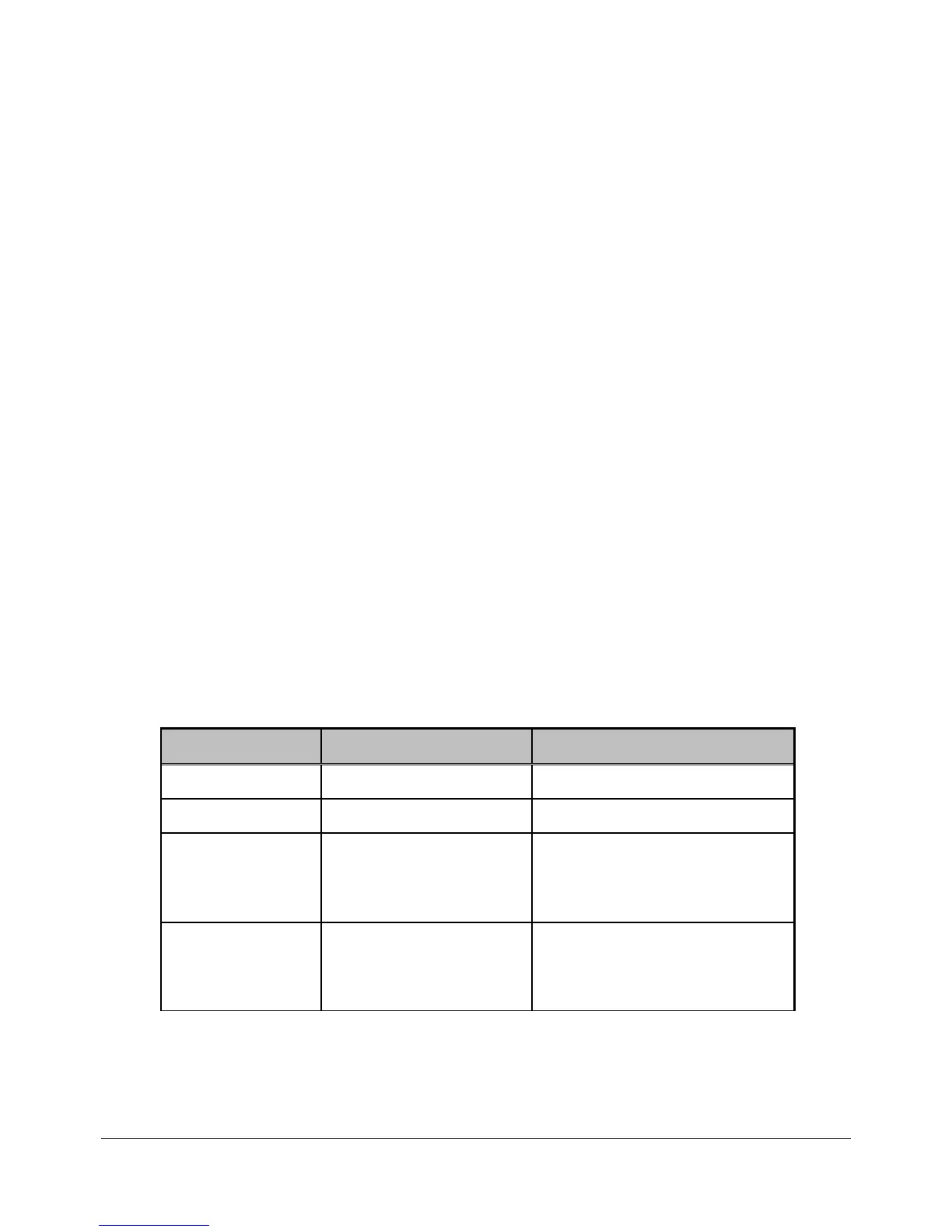
3.5 Image Menu
• The following menu can be used to set up the image parameters:
Sub-Menu Value Description
Brightness 0% to 100% (50%) Brightness value setting.
Contrast 0% to 100% (50%) Contrast value setting.
Input LUT Gamma: 0.1 to 4.0 (1.0)
or User Defined (Use
Doremi Universal
Interface).
Input LUT Gamma value
setting.
Output LUT Gamma: 0.1 to 4.0 (1.0)
or User Defined (Use
Doremi Universal
Interface).
Output LUT Gamma value
setting.
DM3.OM.001026.DRM Page 21 Version 1.4
Doremi Labs Inc.



 To Next Page