41
ED50/ED100/ED250 09-2021DL4617-003
dormakaba ED50/ED100/ED250 OHC Header
Setup and Troubleshooting Instructions
Chapter 15
Pair door parameters, Sync cable
. Set ED operator parameters for pair door operation
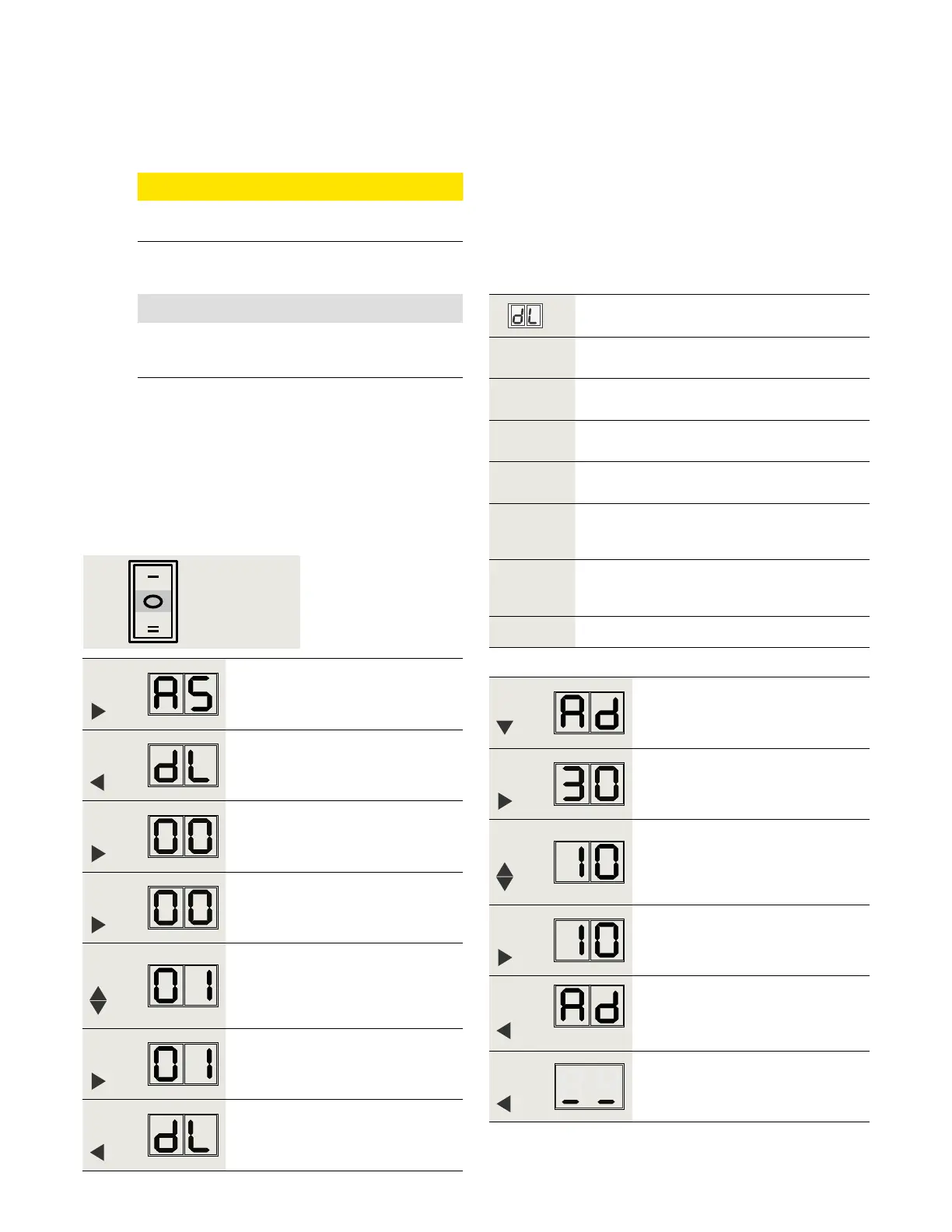
.. Active door, set parameters dL and Ad.
. Set Mode switch to CLOSE.
. Set parameters dL (door type) and Ad (castor angle )
for active door.
• Castor angle sets opening angle of active door
before passive door starts to open.
Factory setting is °.
Door type
Parameter
value
Parameter description
* Single door
Pair door, with astragal.
Active door operator, door opens first.
Pair door, with astragal.
Passive door operator.
Pair door, without astragal.
Active door operator. Both doors open
simultaneously.
Pair door, without astragal.
Passive door operator. Both doors open
simultaneously.
*
Factory setting
Step
Press
Press and hold right button greater
than seconds to enter program
mode, AS parameter displayed.
Step
Press
Scroll to dL parameter.
Step
Press
Displays "" , factory setting.
Step
Press
"" starts flashing.
Step
Press
Scroll to select parameter value
("" as an example).
Step
Press
Saves value entered. Display stops
flashing.
Step
Press
Returns to door type parameter.
Step
Press
Scroll to Ad parameter.
Step
Press
Displays "", factory setting.
Step
Press
Scroll to select parameter value
(° as an example).
Step
Press
Saves value entered. Display stops
flashing.
Step
Press
Returns to caster angle parameter.
Step
Press
Exits program mode.
Fig. 15.1.1 Mode switch
NOTICE
If using BEA LZR Microscan, dL parameter must
be "0" for each door.
CAUTION
Both doors must have full learning cycles
completed; reference Chapter .
Close












 To Next Page