42
ED50/ED100/ED250 09-2021DL4617-003
dormakaba ED50/ED100/ED250 OHC Header
Setup and Troubleshooting Instructions
Chapter 15
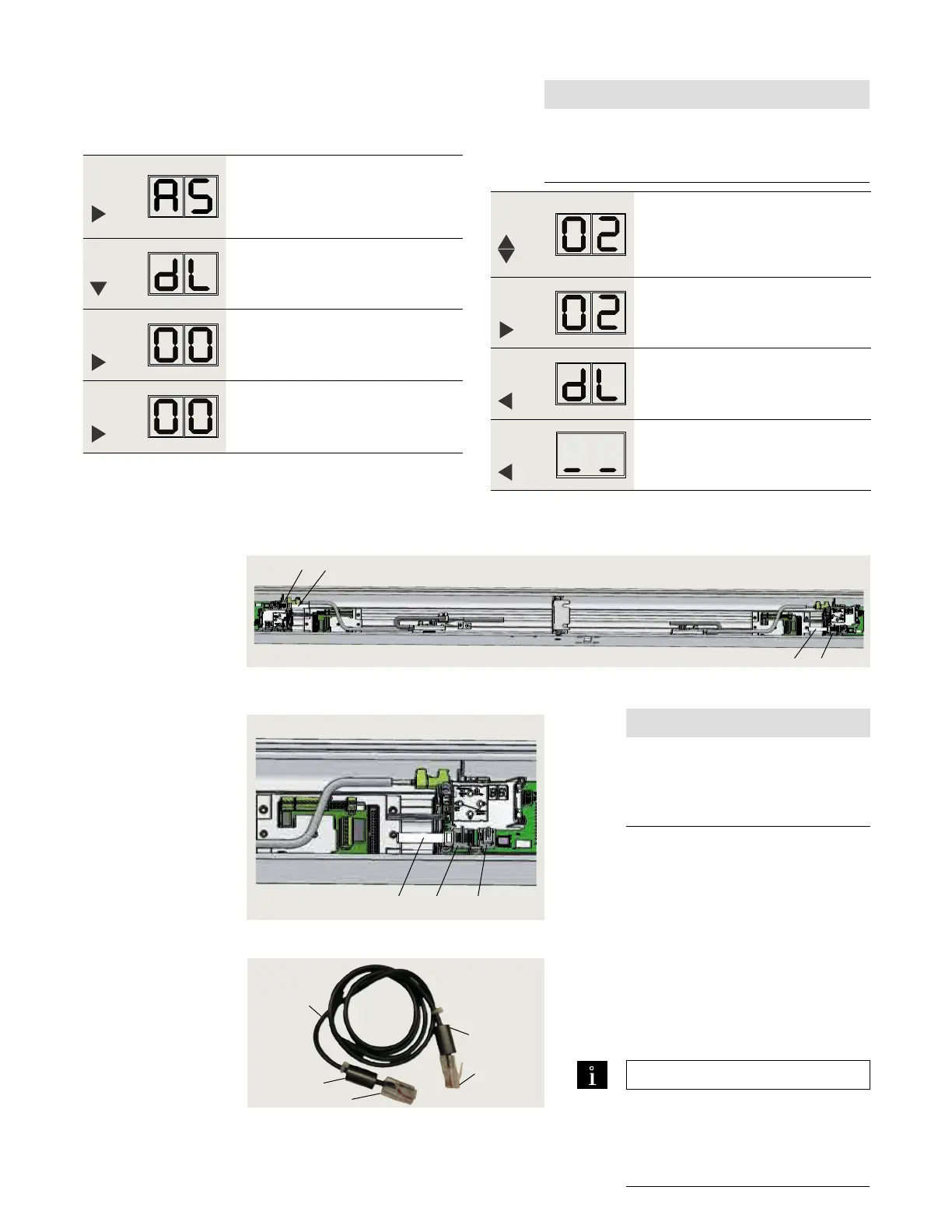
.. Passive door, set parameter dL.
. Set Mode switch to CLOSE.
. Set parameter dL (door type) for passive door.
Step
Press
Press and hold right button to enter
program mode, AS parameter
displayed.
Step
Press
Scroll to dL parameter.
Step
Press
Displays "" , factory setting.
Step
Press
"" starts flashing.
. Connect Sync cable between ED/ED/ED operators
Fig. 15.2.1 Pair door operators, Sync cable
.. Install Sync cable.
NOTICE
Do not install Sync cable if using
BEA LZR Microscan.
Reference ED100/ED250 Sensor
Installation and Wiring Manual.
. Set Mode switch to CLOSE.
. Install and route Sync cable between the
two operators.
. Connect Sync cable to active and passive
operator RJ horizontal jacks.
. Secure cable inside header.
.. Test door operation
. Set Mode switch to AUTO.
. Test double door operation.
TIPS AND RECOMMENDATIONS
In sensors have not been
connected, set Mode switch to
OPEN, and after doors have
opened set back to CLOSE.
Fig. 15.2.2 Sync cable jack
1 ED50/ED100/
ED250 operator
RJ45 jack
(horizontal) for
Sync cable
2 Sync cable
DX3485-030
*Ribbon cables not shown.
Fig. 15.2.3 Sync cable DX3485-030
1
2
2
1
2
1
3
1 ED50/ED100/
ED250 operator
RJ45 jack
(horizontal) for
Sync cable
2 Sync cable
DX3485-030
3 RJ45 jack for
dormakaba
handheld
Step
Press
Scroll to select parameter value
("" as an example).
Step
Press
Saves value entered. Display stops
flashing.
Step
Press
Returns to door type parameter.
Step
Press
Exits program mode. Operator is ready
for operation.
1 Sync cable 6.7'
[2030 mm]
1.1 Ferrite bead
2 RJ45 connector
2
1.1
1.1
2
1
NOTICE
Pairs must be:
• (active) and (inactive) or
• (active) and (inactive).












 To Next Page