English: 8
Operations
Clicking Sound is Normal
Fluid fl owing through the injector will automatically cause
the injector to “click” and inject a set amount of solution
into the fl uid line. The higher the fl ow rate the more
frequent the "clicking". The injector is designed to inject
solution proportionally (at the same set ratio) regardless
of fl uid fl ow.
Service Fluid Flow
Fluid fl ow and pressure must be within the established
specifi cations (see Specifi cation on page 6) for your
model.
Change Feed (Injection) Rate
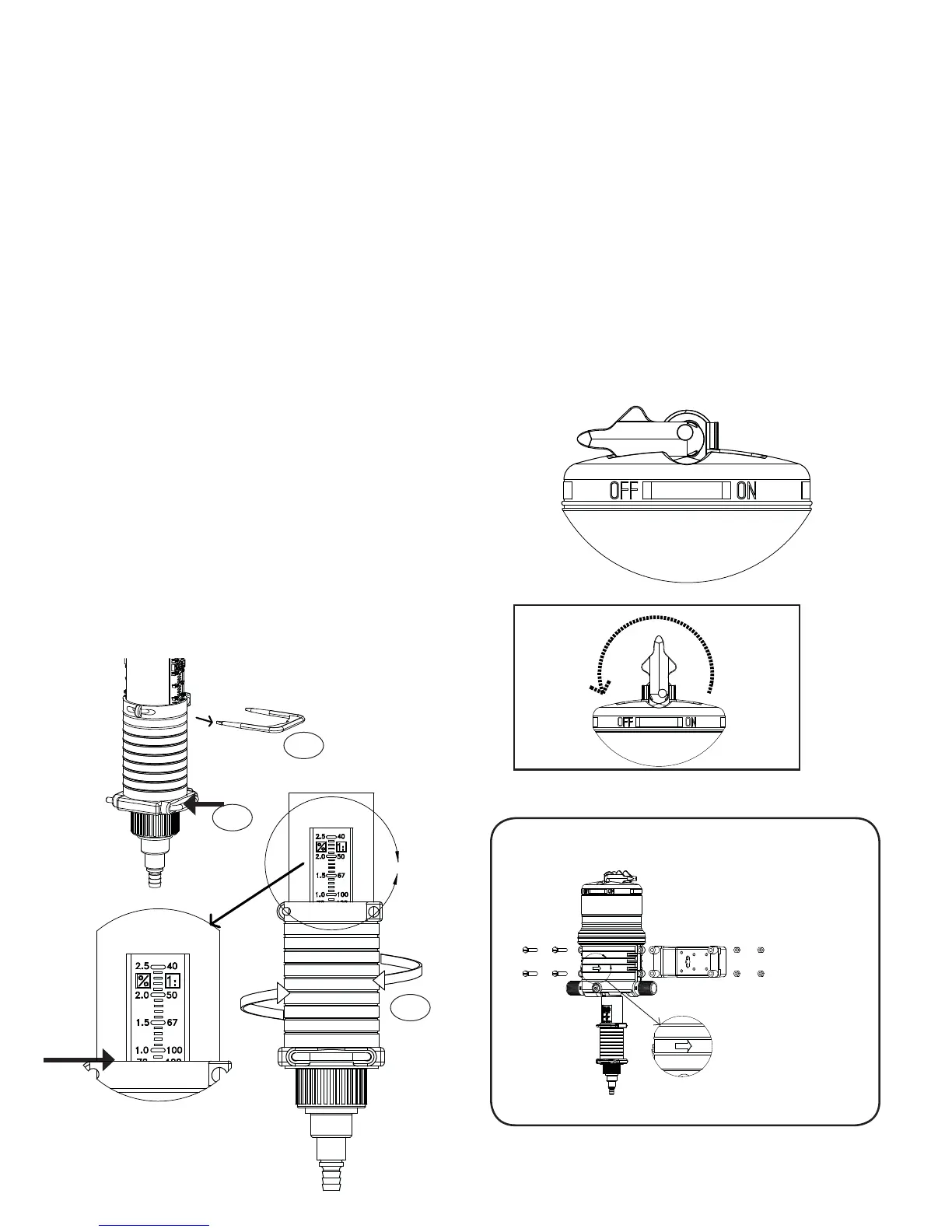
The feed rate on the injector is adjustable EVEN WHILE
OPERATING AND UNDER PRESSURE. To change feed
rate see (Fig. 1 and Fig. 2).
* Do not remove #79 when injector is under pressure.
1. Remove Upper Interlock Pin (#65) (Fig. 1).
2. Rotate Ratio Adjuster Sleeve (#61) up or down to the
desired setting (Fig. 2). Use the top of the Ratio Adjuster
Sleeve to line up with the desired feed rate on the
setting (Fig. 2a).
3. Re-insert Upper Interlock Pin (#65). Clip must be
parallel with settings to be able to re-insert.
NOTE: Do not screw Ratio Adjuster Sleeve below lowest
setting line. Measure outlet fl uid to assure desired feed
rate is being delivered.
Bypass Operation
Injecting solution into the fl uid line can be TEMPORARILY
stopped with the On/Off feature (Fig. 3). Moving the
On/Off Lever to the OFF position allows service fl uid to
pass through the injector without injecting chemical. No
"clicking" will be heard.
With the On/Off lever set to the ON position the injector
will operate as normal and “clicking” will be heard when
fl uid is fl owing. It is recommended to use the three-valve
bypass (see Fig. 5), for continued bypassing or servicing
of the injector.
Fig. 1
Fig. 3
Fig. 2
Fig. 4
Run Position
(clicking)
Off Position
(not clicking)
A
Typical wall
mounting
Fig. 2a
A
#61
#65
#79


 To Next Page