Vigor2912 Series User’s Guide
143
4
4
.
.
2
2
.
.
7
7
W
W
e
e
b
b
P
P
o
o
r
r
t
t
a
a
l
l
S
S
e
e
t
t
u
u
p
p
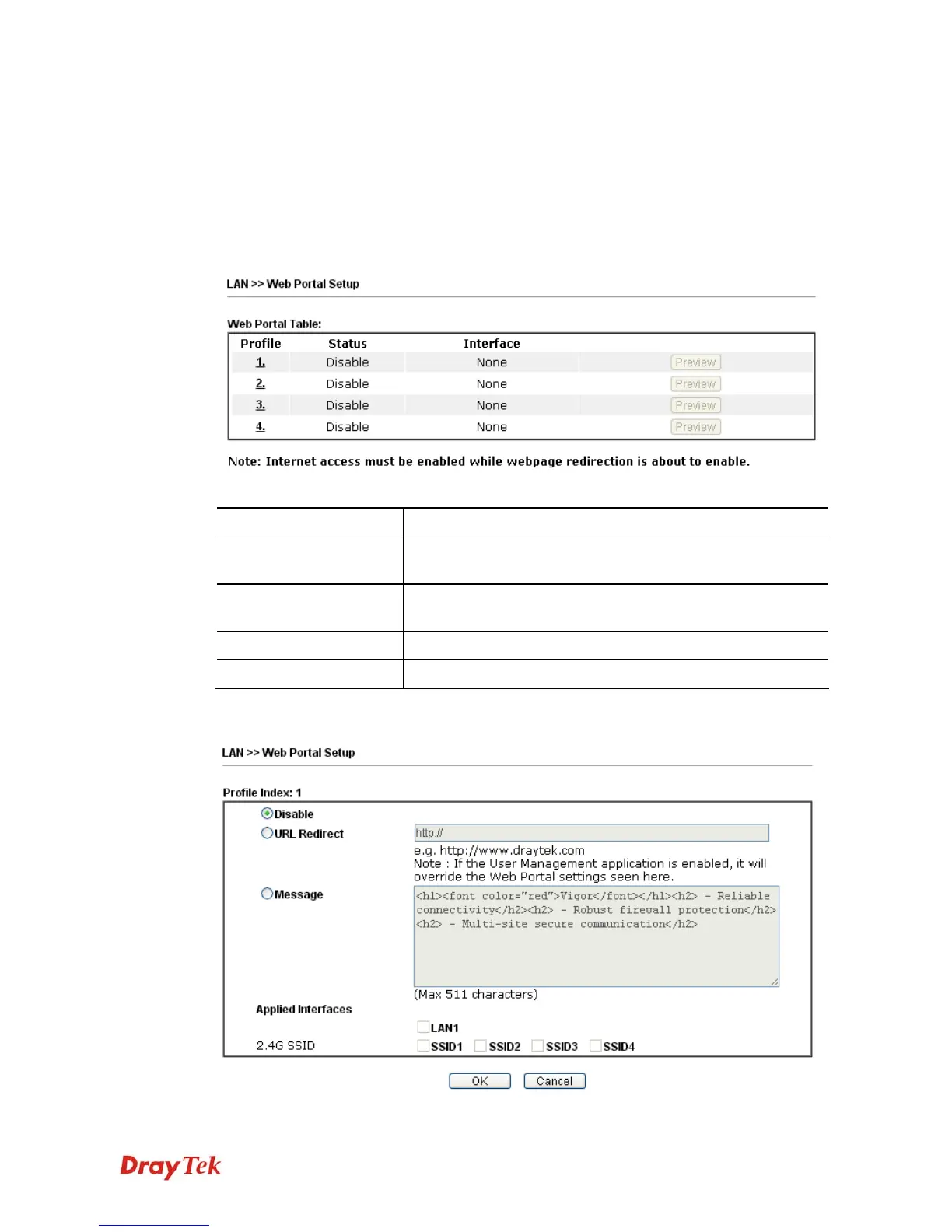
This page allows you to configure a profile with specified URL for accessing into or display a
message when a wireless/LAN user connects to Internet through this router. No matter what
the purpose of the wireless/LAN client is, he/she will be forced into the URL configured here
while trying to access into the Internet or the desired web page through this router. That is, a
company which wants to have an advertisement for its products to users can specify the URL
in this page to reach its goal.
Each item is explained as follows:
Item Description
Profile
Display the number link which allows you to configure the
profile.
Status
Display the content (Disable, URL Redirect or Message) of the
profile.
Interface
Display the applied interfaces of the profile.
Preview
Open a preview window according to the configured settings.
To configure the profile, click any index number link to open the following page.
Available settings are explained as follows:













 To Next Page