Vigor2912 Series User’s Guide
287
A
A
d
d
v
v
a
a
n
n
c
c
e
e
d
d
B
B
a
a
c
c
k
k
u
u
p
p
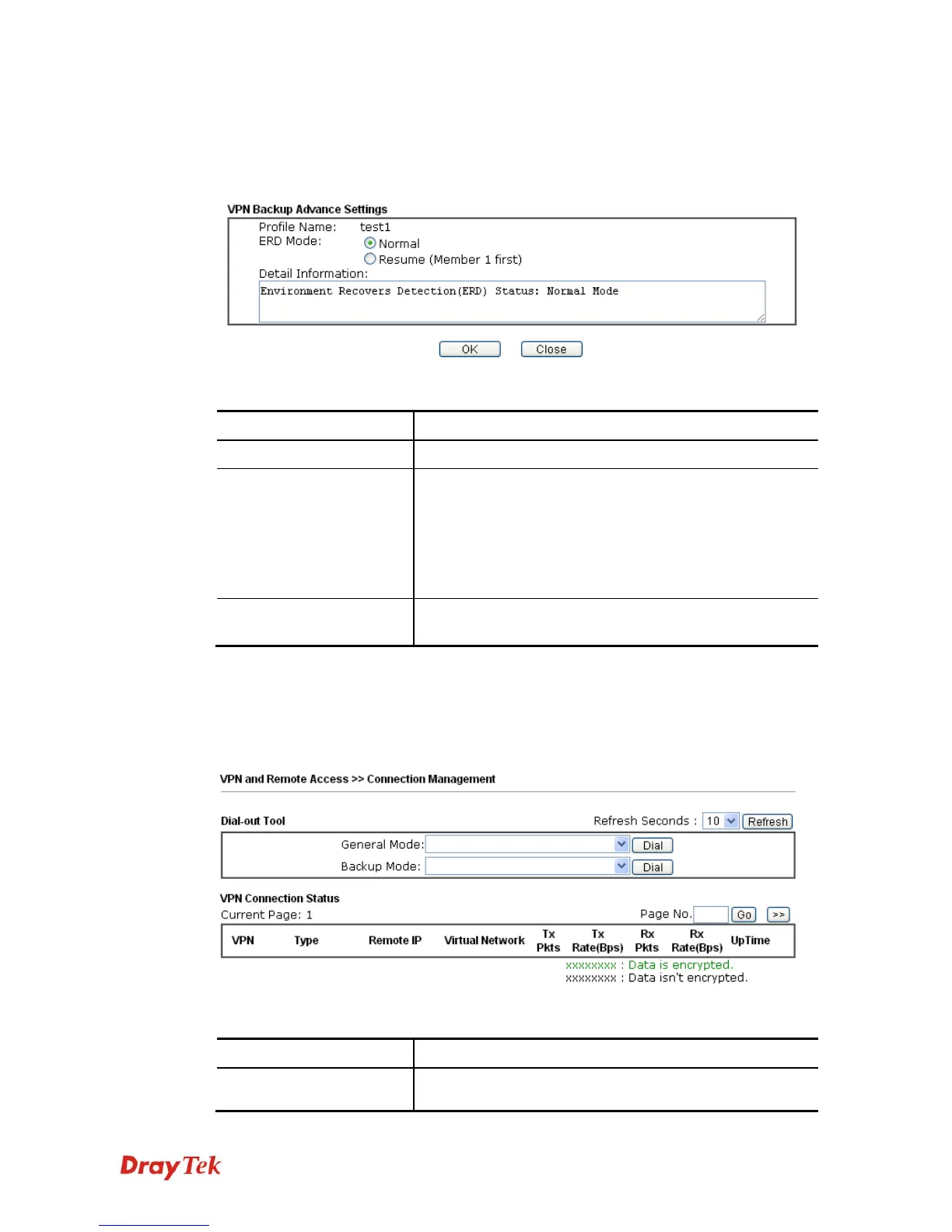
After setting profiles for backup, you can choose any one of them and click Advance for more
detailed configuration. Refer to the following explanation:
Available settings are explained as follows:
Item Description
Profile Name
List the backup profile name.
ERD Mode
ERD means “Environment Recovers Detection”.
Normal – choose this mode to make all dial-out VPN
TRUNK backup profiles being activated alternatively.
Resume – when VPN connection breaks down or
disconnects, Member 1 will be the top priority for the
system to do VPN connection.
Detail Information
This field will display detailed information for Environment
Recovers Detection.
4
4
.
.
1
1
0
0
.
.
1
1
0
0
C
C
o
o
n
n
n
n
e
e
c
c
t
t
i
i
o
o
n
n
M
M
a
a
n
n
a
a
g
g
e
e
m
m
e
e
n
n
t
t
You can find the summary table of all VPN connections. You may disconnect any VPN
connection by clicking Drop button. You may also aggressively Dial-out by using Dial-out
Tool and clicking Dial button.
Available settings are explained as follows:
Item Description
Dial-out Tool
General Mode - This filed displays the profile configured
in LAN-to-LAN (with Index number and VPN Server IP



 To Next Page
 Loading...








