VigorAP 810 User’s Guide
18
A
A
d
d
v
v
a
a
n
n
c
c
e
e
d
d
S
S
e
e
t
t
t
t
i
i
n
n
g
g
s
s
f
f
o
o
r
r
S
S
t
t
a
a
t
t
i
i
o
o
n
n
-
-
I
I
n
n
f
f
r
r
a
a
s
s
t
t
r
r
u
u
c
c
t
t
u
u
r
r
e
e
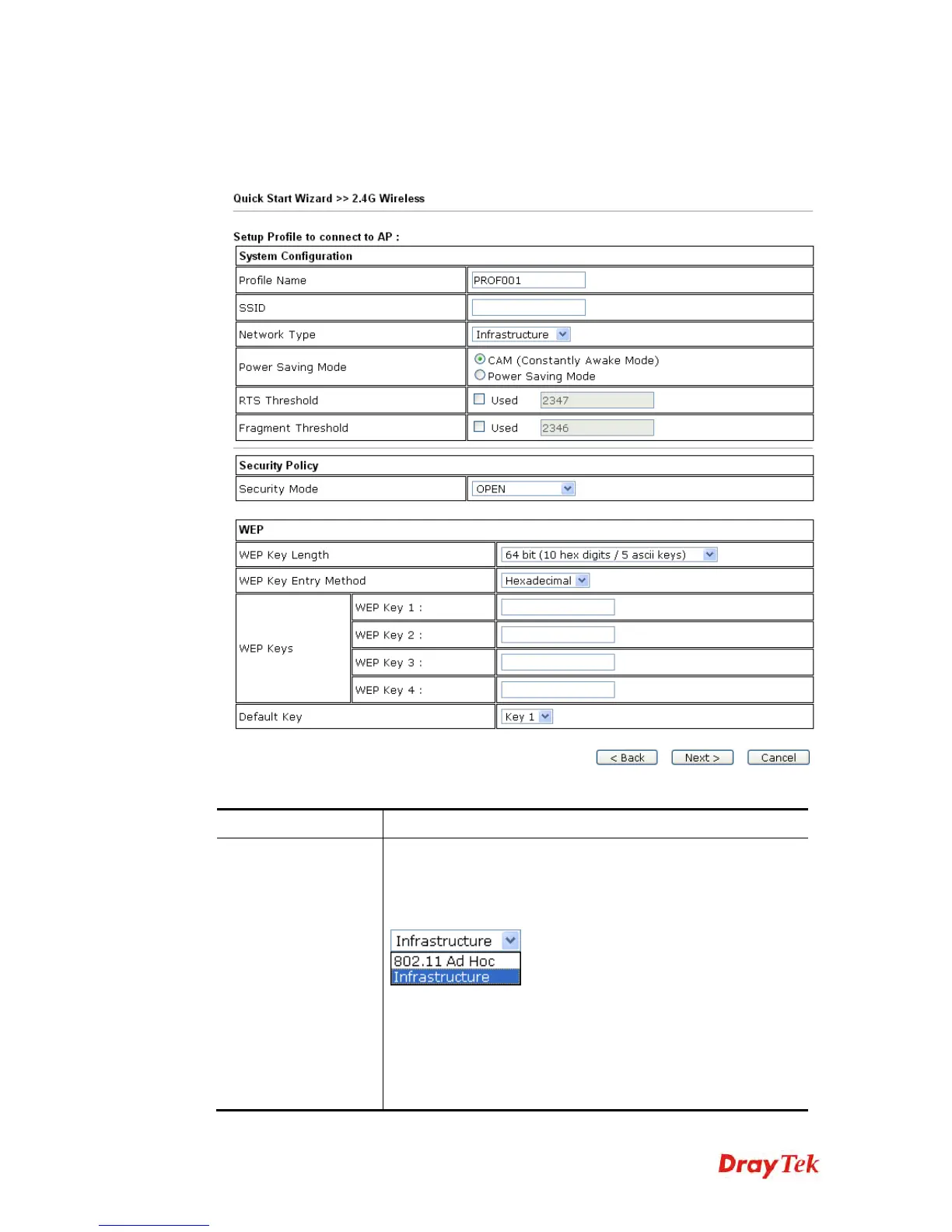
When you choose Station-Infrastructure as the Operation Mode and click Next, you need to
configure the following page to connect to one AP.
Available settings are explained as follows:
Item Description
System
Configuration
Profile Name -Type a name for the new profile.
SSID - Type the name for such access point that can be used
for
connection by the stations.
Network Type
Infrastructure - In this mode, you can connect the access
point
to Ethernet device such as TV and Game player to
enable the
Ethernet device as a wireless station and join to
a wireless
network through an access point or AP router.
802.11 Ad Hoc – An ad-hoc network is a network where
wireless stations can communicate with peer to peer (P2P).












 To Next Page