23 of 36
User Manual - ProVideo GUI v1.2.4
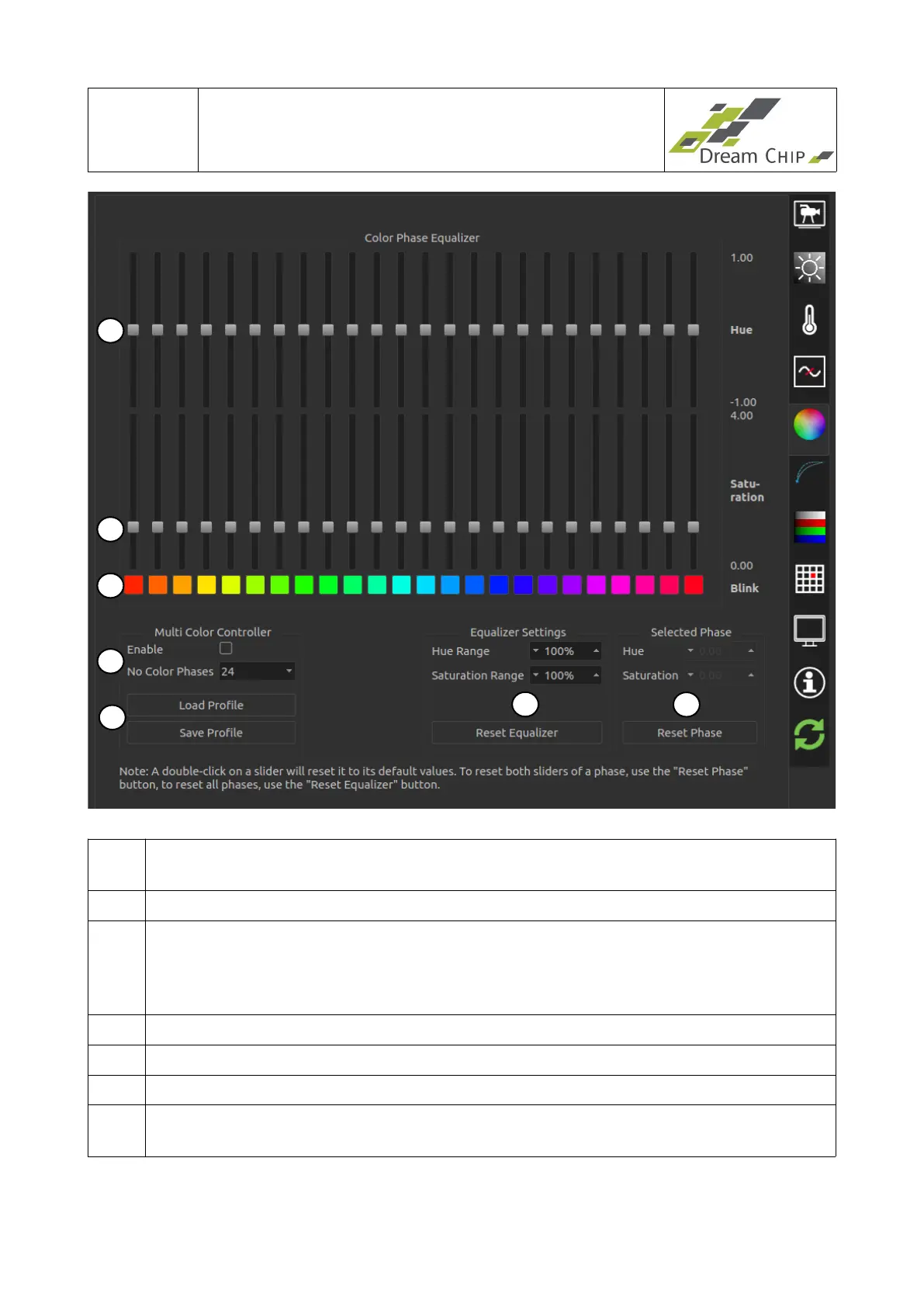
1 Enable / disable the multi color controller and select the amount of phases (12, 16,
24 or 32). The more phases the finer you can tune the image color.
2 Load or save the current color profile from / to file.
3 Change the range of the hue and saturation sliders to make more accurate
adjustments to the phases. The current minimum and maximum values are
displayed on the right hand side of the equalizer sliders. Resetting the equalizer
will set all sliders to their default values.
4 Set hue and saturation of the currently selected color phase.
5 The hue sliders will move the color of the selected phase to the neighboring color.
6 The saturation sliders make the selected phase more or less prominent.
7 Toggle the blink button of a phase to make it blink in the output image to spot
which colors the phase will effect.
1
2
3
4
6
7
5


 To Next Page