3 of 36
User Manual - ProVideo GUI v1.2.4
2 Connecting with a Device
The GUI supports serial connections using either the RS485 or RS232 protocol. When
using RS232 only one device can be connected at a time, with RS485 multiple devices
can be connected over one bus. The standard power cable adapter provided with most
devices uses RS485.
On application startup the GUI will automatically search for connected devices on the last
used COM-Port. If one ore more devices are found, the GUI will connect to the first device
and directly open the main window. If no device can be found the connect dialog will open.
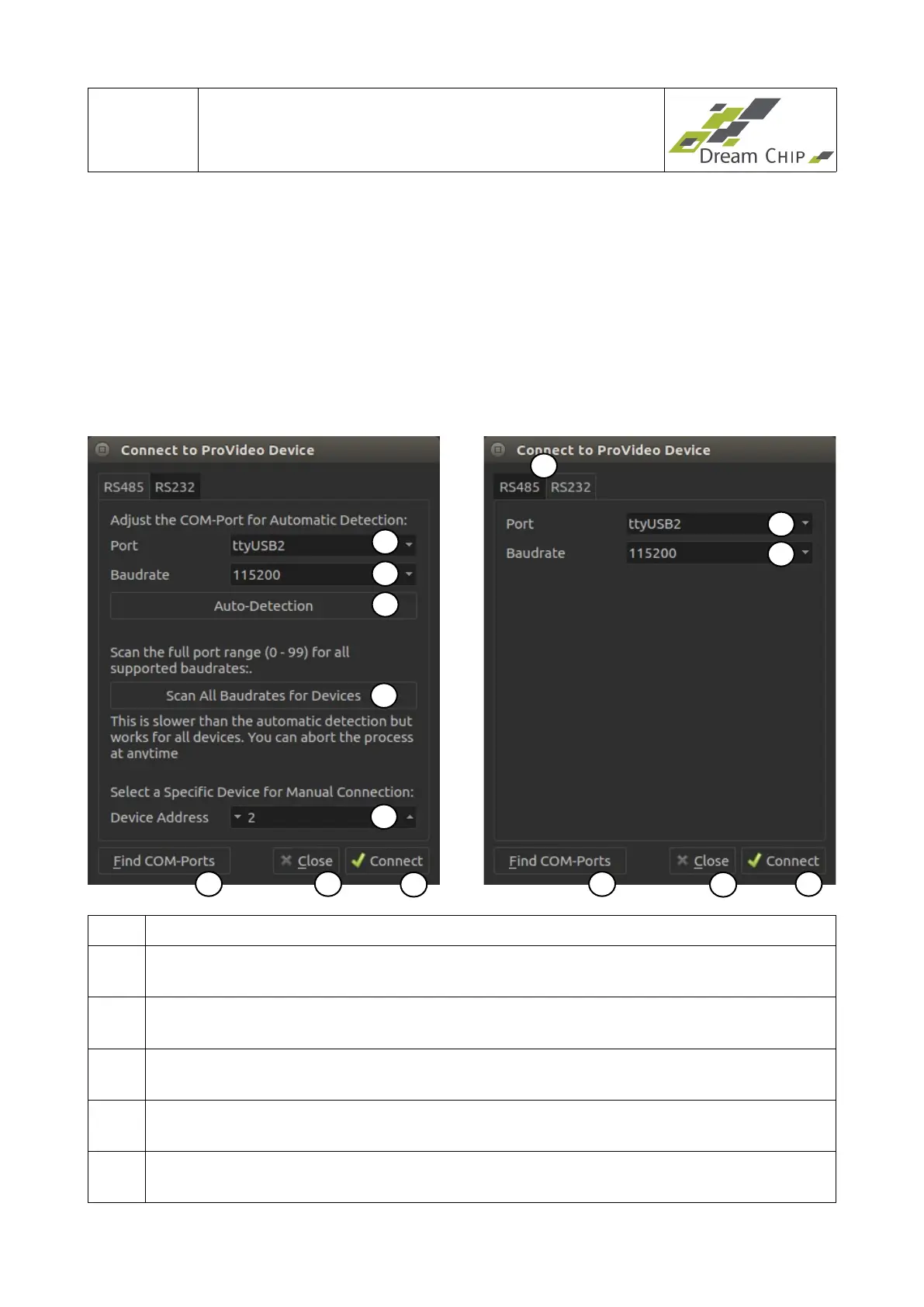
It has two pages, one for setting up RS485 the other for RS232 connections:
1 Choose between RS485 or RS232 connection.
2 COM-Port to which the device is connected. This will be “ttyUSBX” on Linux and
“ComX” on Windows.
3 The Baudrate has to match the Baudrate of all connected devices. Using devices
with different Baudrates on the same RS485 Bus is not supported.
4 The Auto-Detection will find all devices wich are connected to the selected COM-
Port and match the selected Baudrate.
5 If the Auto-Detection fails, you can try the automated scan which will find all
devices which are connected to the selected COM-Port.
6 When manually connecting to a device, the Device Address has to match the
device parameters.
2
3
5
7
8
9
4
2
3
9
8
7
1
6


 To Next Page