13 EN
2.5 Sensors
Name Description
LiDAR
Obtains environmental information and facilitates the robot's positioning, obstacle
avoidance and sensing of water and dirt.
Detection range (at 100 klx): 40 m at 10% reectivity; 70 m at 80% reectivity
Field of view: 360° (horizontal) × 59° (vertical)
Front
Camera
Detects obstacles, lawn boundaries, and human presence.
Angle of view: 89° (horizontal), 58° (vertical), 97° (diagonal)
Resolution: 2 MP
GPS
The Link Module with a built-in GPS is installed in the robot. You can track the robot’s real-
time location in Google Maps via the app.
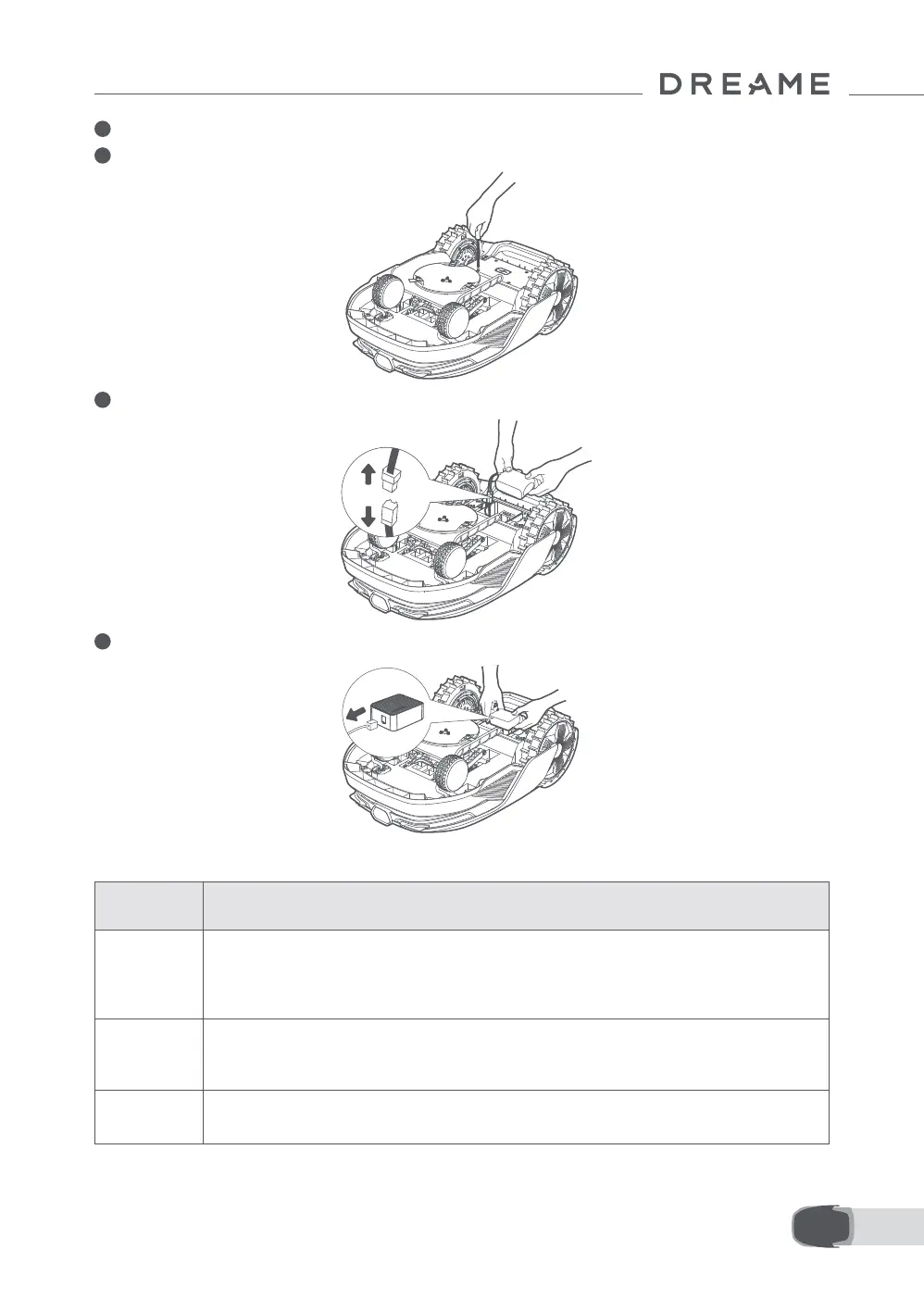
2 Place the robot on a soft surface and turn it upside down.
3 Loosen 4 screws to remove the cover using a screwdriver.
4 Take out the battery, and disconnect the battery connector.
5 Disconnect the module connector and carefully remove the Link Module from its slot.


 To Next Page