30EN
OR
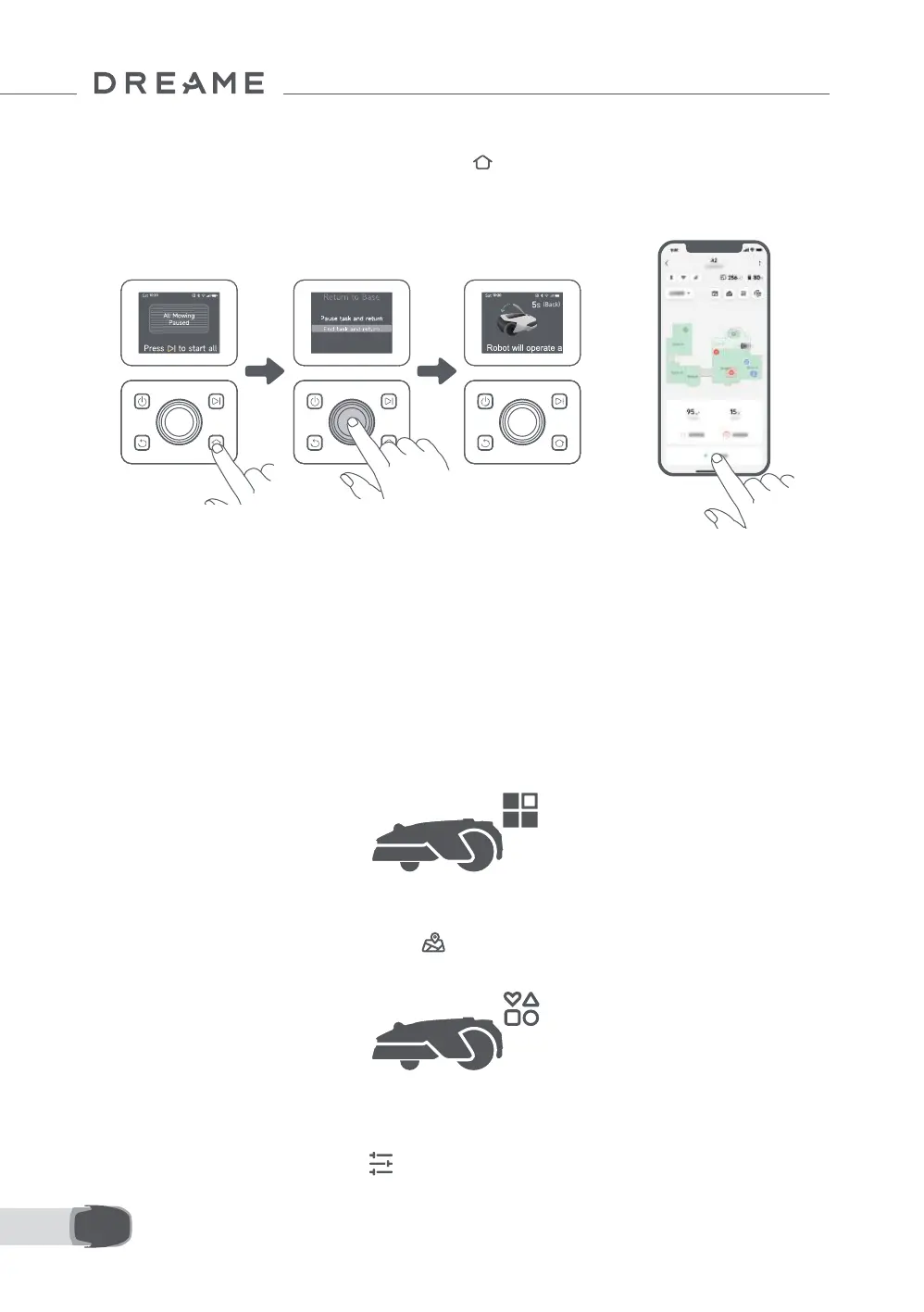
6.4 Return to the Charging Station
To send the robot back to its charging station, press the on the control panel. Conrm to pause or cancel
the current task, then close the top cover within 5 seconds. The robot will automatically return to the
charging station to recharge. Alternatively, you can select Start Returning to Station in the app to send the
robot back.
Where You Can Explore More
Dreamehome app is more than a remote control. There are many things you can do through the app:
completing various settings remotely, experiencing dierent mowing modes, editing the map freely and
adjusting mowing schedules.
7 Dreamehome App
7.1 Mowing Modes
7.2 Mowing Shapes
The robot oers various mowing modes. You can switch between modes through the app including All-Area
Mowing, Zone Mowing, Edge Mowing, Spot Mowing and Manual Mode.
Customise your lawn by adding shapes through > Map Editing > Shapes in the app. Dened shapes
will be excluded from mowing in all mowing modes. You can modify their position, size, or remove them in
Shapes.
7.3 EdgeMaster ™ Blade Disc
The EdgeMaster ™ blade disc is designed to move to the side when it reaches the lawn edges, ensuring a
cleaner cut. To enable this feature, go to > Edge Mowing Settings > EdgeMaster ™ in the app.


 To Next Page