25
1. Ensure the power switch is in the off
position.
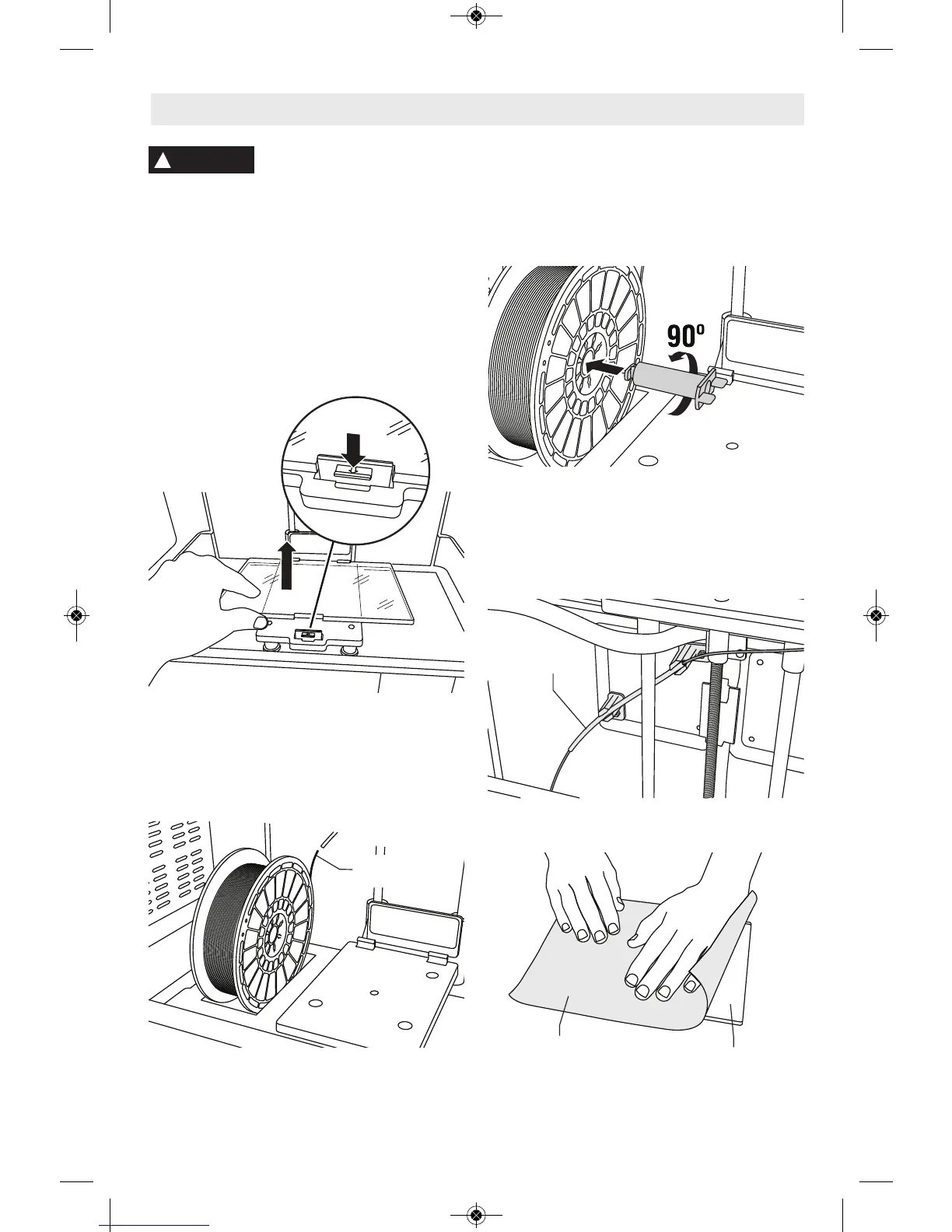
2. Remove the Dremel 3D20 lid for better
access to extruder and build platform.
3. If build platform is installed, remove by
pinching the clamp located at the front of
the build platform and lifting the build
platform off the base.
4. Mount filament spool to spool holder and
secure with spool lock.
a. Place filament spool onto spool holder
with spool being fed from the bottom
towards the back of the Dremel 3D20.
b. Insert spool lock into spool holder and
rotate 90 degrees to lock in place.
5. Thread filament through filament guide
tube. The filament can then be inserted
into the extruder intake. This will ensure
the extruder experiences minimal
resistance while building.
6. Place Build Tape over Build Platform.
Getting Ready to Build
Observe all provided warnings and safety instructions when using the
Dremel 3D20. Failure to do so may result in fire, equipment damage,
property damage or personal injury.
!
WARNING
End of
Filament
Filament
Guide
Build Tape
Build
Platform



 To Next Page