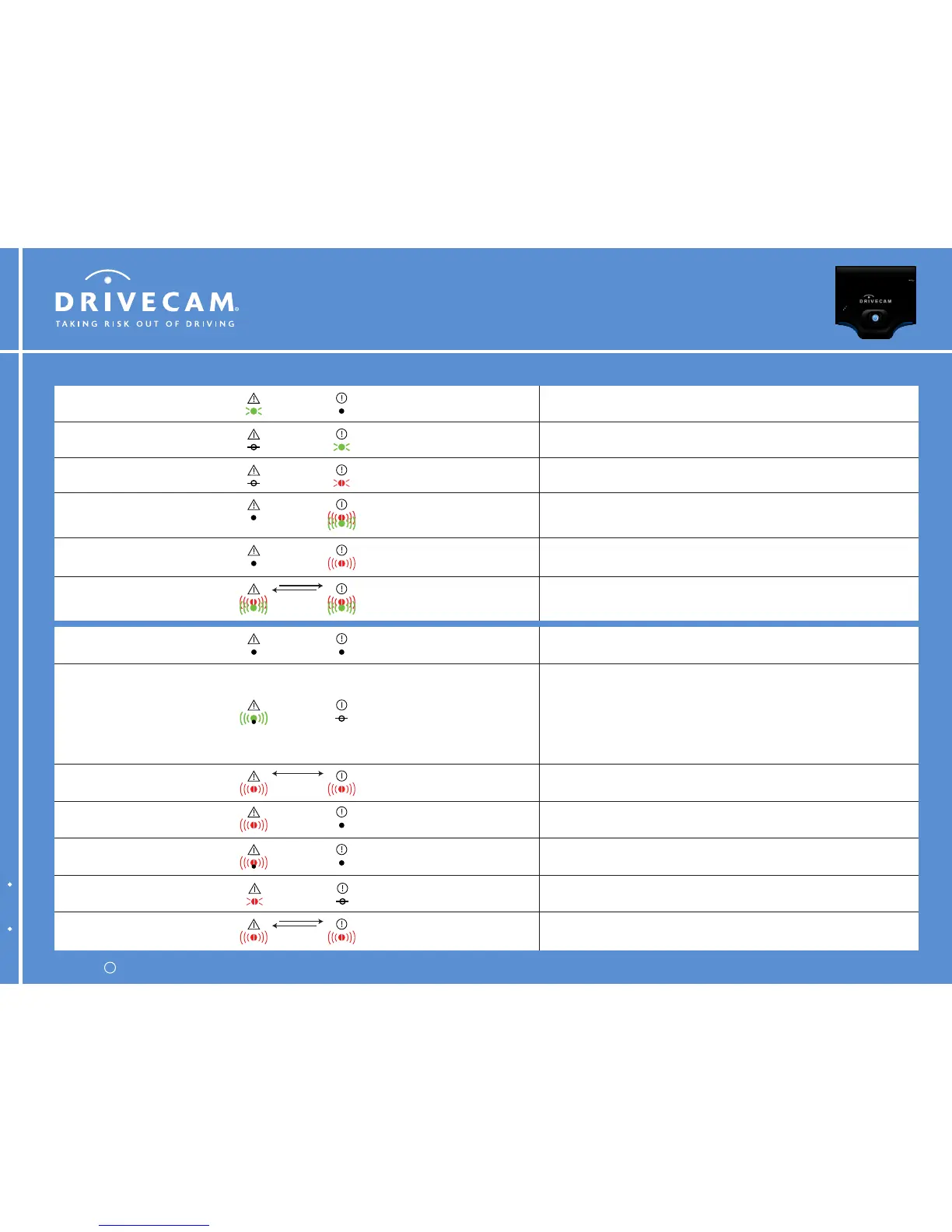
Boot error (fast blink) or event recorder is in limited mode (slow blink).
Contact DriveCam Technical Support.
Both LEDs blinking
red together
Both LEDs blinking
red together
No event files are stored in memory.
The event recorder is ready to record an event.
Solid greenAny state
The event recorder is powering up (booting).
The warning light should go off within 30 seconds. If not, cycle power.
OffSolid green
Power to the event recorder is off or less than 9V. Supply power to the
event recorder. Check vehicle battery and wiring to restore voltage.
OffOff
Unsuccessful wireless connection.
2 blinks = No WAP found or failed to connect with WAP (WiFi)
Failed to make cell-modem data connection (Cellular)
3 blinks = Connected to WAP but no DHCP address (WiFi only)
4 blinks = Received DHCP but no TCP connection with HindSight (WiFi)
Data connection but no TCP connection with HindSight (Cellular)
5 blinks = HindSight protocol error (WiFi & Cellular)
Any stateBlinking green then off
Event files are stored in memory and ready to download.
The event recorder is ready to record an event.
Solid redAny state
An event was triggered and is being recorded.
Alternating green & redAny state (off is typical)
Data transfer is in progress. Event files are being downloaded. The rate of
flashing indicates the speed of the connection.
Blinking redAny state (off is typical)
Internal error.
Contact DriveCam Technical Support.
Both LEDs blinking
red alternating
Both LEDs blinking
red alternating
Backup battery failure.
Contact DriveCam Technical Support.
Any stateSolid red
Nonvolatile memory failure.
Contact DriveCam Technical Support.
Off
Blinking red
then off repeatedly
Memory failure.
Contact DriveCam Technical Support.
OffBlinking red continuously
Alternating green & redAlternating green & red
Firmware upgrade is in progress. The event recorder is operating normally
but is not available to record an event.
Normal OperationWarnings & Errors
DriveCam Technical Support is available 24 hours / 7 days at (866) 910-0403.
Warning (Left LED) Status (Right LED) Description
Copyright 2007 DriveCam, Inc. All rights reserved.c
DRC 971-A May 2007 Commercial Wi-Fi & Cellular
DC3 Video Event Recorder LED Behavior
for Wi-Fi & Cellular DC3 models



 To Next Page