DRC 242-A 2007-08-03 Page 8 DC3 with SEM Installation Instructions
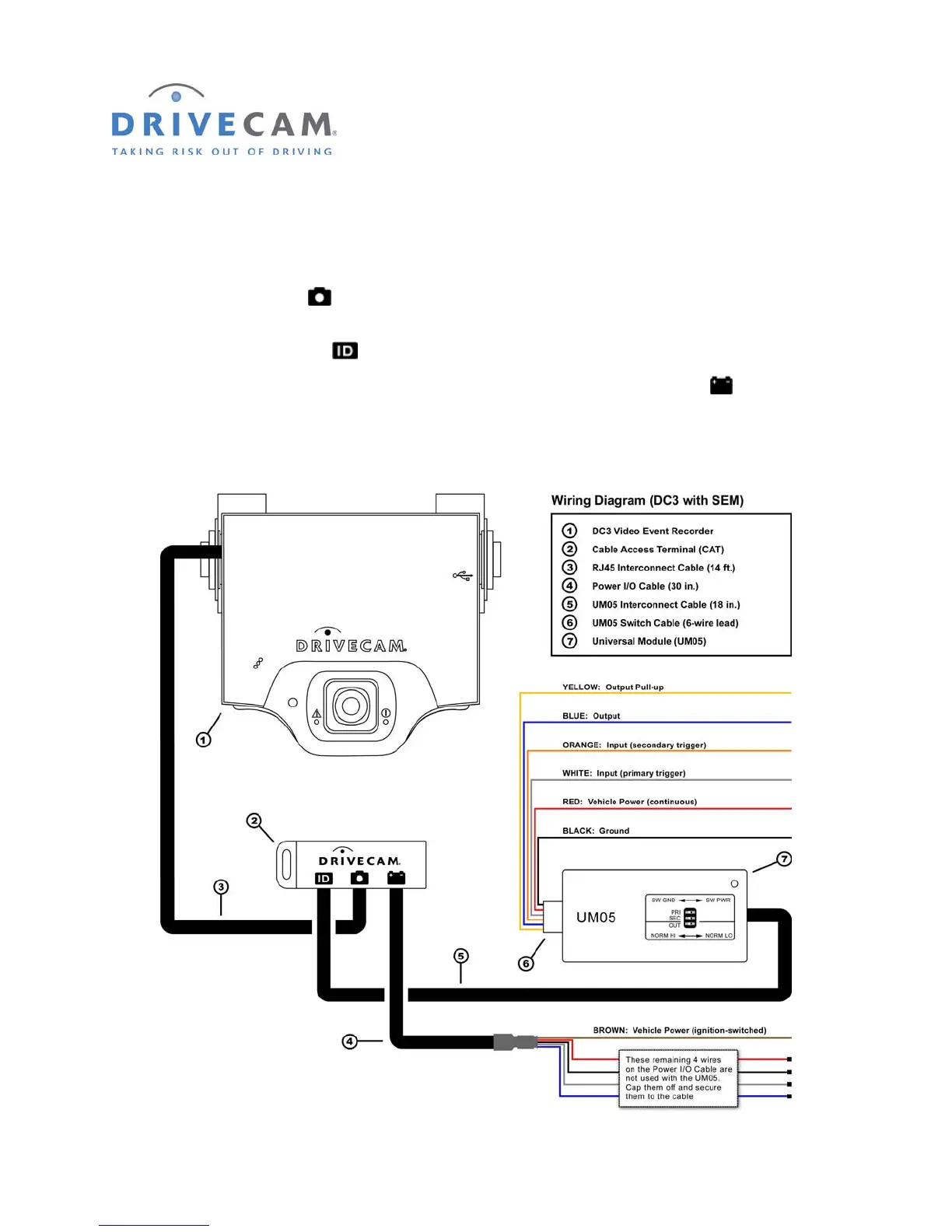
8. Wiring Diagram (DC3 with SEM Installation)
The RJ45 Interconnect Cable is 14 feet long with RJ45 (large) connectors at each end. One end of
the cable plugs into the event recorder. It is then routed to a secure location under the dashboard and
plugged into the middle port
of the Cable Access Terminal (CAT).
The UM05 Interconnect Cable is 18 inches long with RJ11 (small) connectors at each end. One end of
the cable plugs into the left port
of the CAT. The other end plugs into the Universal Module (UM05).
The Power I/O Cable is 30 inches long. One end of the cable plugs into the right port
of the CAT. At
the other end of the cable is a brown wire which connects to an ignition-switched power source.
The UM05 Switch Cable varies in length. One end of the cable plugs into the UM05. At the other end of
the cable are six wires which connect to vehicle power, ground, inputs and output (optional).



 To Next Page