8.1 | Cloud Gallery
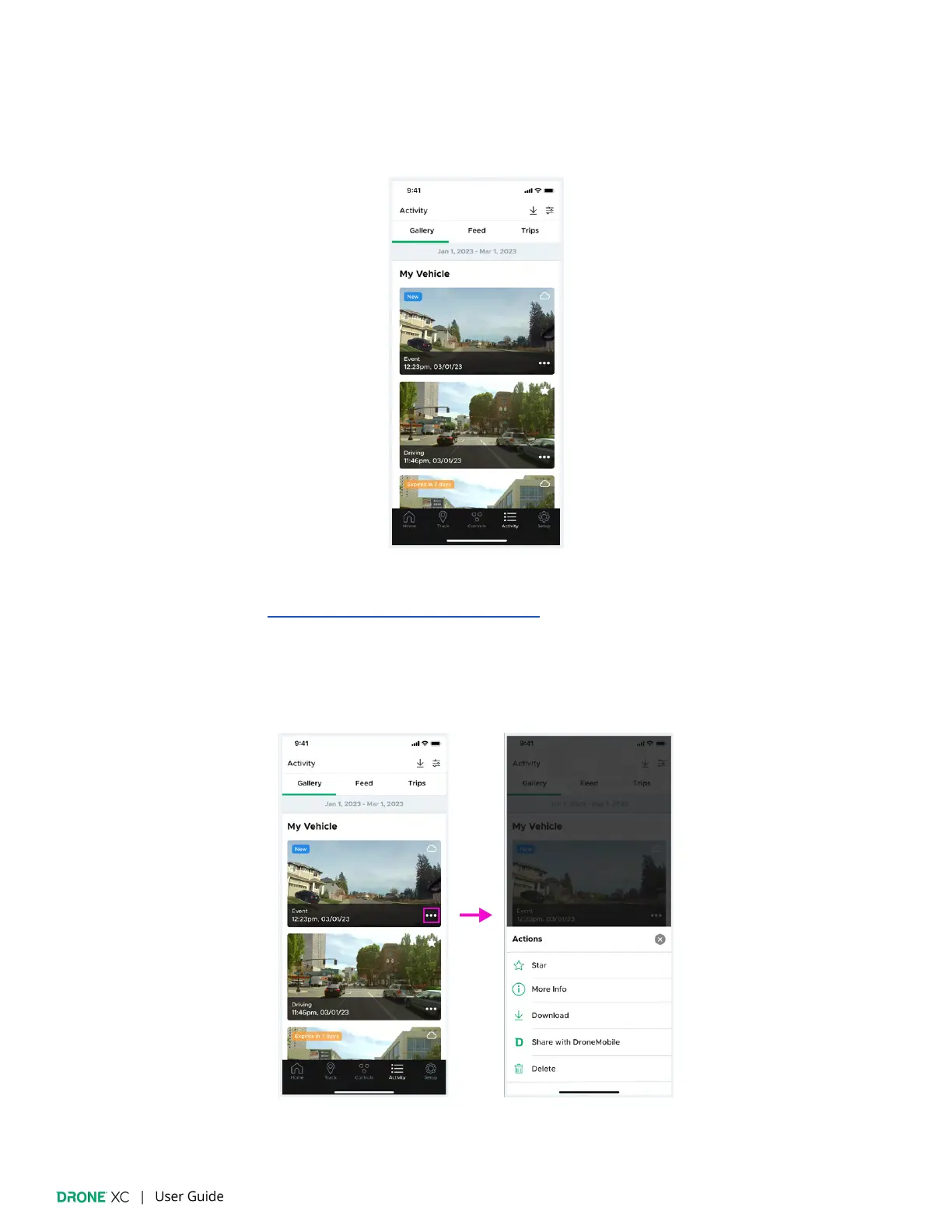
The “Cloud” gallery displays a log of media from your Drone XC dash cam that is stored in the cloud. All driving and parking
events, and snapshots are automatically uploaded. Live streams are also stored on the cloud, but expire in 7 days unless they
are favorited.
(Please note: A “Streaming” plan is required in order to have access to the “Cloud” gallery. To learn more about
“Streaming” plans see section 4.3 - “Selecting Your DroneMobile Plan”.)
The “Cloud” gallery consists of a timeline of media thumbnails. Within each thumbnail you will
fi
nd the event name, time & date,
source/star indicator in the top right, and space in the top left corner for a badge indicating the status of the media item.
Additionally you will see a “More Actions” icon in the bottom right.
The “More Actions” pop-up gives you the ability to star/favorite, get more info, download, share with DroneMobile, or delete. In
order to download media, you will need to give the DroneMobile App permission to access your photo library.


 To Next Page