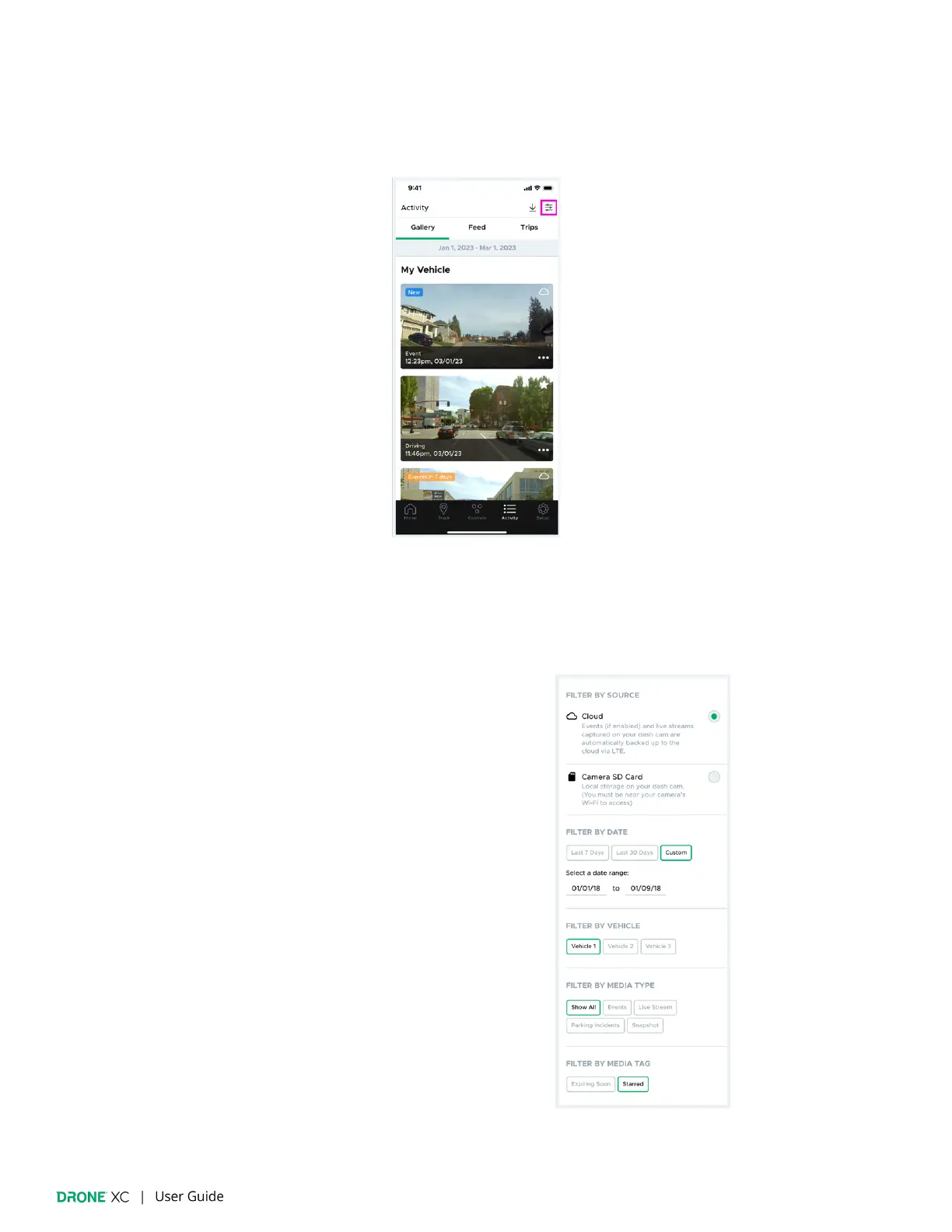
8.4 | Filters
Filters allow you to re
fine the media items you are viewing. Please note, SD Card
fi
lters do not include the “Live Stream” media
type, and you cannot
fi
lter by “Media Tag”. You can access the “Filters” page by tapping on the “Filters” icon in the top right corner
of the “Activity” page.
If you have a streaming plan, “Cloud” will be selected as your default source. In order to select “SD Card” as your source, you
must be in your vehicle and follow the on-screen steps to connect to your camera’s Wi-Fi. You can
fi
lter your results with the
following criteria:
Cloud
● Date:
○ Last 7 Days
○ Last 30 Days
○ Custom Date Range
● Vehicle
● Media Type:
○ Events
○ Live Stream
○ Parking Incidents
○ Snapshot
● Media Tag:
○ Expiring Soon
○ Starred


 To Next Page