Tamarisk
®
Camera Control Software User Guide
If using a DC power supply to power the camera, verify that the power supply is on and
supplying the correct voltage and is capable of sourcing enough current.
• Symptom: A continual audible shutter click is heard when the camera is powered. This
commonly occurs when the supply current drops below the minimum operating requirement.
Refer to the Tamarisk
®
Electrical ICD for specifications. Check for the following:
Voltage drop or marginal supply current:
Verify supply voltage and current capabilities of the power source. If batteries are
being used it may be necessary to exchange them for new ones
Excessively long USB cables may cause a voltage drop in the cable which results in a
temporary power cycle of the PC’s USB port; this behavior is typically seen as the
camera’s shutter closes.
If connecting the camera to a hub, it is recommended to limit the number of USB
devices connected to the hub. The user may also want to power the hub from an
external power supply.
If connecting the camera directly to the PC, it is recommended to limit the number of
USB devices connected to the PC. Too many USB devices may overload the PC’s
USB ports.
• Symptom: A single audible shutter click is heard when the camera is powered via the USB
cable but the Camera Control Software does not detect the camera. Check the following:
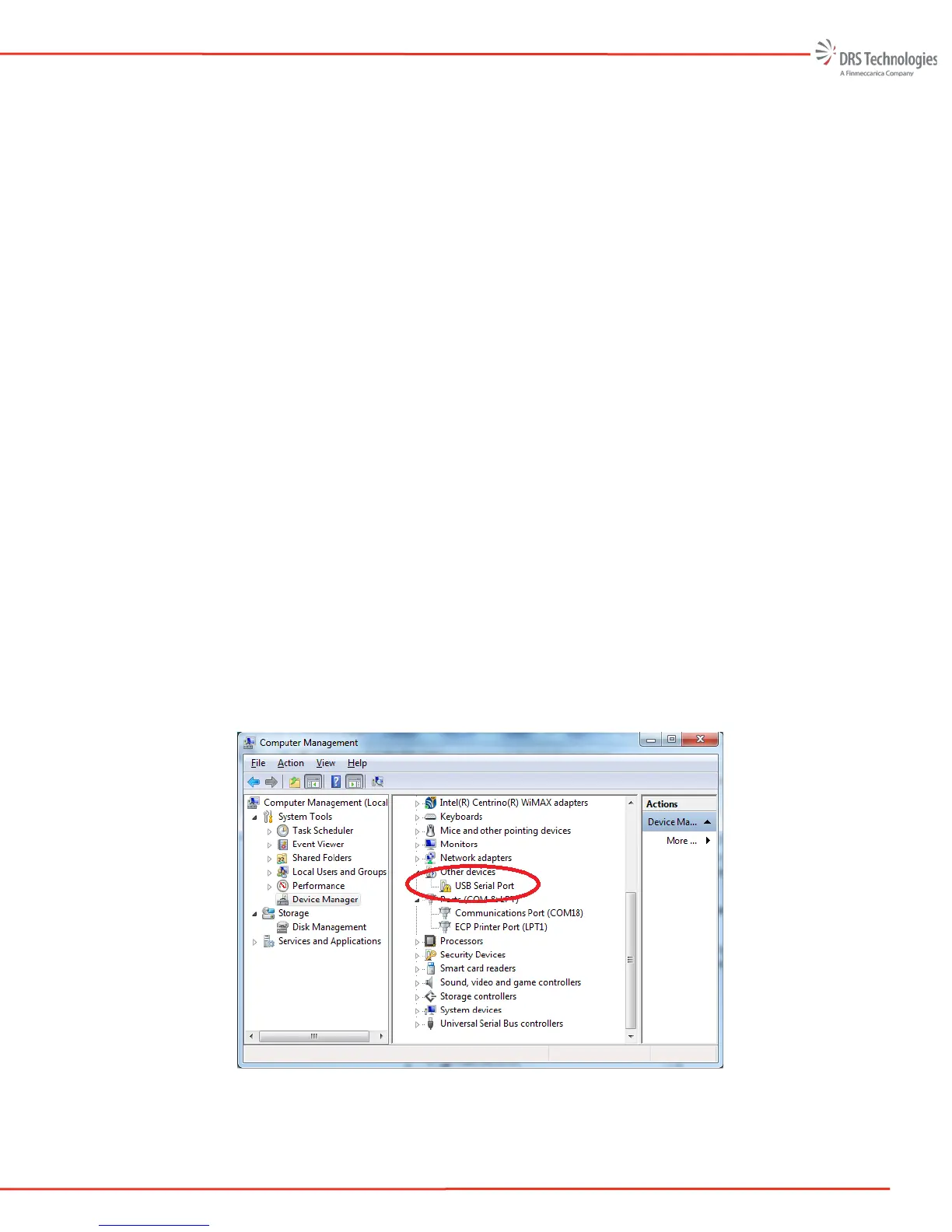
Open Windows Device Manager and verify that the camera hardware is detected and
installed properly. A yellow exclamation mark indicates a problem Figure 58 shows the
camera is not installed properly.
Figure 58 Windows Device Manager


 To Next Page
 Loading...

