Setup
30
6.2.6.2 FIRMWARE UPGRADE BY USB MEMORY STICK
When available, firmware upgrade files are available from Deep Sea Electronics PLC website
www.deepseaplc.com.
To do this you will need :
• Firmware update filed from DSE. This file must be called 0892-01.bin
• USB flash memory stick formatted to FAT.
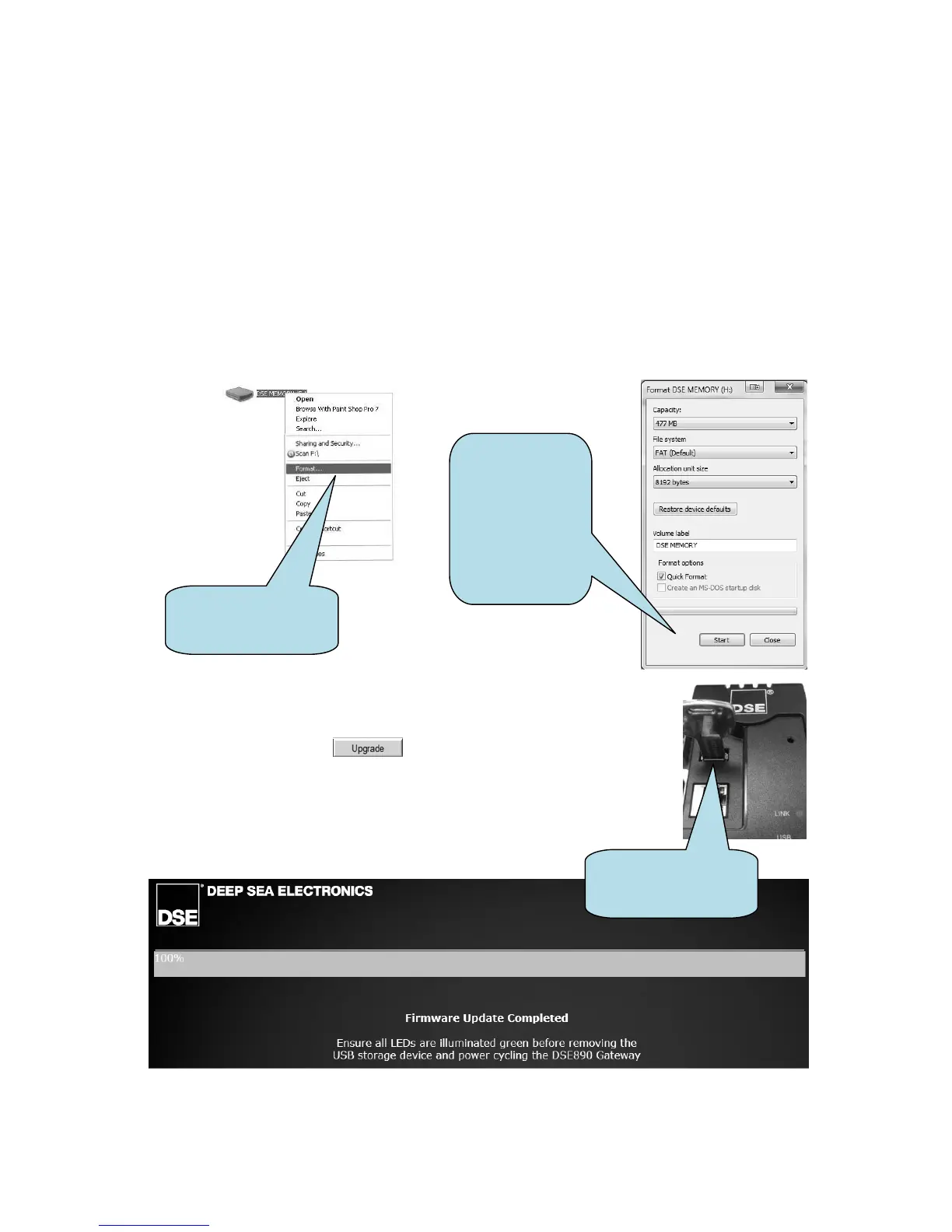
To Format a USB stick to the FAT File System :
Insert memory stick into PC USB port.
• Browse to Computer in Windows Explorer. Identifty the memory stick, Right Click the
device and select Format.
• Select FAT and click Start
• Copy the firmware upgrade file onto the USB flash memory stick and
insert this into the ‘USB Host’ socket of the DSE892 Gateway.
• Once inserted, click . The module is restarted and the
upgrade process begins. The PC screen shows the progress of the
upgrade.
• Once complete, Check that all the LEDs are illuminated on the DSE892.
This shows that the updgrade is successful.
• Next, remove the USB memory device and remove the DC power from
the DSE892. Wait a few seconds, then reapply DSE power.
USB flash memory
stick inserted into the
DSE892 Gateway
menu of USB flasm
memory device
Format tool for
USB flash
memory.
Ensure you have
selected the
correct disk
before clicking
Start!



 To Next Page