Setup
35
6.4 MODBUS
NOTE: This section is only used when setting up the DSEGateway
®
to operate as a
communications protocol convertor. This section should be left with no entries if using the
DSEGateway
®
purely as an SNMP or email notification system.
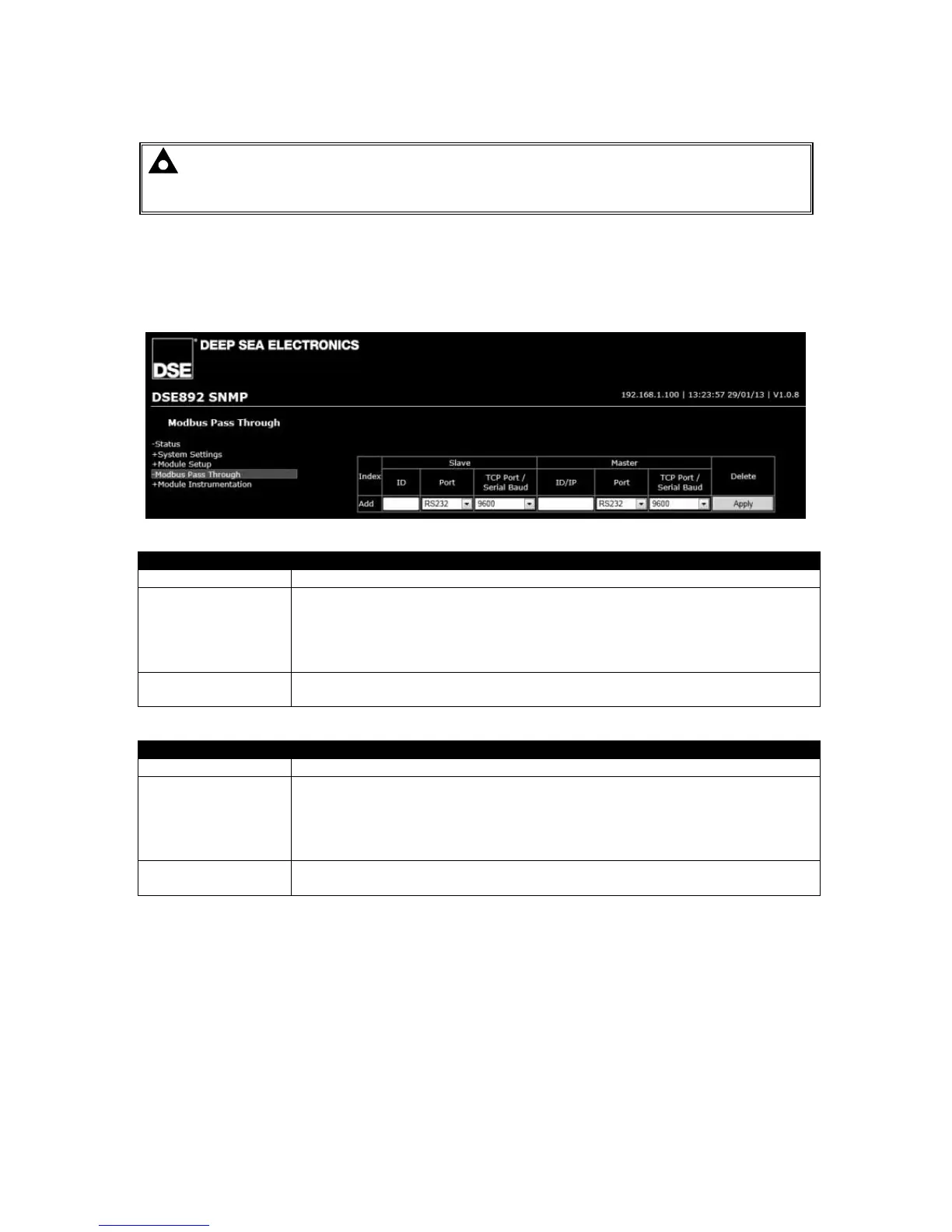
This page is used to configure the DSEGateway
®
as a Modbus Gateway to allow conversion across
the various ports.
It can be used for example to set USB as a modbus master to connect to any DSE controller fitted
with a USB port and supporting the DSE Configuration Suite SCADA function.
SLAVE (Settings of the DSEGateway
®
port this is connected to the monitoring device)
ID Modbus slave address of the selected DSEGateway
port
Port The incoming port of the DSEGateway
RS232
RS485
Ethernet
USB
TCP Port/Serial
Baud
TCP port to use for Modbus (usually 502)
When Port is set to RS232/RS485 – Baud rate of the selected port.
MASTER (Settings of the DSEGateway
®
port that is used to connect to the DSE controller)
ID Modbus slave address of the connected DSE controller
Port The outgoing port of the DSEGateway
RS232
RS485
Ethernet
USB
TCP Port/Serial
Baud
TCP port to use for Modbus (usually 502)
When Port is set to RS232/RS485 – Baud rate of the selected controller.



 To Next Page