Page 15
Pulmonary Function Test • Publication 014181-001 Rev 02 • www.datasci.com ©2023 Data Sciences International
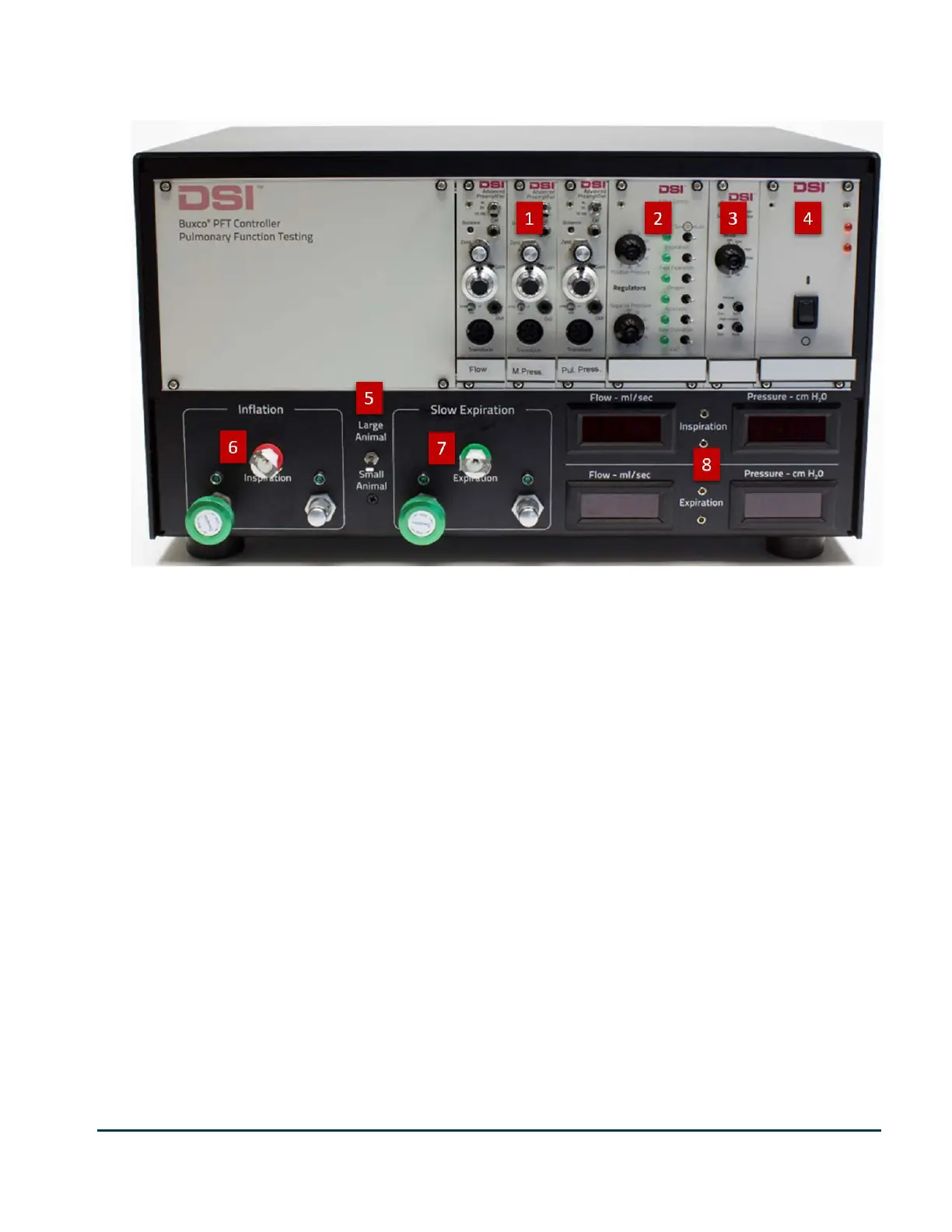
Pressure Panel Front
Pressure panel controls
The following are descriptions and operational definitions of controls and modules on the front of the Pressure
Panel
1. Preamplifier modules (Flow, Mouth Pressure, Esophageal) - These modules provide signal amplification
and conditioning for the flow, mouth pressure, and (optionally) esophageal pressure transducers.
2. Valve Control module - This module has two purposes:
• The Positive Pressure and Negative Pressure adjustment knobs control the pressure that is maintained
in the positive and negative pressure reservoirs. The pressure levels should be set at values that
ensure the safety of the animal. By default, set them to +50 cmH2O on the positive pressure
reservoir and -50 cmH2O on the negative pressure reservoir.
• The valve control switches are used to set the valves to one of three states, On, Off, or Auto. On closes
the valve. Off opens the valve. Auto allows the FinePointe software to control the valves. Valves are
manually controlled when setting flow rates and when calibrating the lung pressure. Auto control is
used when FinePointe is controlling the system during the test recording session.
3. Signal Generator module - This module provides pre-set computer-generated waveforms. This allows you
time to learn how the system works without having to run with a live animal. When set to the Live
position, the generated signals are disabled, and live signals from the transducers are used. The control
knob must be set to the Live position when collecting data. The Volume and High Volume reset buttons
are inactive and not used by the system.
4. Power module - This module has the pressure panel On/Off switch, and 2 LEDs in the top right corner. These
two LEDs confirm that the internal power supply is functioning. If they are dim, your power supply might not be
putting out the required voltage. If they are off, the Pressure panel has no power.


 To Next Page