Page 45
Pulmonary Function Test • Publication 014181-001 Rev 02 • www.datasci.com ©2023 Data Sciences International
2 - Calibrate Flows
Before you begin calibrating the flows, place a luer plug in the tracheal port to ensure the manifold is isolated from
the chamber.
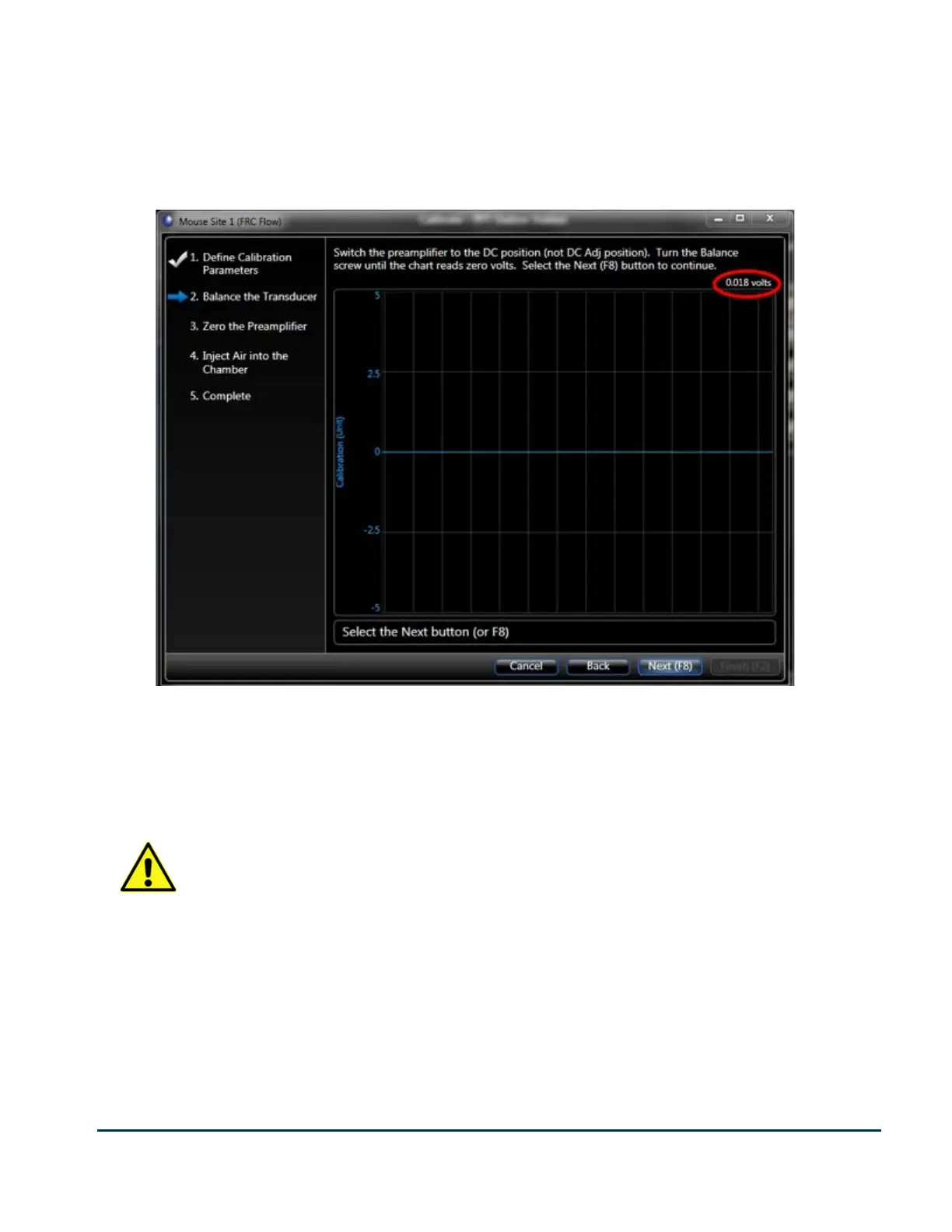
Begin by calibrating FRC Flow. Click the Calibrate button for FRC Flow.
The calibration wizard begins at step 2 “Balance the Transducer”. As with all wizards in FinePointe software, the
list at the left shows you the steps you will need to complete in order to finish the wizard, indicating which step
you are on by the blue arrow. The scrolling chart on the right shows you the current live
waveform. The text above the chart describes what you need to do during this step.
Your calibration wizard may be slightly different if you are not using the Advanced Preamplifiers.
If you see differences, please follow the instructions as they are stated on your calibration wizard.
As indicated above the chart in the step, you need to turn the Balance screw on the preamplifier module until the
chart reads 0 volts. You can see the voltage reading in the upper right-hand corner of the chart (circled in yellow).
It does not have to be exactly 0 volts. The system will check to determine if you are close enough.


 To Next Page