Page 26
Pulmonary Function Test • Publication 014181-001 Rev 02 • www.datasci.com ©2023 Data Sciences International
2 - Rear Panel Connections
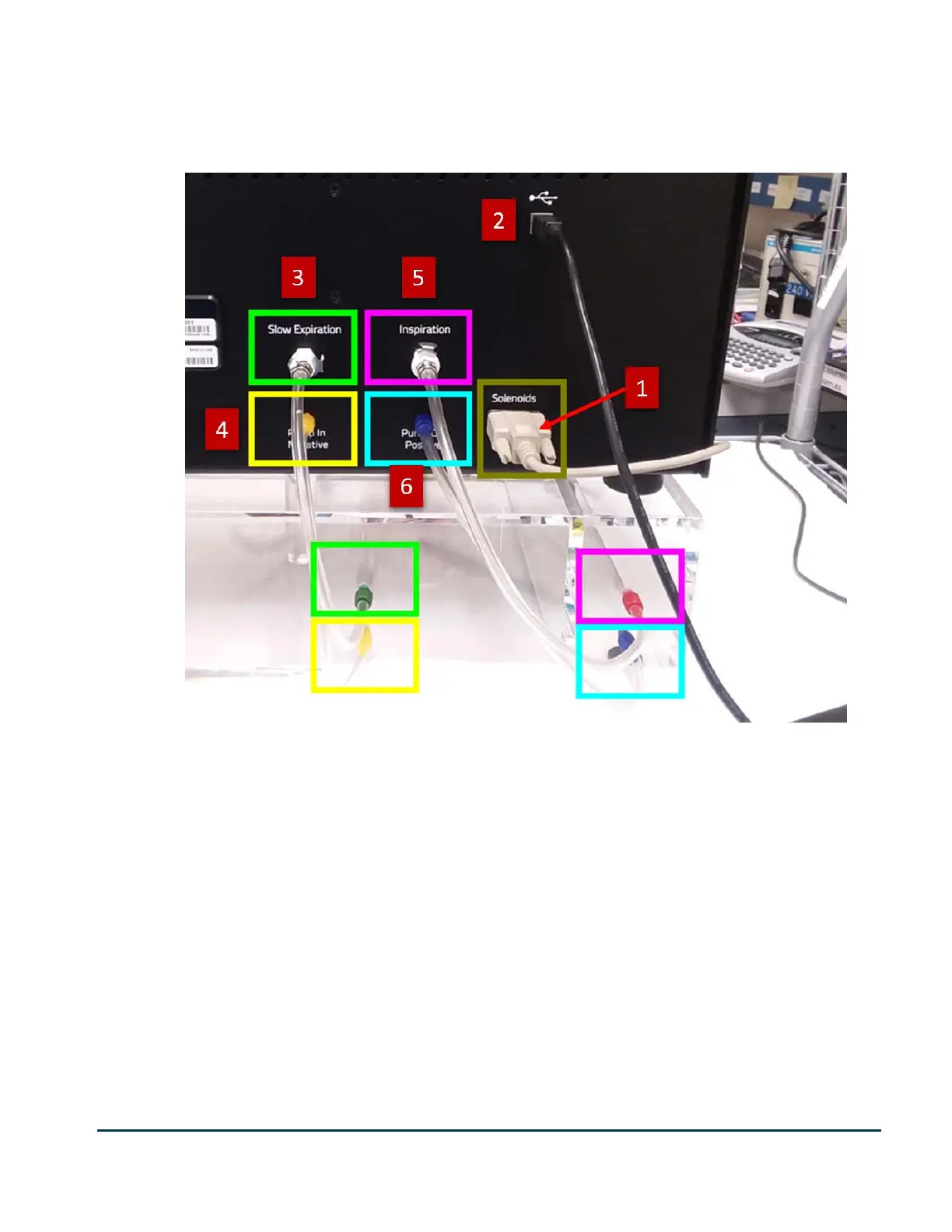
Make the following connections to the back of the pressure panel:
1. Connect the cable from the Valves Control connector on the plethysmograph to the Solenoids
connector on the rear of the Pressure Panel.
2. Connect the USB connector to a USB port on the computer. Avoid going through a USB hub
(including the hub on the monitor) unless it is approved for use by DSI.
3. Connect tubing from the Slow Expiration quick disconnect on the rear of the Pressure Panel to the green
input on the negative reservoir.
4.
Connect tubing from the yellow Pump in Negative luer connector on the rear of the Pressure Panel to
the yellow input on the negative reservoir.
5. Connect tubing from the Inspiration quick disconnect on the rear of the Pressure Panel to the
red input on the positive reservoir.
6. Connect tubing from the blue Pump Out Positive luer connector on the rear of the Pressure Panel to the
blue input on the positive reservoir.
7. Connect the Power Transformer to the power connector. (Not pictured)


 To Next Page