Page 17
Pulmonary Function Test • Publication 014181-001 Rev 02 • www.datasci.com ©2023 Data Sciences International
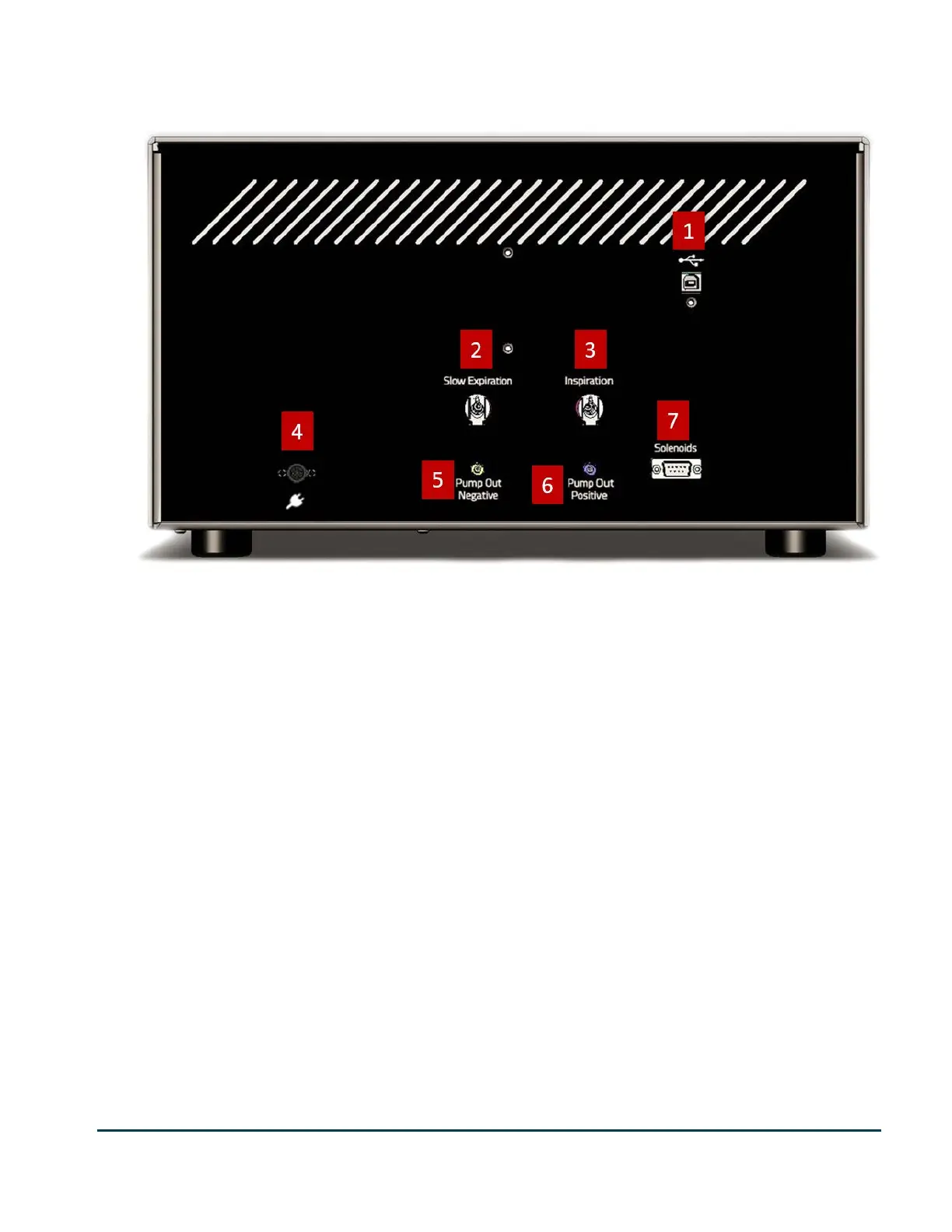
Pressure Panel Back
Connections on the back of the pressure panel
The following are descriptions of the connections on the back of the Pressure Panel
1. USB Port - The USB port accepts a standard non-powered USB cable which is then connected to the PC. All
data acquired from the controller, and all control commands (from the PC) are sent through this connection.
2. Slow Expiration Port - This port is connected to the negative pressure section of the pressure
reservoir.
3. Inspiration Port – This port is connected to the positive pressure section of the pressure reservoir.
4. Power Connector – The power transformer is connected to this port.
5. Pump Out Negative Port – This port is connected to the pump port on the negative section of the pressure
reservoir.
6. Pump Out Positive Port- This port is connected to the pump port on the positive section of the pressure
reservoir.
7. Solenoids Port – This 9-pin D shell connector is connected to the chamber manifold. It controls the chamber
manifold valves.


 To Next Page