Page 68
Pulmonary Function Test • Publication 014181-001 Rev 02 • www.datasci.com ©2023 Data Sciences International
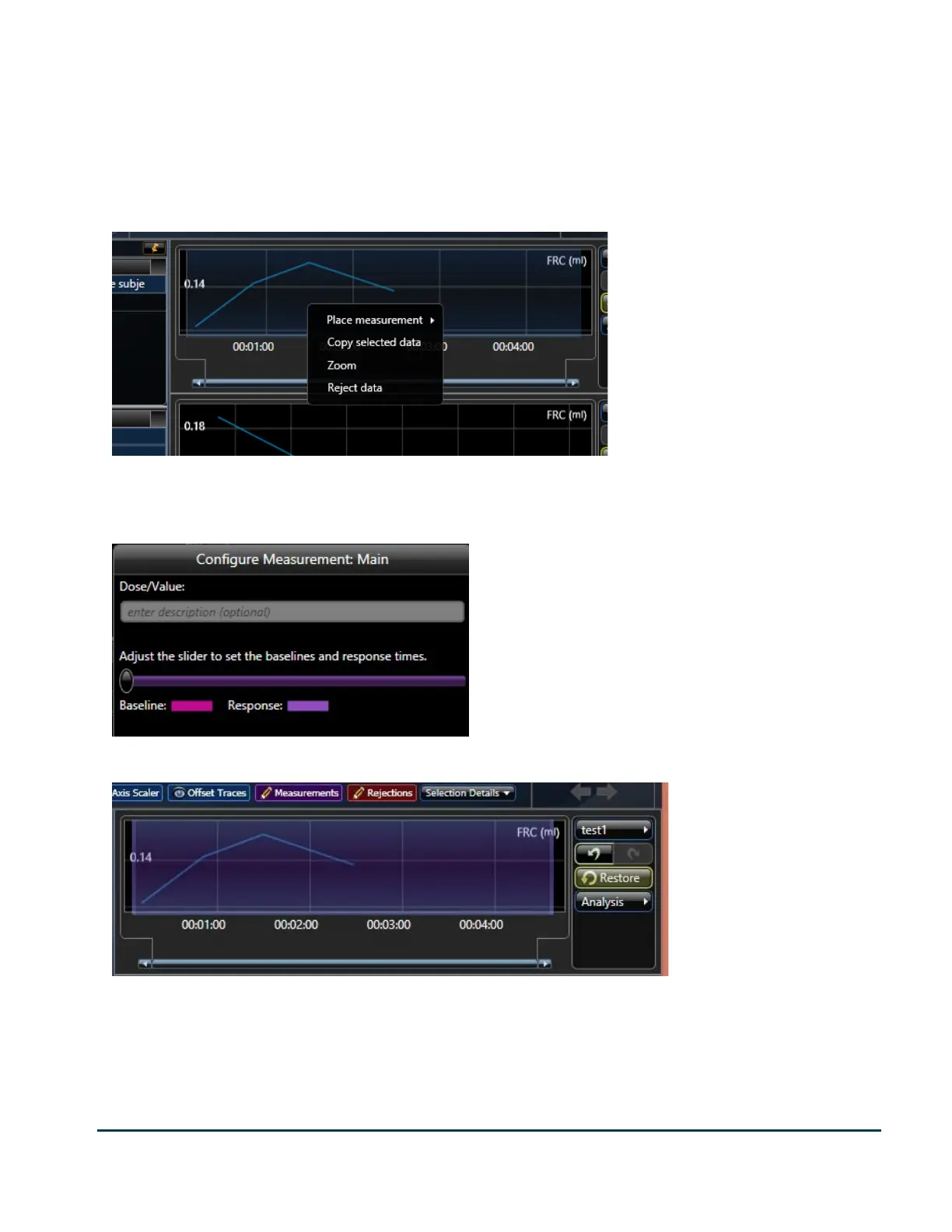
When you select a recording, any measurements that have already been placed will appear as shaded blue
regions. If there is not any (as shown in the previous image), you will see no such region. In this case, you can
place a measurement by clicking and dragging a region, then right click on that region to Place Measurement.
The following image shows a region drawn the full width of the recording and the context menu which is
presented by right clicking on the region. With a PFT study, your measurement will usually span the entire
recording. With other study types, this is generally not the case.
To place a measurement, you will select Place measurement->Main (or you may replace Main with one of the
available measurements presented by the submenu). The following form is presented to give you an opportunity
to give the measurement a baseline region. In PFT data, there should not be any baseline data.
Once you have placed all the measurements, you can still modify them by dragging the edges.


 To Next Page