10
CA 150 O150EN2
INSTRUMENTS AND CONTROLS, FUNCTIONAL DESCRIPTION
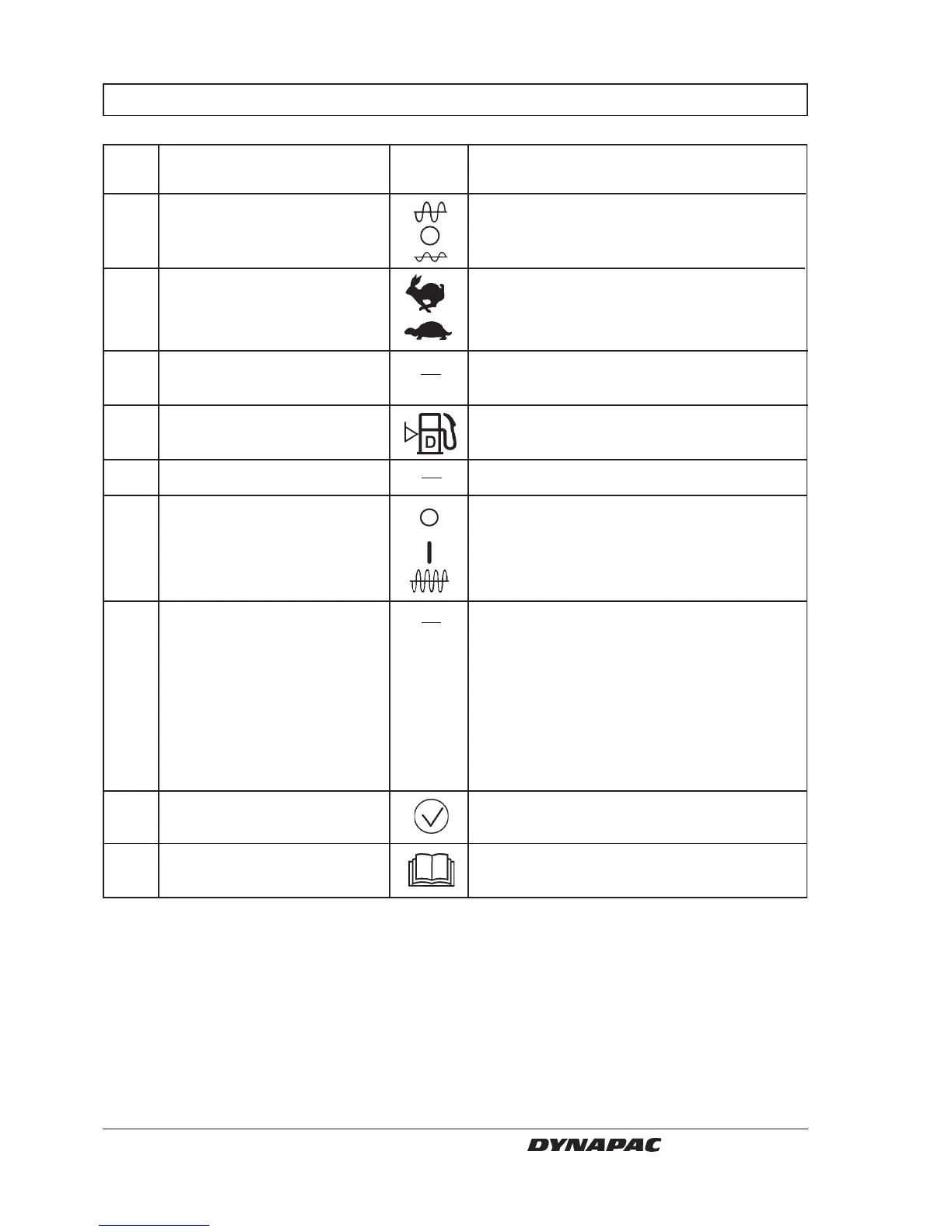
13 Amplitude selector
14 Speed selector, rear axle
(Optional)
15 Revs control, diesel engine
16 Fuel gauge
17 Fuse box
18 Vibration ON/OFF, switch
19 Forward/Reverse lever
20 Test button for warning lamps
21 Handbook compartment
Items in Designation Symbol Function
fig. 6
The left mode gives low amplitude.
The right mode gives high amplitude.
Vibration is OFF in the O mode.
Transportation speed (High)
Working speed (Low)
Working revs in the upper position.
Idling in the lower position.
Indicates fuel tank level.
Contains fuses for the electrical system.
Press once and release to switch vibration
ON, press again to switch vibration OFF.
The above applies only when the amplitude
selector (13) is in the High or Low mode.
The lever must be in neutral to start the
engine, it cannot be started with the forward/
reverse lever in any other position.
Direction of travel and speed of the roller is
regulated with the forward/reverse lever. The
roller moves forward when the lever is
moved forward, etc. Speed of the roller is
regulated in proportion to how far the lever is
moved from neutral. The further from neutral,
the higher the speed.
The lamps 10, 11, 12 are checked when the
switch is pressed.
Stowage space for safety manual and
operator’s manuals.



 To Next Page