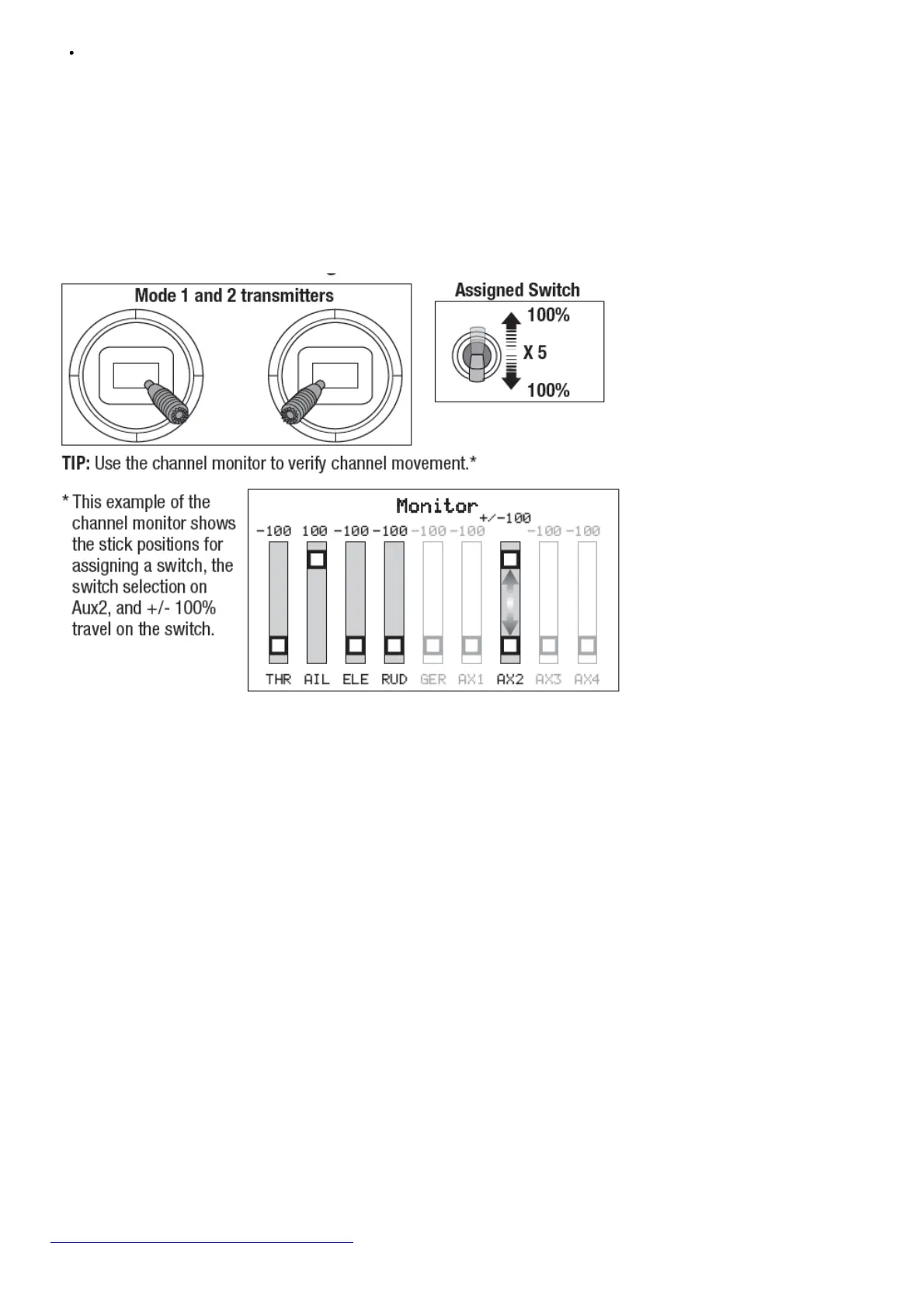
The aileron, elevator, rudder and throttle are set to 100% travel. If dual rates are in use, the switches need to be in the 100% position.
See your transmitter manual for more information about assigning a switch to a channel.
Assigning a Switch
1. Power on the transmitter.
2. Power on the aircraft.
3. Hold both transmitter sticks to the inside bottom corners, and toggle the desired switch 5 times quickly (1 toggle = full up and down).
4. The control surfaces of the aircraft will move, indicating the switch has been selected.
Repeat the process to assign a different switch or to deactivate the current switch.
SAFE Select Switch Assignment Stick Positions
Forward Programming
Assign the SAFE Select channel through forward programming on your compatible Spektrum transmitter.
Forward Programming SAFE Select Setup
DX
series,
NX
series,
iX
series
1. Begin with the transmitter bound to
the receiver.
2. Power ON the transmitter.
3. Assign a switch for SAFE Select
that is not already in use for another
function. Use any open channel
between 5 and 9 (Gear, Aux1-4).
4. Set switch H (throttle cut) to prevent
accidental motor operation.
5. Power ON the aircraft. A signal bar
appears on your transmitter’s main
screen when the telemetry information
is being received.
6. Go to the FUNCTION LIST (Model
Setup)
7. Select Forward Programming;
Select Gyro Settings; Choose SAFE
Select to enter the menu.
8. Set SAFE Select Ch: To the channel
you have chosen for SAFE Select.
9. Set AS3X and SAFE On or Off as
desired for each switch position.
For more information about setting SAFE Select and using Forward Programming, please refer to the following link for a detailed video:
https://www.youtube.com/watch?v=o-46P066cik



 To Next Page