20
7 Common operation of the web screens
Installation and Operating Instructions CGLine+ Web-Controller 40071860236 (E) February 2019 www.eaton.com
7.9 Device information screen
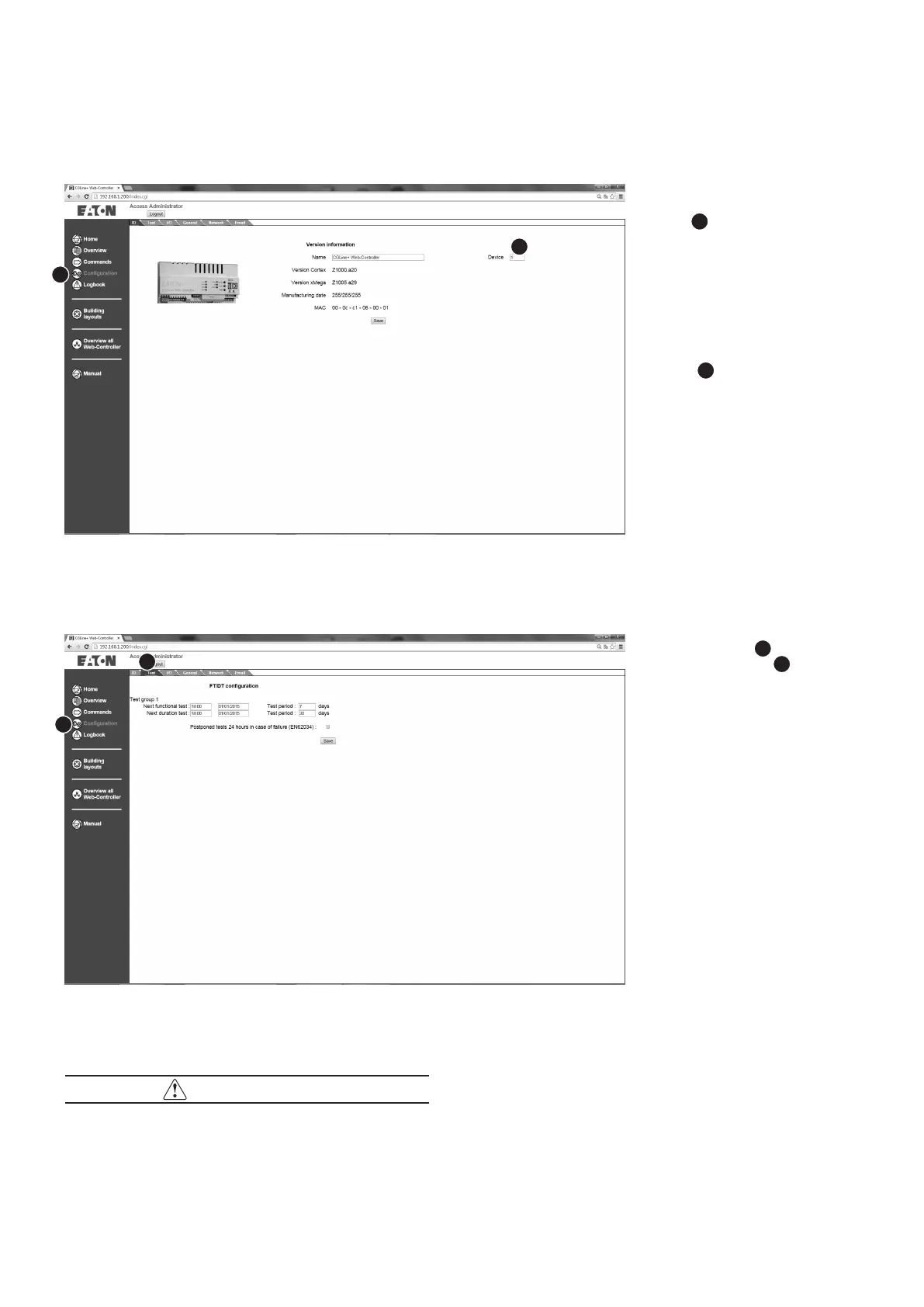
The device information
screen in the configuration
menu
1
displays informa-
tion about the CGLine+
Web-Controller,such as
device name (freely configu-
rable), software version etc.
It is also possible with sever-
al CGLine+ Web-Controllers
in the network to assign a
logical address to each from
1 to 32
2
.
1
7.10 Configuration screen test times
On the “Test” tab
2
in the
configuration menu
1
, it is
possible to determine start
times for a function test and
duration test for up to 8
groups.
It is also possible to set a
test interval via which tests
are cyclically repeated.
Possible test frequencies:
n
Function test: 1-30 days
n
Duration test: 30 -365
days
The CGLine+ self-contained
luminaires of the corre-
sponding test groups then
carry out an automatic func-
tion test of the lamps or a
duration test of the batteries
according to these set times.
2
1
2
NOTE
If the period of mains failure is greater than 21 days, the com-
plete system should be re-commissioned. Especially the date
and time must be reconfigured to assure proper sequencing




 To Next Page