SET UP
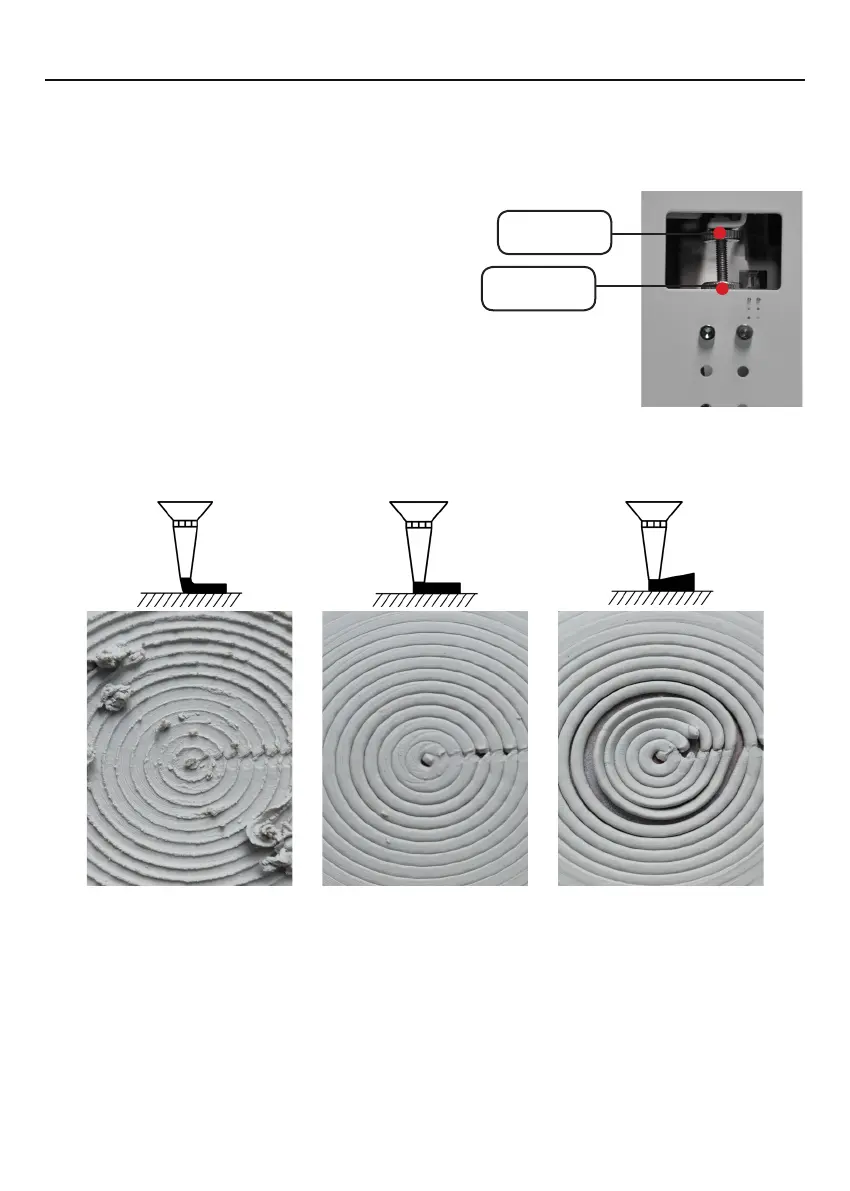
3.11 Print checking chart.
Note
:
If the distance between the print bed board and the needle is too large or too
small, the distance between the print bed board and the needle cannot be adjusted by
rotating the thumbwheel. You can adjust the Z-axis limit bolt length to set the Z-axis
home position. This step is shown in the following figure:
1. On the right side of the Z-axis frame, first
loosen the Z-axis limit lock nut, and then adjust
the Z-axis limit bolt.
2. After adjusting the Z-axis limit bolt, enter
the "Home" option, select the Z-axis home,
and observe whether the distance between the
needle and the print bed is correct.
3. If the distance is correct, tighten the Z-axis
limit lock nut, if it is too large or too small, repeat
the above steps.
Z-axis
limit lock nut
Z-axis
limit bolt
Before printing, water can be sprayed on the printing bed board to increase the
adhesion of the first layer.
If you are new to 3D Printing we highly recommend that you visit our website to review
our video tutorial on leveling the print bed at
https://www.eazao.com
The needle is too
close
to the print bed
or the clay is too
soft
and wet
will cause
this kind of excessive
expansion.
Normal
The needle is too
far
away from the print
bed or the clay is too
hard and dry
will
cause this kind of
excessive extrusion.
12


 To Next Page