EasyManua.ls Logo

Eclipse CD1200 - Page 11

Eclipse CD1200
101 pages
Print Icon
To Next Page IconTo Next Page
To Previous Page IconTo Previous Page
Loading...
Switching
Audio
Modes
Changement de
mode
audio
Cambio
de
los
modos
de
audio
listening
to
CD I
Lecture
d'un
CD
I
Escucha
de
un
CD
Adjusting volume
Reglage
du
volume
Ajuste del volumen
:P_
iL_
iR
;L;
L~
'------'
-"--
C'
.n
~
:t<!_-"~'_;L_/
,---'-
'<---...~"-
'~~,.
f/
C.ii...
i?:.:l
~~
BaSIC
Operation
Fonctronnemenl
de
base
Funclonamlento
baslco
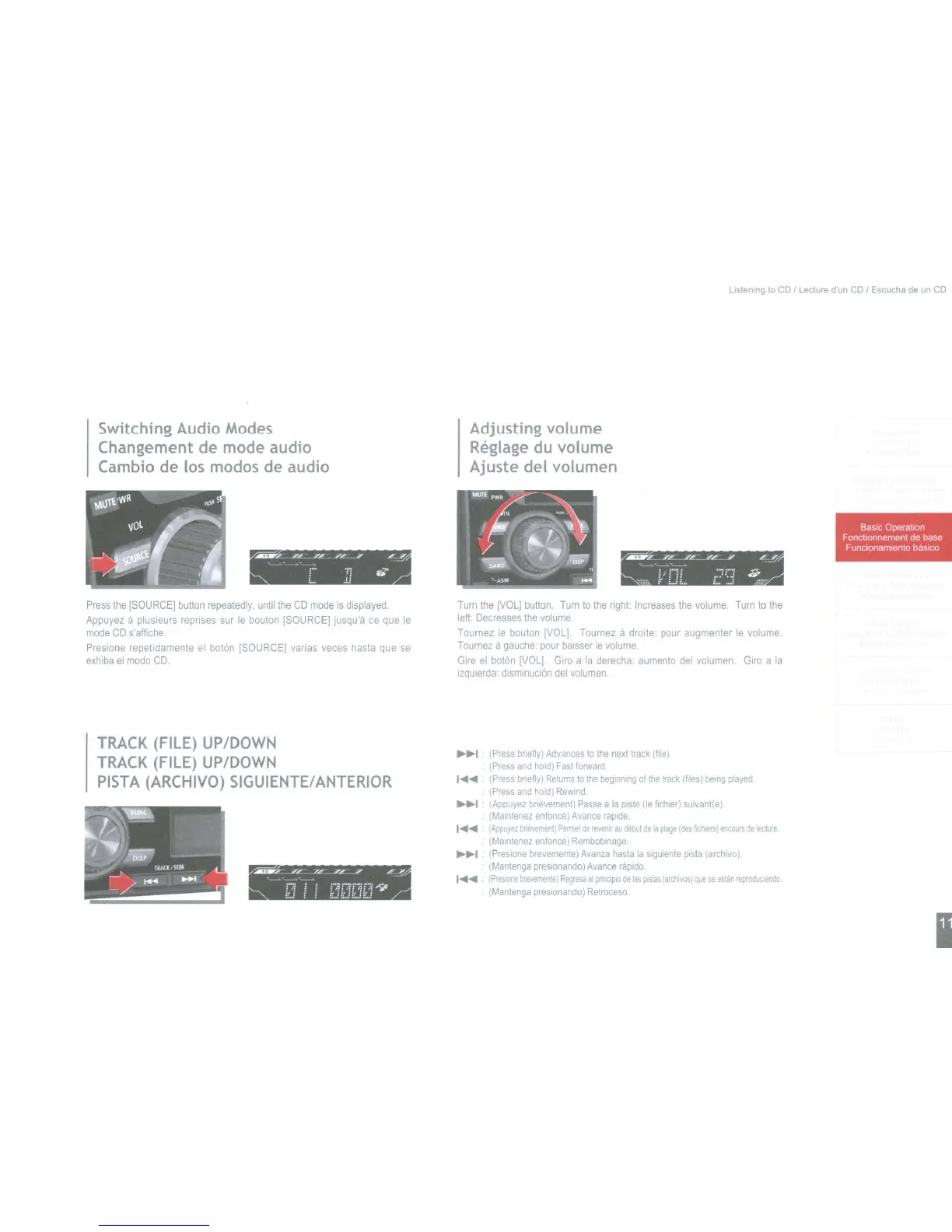
Press
the
[SOURCE]
button
repeatedly,
until
the
CD
mode
is
displayed
Appuyez
a plusieurs reprises sur
Ie
bouton
[SOURCE]
jusqu'a
ce
que
Ie
mode
CD
s'affiche,
Preslone repetidamente
el
boton [SOURCE] varias
veces
hasta
que
se
exhiba
el
modo
CD
TRACK
(FILE)
UP/DOWN
TRACK
(FILE)
UP/DOWN
PISTA
(ARCHIVO)
SIGUIENTE/
ANTERIOR
'J!'--.:...-U/...:..-...J~L:.-'
L....I',.
'-'~'--
la
11
1:,'1
n!a
f.':i
,~
Turn
the
[VOL]
button,
Turn
to
the
nght:
Increases
the
volume.
Turn
to
the
left:
Decreases
the
volume.
Tournez
Ie
bouton
[VOL].
Tournez a droite: pour augmenter
Ie
volume.
Tournez
a
gauche:
pour
baisser
Ie
volume.
Gire
el
boton
[VOll.
GirO
a
la
derecha: aumento
del
volumen.
GirO
a
la
Izqulerda:
dlsminucion
del
volumen.
~~I
(Press
bnefly)
Advances
to
the
next
track
(file).
(Press
and
hold)
Fast
fOlward
......
(Press
bnefly)
Returns
to
the
beginning
of
the
track
(files)
being
played
(Press
and
hold)
Rewind.
~I
(Appuyez
bnevement)
Passe
a
la
plste
(Ie
fichler)
sUlvant(e).
(Malntenez
enfonce)
Avance
raprde.
I......
IAppuye,
bnevement)
Permel
de
reven"
au
debul
de
la
~age
Ides
fich"rsl
encours
de
lecture
(Malnlene,
enfonce)
Remboblnage.
~~I
(Preslone
brevemente)
Avanza
hasta
la
sigulente
plsta
larchlvo).
(Mantenga
preslonando)
Avance
nipido
I......
,PreSione
brevemenlel
Regresa
al
pnnop~
de
las
plstas
larchlYosl
que
se
eSlan
reproduoendo.
(Mantenga
presronando)
Retroceso.
I
Switching
Audio
Modes
Changement de
mode
audio
Cambio
de
los
modos
de
audio
listening
to
CD I
Lecture
d'un
CD
I
Escucha
de
un
CD
Adjusting volume
Reglage
du
volume
Ajuste del volumen
:P_
iL_
iR
;L;
L~
'------'
-"--
C'
.n
~
:t<!_-"~'_;L_/
,---'-
'<---...~"-
'~~,.
f/
C.ii...
i?:.:l
~~
BaSIC
Operation
Fonctronnemenl
de
base
Funclonamlento
baslco
Press
the
[SOURCE]
button
repeatedly,
until
the
CD
mode
is
displayed
Appuyez
a plusieurs reprises sur
Ie
bouton
[SOURCE]
jusqu'a
ce
que
Ie
mode
CD
s'affiche,
Preslone repetidamente
el
boton [SOURCE] varias
veces
hasta
que
se
exhiba
el
modo
CD
TRACK
(FILE)
UP/DOWN
TRACK
(FILE)
UP/DOWN
PISTA
(ARCHIVO)
SIGUIENTE/
ANTERIOR
'J!'--.:...-U/...:..-...J~L:.-'
L....I',.
'-'~'--
la
11
1:,'1
n!a
f.':i
,~
Turn
the
[VOL]
button,
Turn
to
the
nght:
Increases
the
volume.
Turn
to
the
left:
Decreases
the
volume.
Tournez
Ie
bouton
[VOL].
Tournez a droite: pour augmenter
Ie
volume.
Tournez
a
gauche:
pour
baisser
Ie
volume.
Gire
el
boton
[VOll.
GirO
a
la
derecha: aumento
del
volumen.
GirO
a
la
Izqulerda:
dlsminucion
del
volumen.
~~I
(Press
bnefly)
Advances
to
the
next
track
(file).
(Press
and
hold)
Fast
fOlward
......
(Press
bnefly)
Returns
to
the
beginning
of
the
track
(files)
being
played
(Press
and
hold)
Rewind.
~I
(Appuyez
bnevement)
Passe
a
la
plste
(Ie
fichler)
sUlvant(e).
(Malntenez
enfonce)
Avance
raprde.
I......
IAppuye,
bnevement)
Permel
de
reven"
au
debul
de
la
~age
Ides
fich"rsl
encours
de
lecture
(Malnlene,
enfonce)
Remboblnage.
~~I
(Preslone
brevemente)
Avanza
hasta
la
sigulente
plsta
larchlvo).
(Mantenga
preslonando)
Avance
nipido
I......
,PreSione
brevemenlel
Regresa
al
pnnop~
de
las
plstas
larchlYosl
que
se
eSlan
reproduoendo.
(Mantenga
presronando)
Retroceso.
I

Table of Contents

Other manuals for Eclipse CD1200

Related product manuals