EasyManua.ls Logo

Eclipse CD1200 - Names of Controls and Parts

Eclipse CD1200
101 pages
Print Icon
To Next Page IconTo Next Page
To Previous Page IconTo Previous Page
Loading...
Names
of
controls
and
parts
Names
of
controls and parts
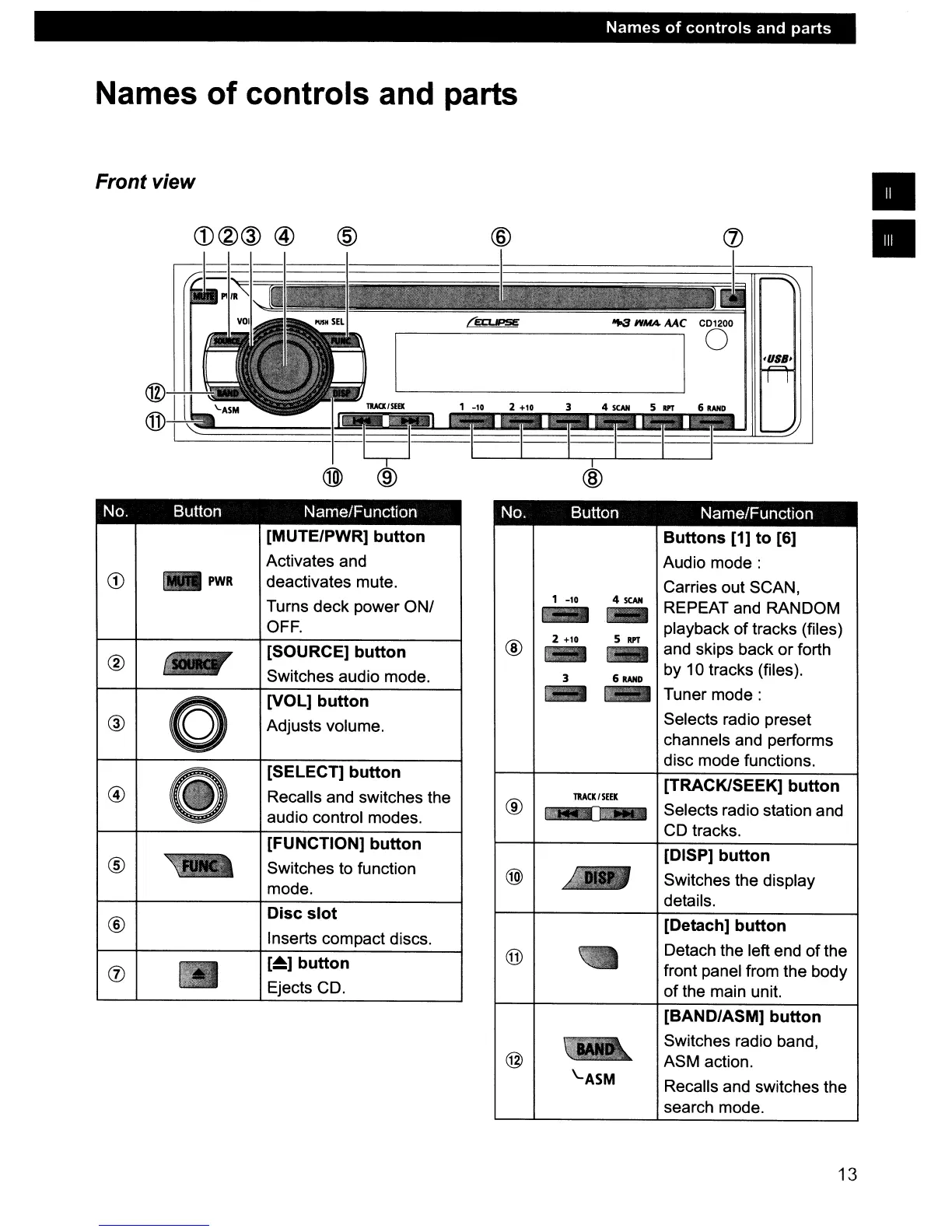
Front view
CD®@
@
@ @
@
No. Button Name/Function No. Button Name/Function
[Detach]
button
Detach the left end
of
the
front panel from the body
of
the main unit.
[TRACK/SEEK]
button
Selects radio station and
CD
tracks.
[DISP]
button
Switches the display
details.
[BAND/ASM]
button
Switches radio band,
ASM action.
Recalls and switches the
search mode.
Buttons
[1]
to
[6]
Audio
mode:
Carries out SCAN,
REPEAT and RANDOM
playback of tracks (files)
and skips back
or
forth
by 10 tracks (files).
Tuner
mode:
Selects radio preset
channels and performs
disc mode functions.
511PT
4
SCAN
-
TRACK/SEEK
\..ASM
1 -10
@
®
®
[~]
button
Ejects CD.
Disc
slot
Inserts compact discs.
[FUNCTION]
button
Switches to function
mode.
[SELECT]
button
Recalls and switches the
audio control modes.
[VOL]
button
Adjusts volume.
[SOURCE]
button
Switches audio mode.
[MUTE/PWR]
button
Activates and
deactivates mute.
Turns deck power ONI
OFF.
~PWR
®
®
13

Table of Contents

Other manuals for Eclipse CD1200

Related product manuals