How
to
operate
the USB
music
file
player
• Supported channel modes:
monaural, stereo, joint, dual
rnATTENTION
•
Depending
on
the
encoding
method
used, this
device
may
not
be able to
play
back
some
types
of
AAC
file.
• Tags
for
AAC
files
cannot
be
displayed.
Format
of
USB memory
The USB memory format must be
IS09660
Level 1
or
Level
2.
Standards are as follows:
• Maximum directory layers:
8 layers
• Maximum characters for folder names/file names:
128 (including "." and 3 letter file extension)
• Allowable characters for folder names/file names:
A-Z,
0-9,
_ (underscore)
• Number
of
files possible on a single USB memory:
512
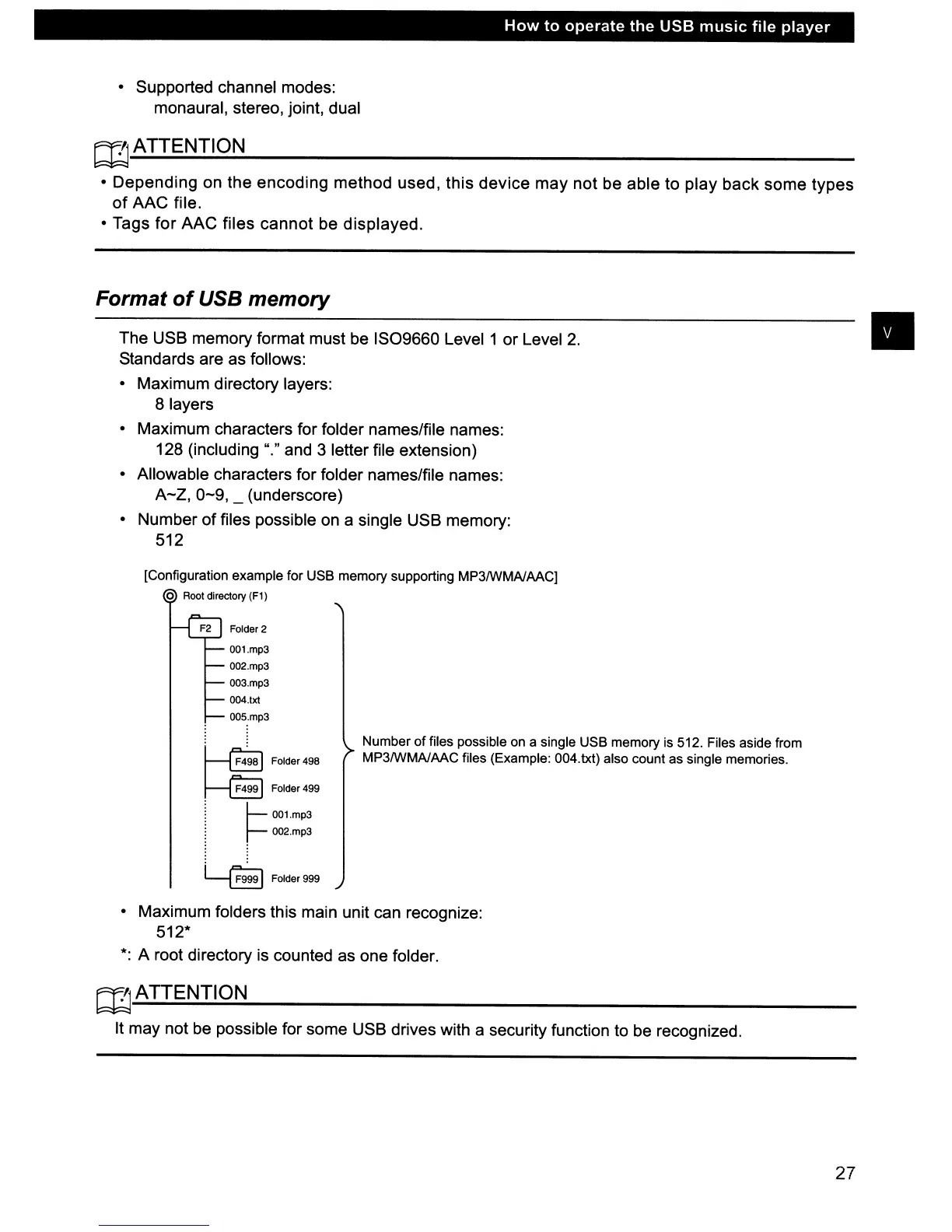
[Configuration example for USB memory supporting MP3IWMAlAACj
o Root directory
(Fl)
F2
Folder 2
00l.mp3
002.mp3
003.mp3
004.txt
005.mp3
•
~
Folder498
~
Folder499
:
~
00l.mp3
~
r-
002.mp3
~
Folder999
Number
of
files possible on a single USB memory is 512. Files aside from
MP3IWMAlAAC files (Example: 004.txt) also count as single memories.
• Maximum folders this main unit can recognize:
512*
*:
A root directory is counted as one folder.
rnATTENTION
It may not be possible for some USB drives with a security function to be recognized.
27



 To Next Page