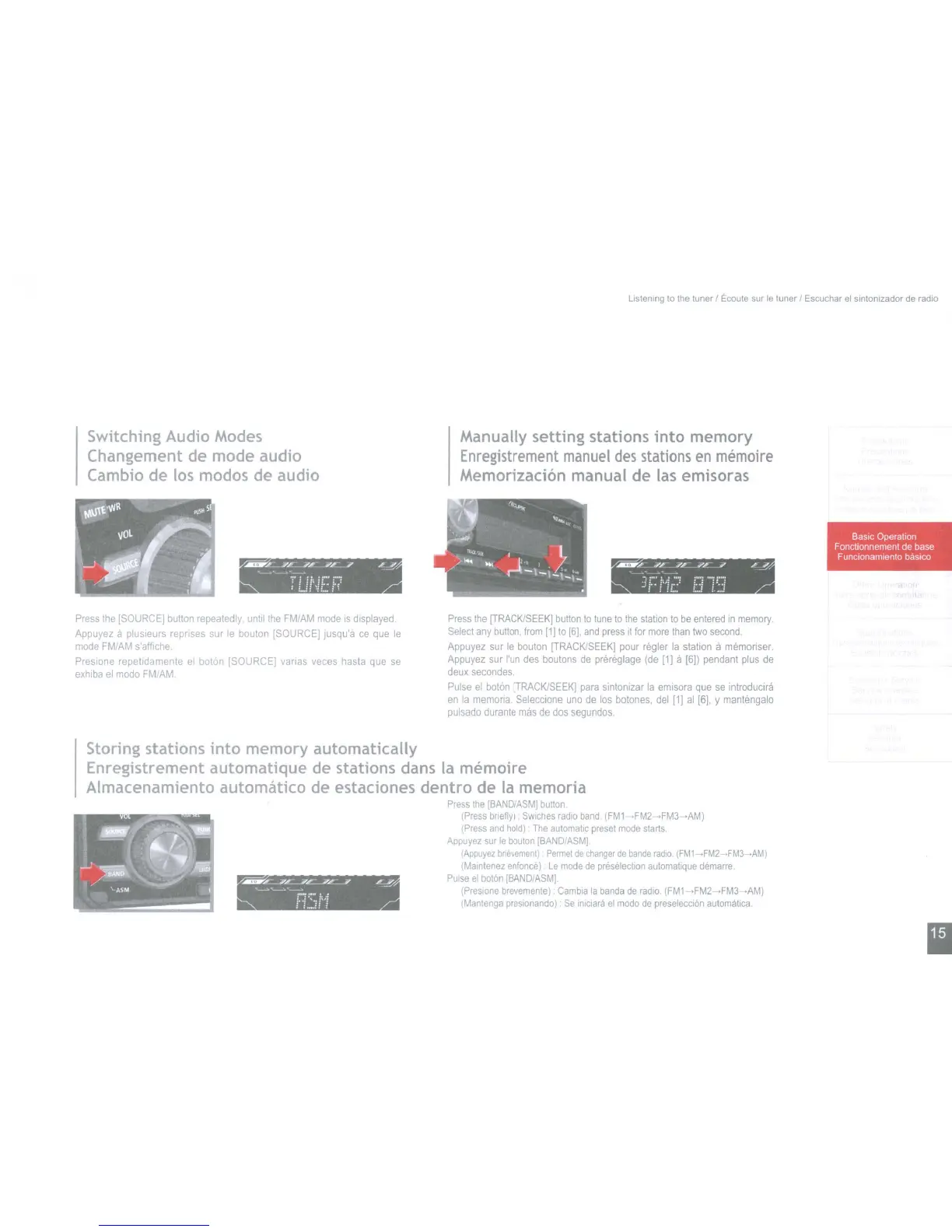
Switching Audio Modes
Changement de mode audio
Cambio de
los
modos de audio
listening
to
the
tuner
I
Ecoute
sur
Ie
tuner
I
Escuchar
el
sintonizador
de
radio
Manually setting stations into memory
Enregistrement
manuel
des
stations
en
memoire
Memorizacion manual de
las
emisoras
oz:........;p~L.-....i£_J
L~
~-~-~
T
L.n·!
E'
F?
~
--:-,,/r
---.ffr-----i£---.i
L----"-
"------.~"------
]r
I"!I:?
U
")
';}
BasIc
Operation
Fonctlonnement de base
Funclonamlenlo
baslCO
Press
the
ISOURCE]
button
repeatedly
until
the
FM/AM
mode
IS
displayed
Appuyez
a plusleurs reprises
sur
Ie
bouton
[SOURCE]
Jusqu'a
ce
que
Ie
mode
FM/AM
s'alfiche.
Presione
repelidamente
el
baton
[SOURCE]
varlas
veces
hasta
que
se
exhiba
el
modo
FM/AM
Press
Ihe
[TRACK/SEEK]
button
to
tune
to
the
station
10
be
entered
In
memory.
Select
any
button,
from
11)
to
[6J,
and
press
It
for
more
than
two
second
Appuyez
sur
Ie
bouton
[TRACK/SEEK]
pour
regler
la
station
a
memonser.
Appuyez
sur
I'un
des
boutons
de
prereglage
(de
11]
a
[6])
pendant
plus
de
deux
secondes.
Pulse
el
baton
[TRACK/SEEK]
para
smtonlzar
la
emlsora
que
se
introductra
en
la
memoria
Selecclone
uno
de
los
botones,
del
[1]
al
[6],
y
mantengalo
pulsado
durante
mas
de
dos
segundos.
~~~~
~
.............
"'---'0.-
t··j
".:
j':j
: :
...
.:: :
Storing stations into memory automatically
Enregistrement automatique de stations dans
la
me-moire
Almacenamiento automittico de estaciones dentro de
la
memoria
Press
the
[BANDIASMj
button.
(Press
briefly)
SWlches
radio
band
(FM1-FM2-FM3
,AM)
(Press
and
hold)
The
automahc
preset
mode
starts
Appuyez
sur
Ie
bouton
[BANDIASMI.
(Appuyez
bnevemem)
Permet
de
changer
de
bande
radio.
(FM1
-FM2
,FM3
·AM)
(Marntenez
enfonce)
Le
mode
de
preselection
automatique
demarre
Pulse
el
baton
IBANDIASM].
(Preslone
brevemente)
Cambia
la
banda
de
radio.
(FMl
.FM2_FM3
.AM)
(Mantenga
presionando)
Se
Inlciara
el
modo
de
preselecclon
automatica.
I
Switching Audio Modes
Changement de mode audio
Cambio de
los
modos de audio
listening
to
the
tuner
I
Ecoute
sur
Ie
tuner
I
Escuchar
el
sintonizador
de
radio
Manually setting stations into memory
Enregistrement
manuel
des
stations
en
memoire
Memorizacion manual de
las
emisoras
oz:........;p~L.-....i£_J
L~
~-~-~
T
L.n·!
E'
F?
~
--:-,,/r
---.ffr-----i£---.i
L----"-
"------.~"------
]r
I"!I:?
U
")
';}
BasIc
Operation
Fonctlonnement de base
Funclonamlenlo
baslCO
Press
the
ISOURCE]
button
repeatedly
until
the
FM/AM
mode
IS
displayed
Appuyez
a plusleurs reprises
sur
Ie
bouton
[SOURCE]
Jusqu'a
ce
que
Ie
mode
FM/AM
s'alfiche.
Presione
repelidamente
el
baton
[SOURCE]
varlas
veces
hasta
que
se
exhiba
el
modo
FM/AM
Press
Ihe
[TRACK/SEEK]
button
to
tune
to
the
station
10
be
entered
In
memory.
Select
any
button,
from
11)
to
[6J,
and
press
It
for
more
than
two
second
Appuyez
sur
Ie
bouton
[TRACK/SEEK]
pour
regler
la
station
a
memonser.
Appuyez
sur
I'un
des
boutons
de
prereglage
(de
11]
a
[6])
pendant
plus
de
deux
secondes.
Pulse
el
baton
[TRACK/SEEK]
para
smtonlzar
la
emlsora
que
se
introductra
en
la
memoria
Selecclone
uno
de
los
botones,
del
[1]
al
[6],
y
mantengalo
pulsado
durante
mas
de
dos
segundos.
~~~~
~
.............
"'---'0.-
t··j
".:
j':j
: :
...
.:: :
Storing stations into memory automatically
Enregistrement automatique de stations dans
la
me-moire
Almacenamiento automittico de estaciones dentro de
la
memoria
Press
the
[BANDIASMj
button.
(Press
briefly)
SWlches
radio
band
(FM1-FM2-FM3
,AM)
(Press
and
hold)
The
automahc
preset
mode
starts
Appuyez
sur
Ie
bouton
[BANDIASMI.
(Appuyez
bnevemem)
Permet
de
changer
de
bande
radio.
(FM1
-FM2
,FM3
·AM)
(Marntenez
enfonce)
Le
mode
de
preselection
automatique
demarre
Pulse
el
baton
IBANDIASM].
(Preslone
brevemente)
Cambia
la
banda
de
radio.
(FMl
.FM2_FM3
.AM)
(Mantenga
presionando)
Se
Inlciara
el
modo
de
preselecclon
automatica.
I



 To Next Page