Listening
to
IPod music files I Ecoute de fichlers audio iPod I Escuchar archIves musicales tPed
Switching
Audio
Modes
Changement de mode audio
Cambio de los modos
de
audio
Searching
for
a music
file
Recherche d'un
fichier
audio
Busqueda
de
un
archivo
musical
~
//'
""....
;/,-"
/ .t(/.
" "
."(
F:iC'j.':.!
//
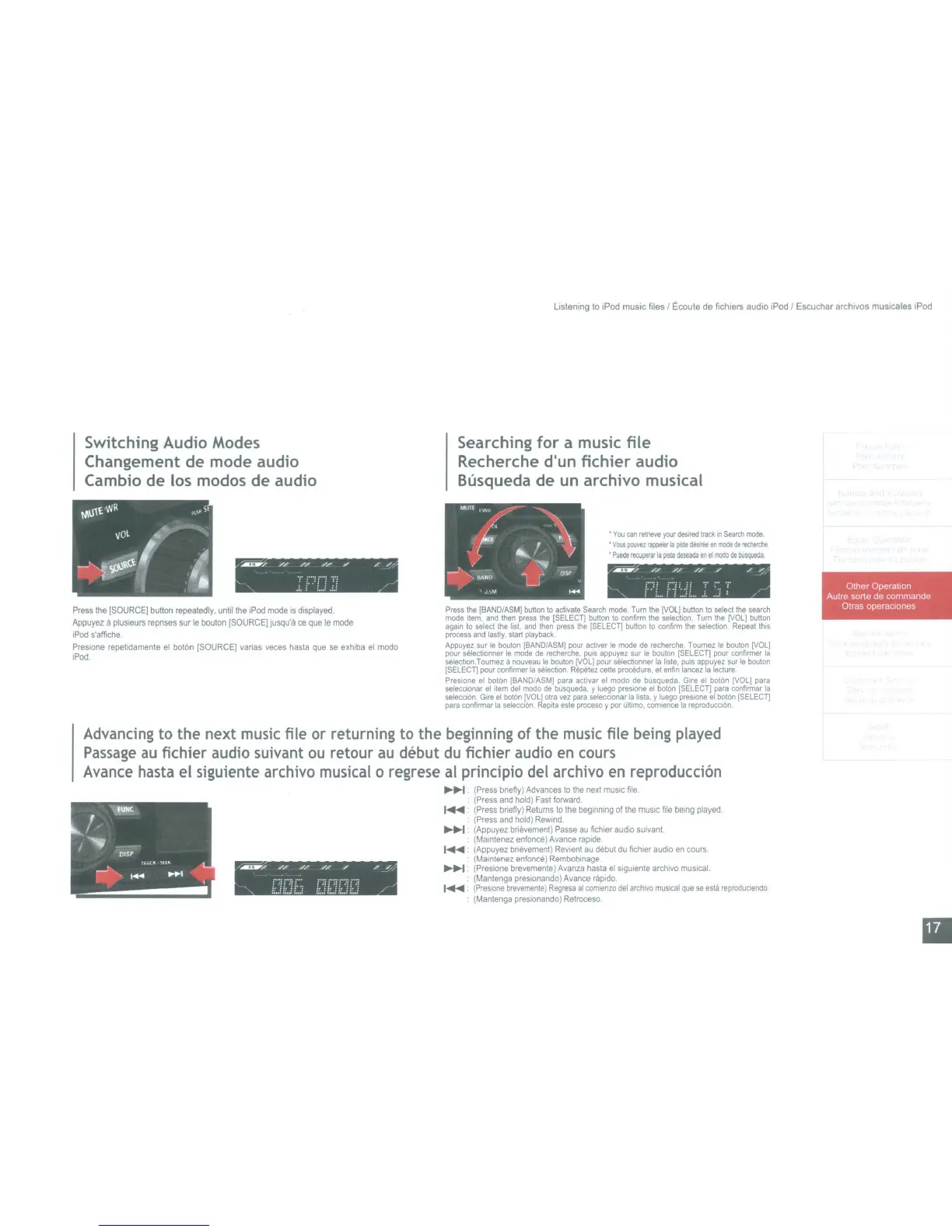
Press
the
[SOURCE]
button
repeatedly.
until
the
IPod
mode
is
displayed.
Appuyez
a
plusleurs
repnses
sur
Ie
bouton
(SOURCE]
Jusqu'a
ce
que
Ie
mode
iPod
s'affiche.
Presione
repetidamente
el
bot6n
[SOURCE]
vanas
veces
hasta
que
se
eXhiba
el
modo
!Pod
•
You
can
retneve
your
desired
track
to
Seardl
mode
•
Voos
pouvez
rappe!ef
la
plSte
dilSiffie
en
mode
de
recherche
•
Puede
rectlperar
Ia
prsla
deseada
en
eI
modo
de
busqueda
/~
//
//
,//,/
,..,
~"
.......... , ,....,
"
t·':L
i·r.:::
:.
.":1
~
/r-'
Press
the
(BANO/ASMj
button
to
acti
....
ale
Search
mode.
Turn
the
[VOL]
button
to
select
the
search
mode
Item.
and
then
press
the
[SELECn
bulton
to
confirm
the
selection.
Tum
Ihe
[VOL]
bulton
again
10
select
the
list,
and
then
press
the
[SELECn
button
10
confirm
the
selection.
Repeallhrs
process
and
lastly.
start
playback
Appuyez
sur
Ie
bouton
[BAND/ASM]
pour
activer
Ie
mode
de
recherche.
Tournez
Ie
bouton
[VOL]
pour
selectionner
Ie
mode
de
recherche,
puis
appuyez
sur
Ie
bouton
(SELECn
pour
confirmer
la
selection.Tournez
a
nou
....
eau
Ie
bouton
[VOL]
pour
selectionner
la
liste,
pUIS
appuyez
sur
Ie
bouton
[SELECn
pour
confirmer
la
selection
Repetez
tene
procedure.
el
enfin
lancez
la
lecture
Prestone
el
bolon
(BANO/ASMJ
para
acllvar
el
modo
de
busqueda.
Glre
el
boton
[VOL]
para
seleCClonar
el
item
del
modo
de
busqueda,
y
luego
presione
el
boton
(SELECn
para
confirmar
la
seleccion
Gire
el
botOn
[VOLl
otra
....
ez
para
selecclonar
la
IIsta,
y
luego
pres
lone
el
bol6rl
[SELECn
para
confirmar
la
selecciOn.
Repila
esla
proceso
y
por
ultimo,
comlence
la
reproducci6n
I
Other Operation
Autre serte de commande
Olras operactones
,..~.....
..........
//
.....
/ /
/'
'-'/,..
L}f:fCf
f;~JCfC!f?
,..
Advancing to the next
music
file or returning to the beginning of the
music
file being played
Passage
au
fichier audio suivant
ou
retour
au
debut
du
fichier audio
en
cours
Avance
hasta
el siguiente archivo musical 0 regrese
al
principio del archivo
en
reproduccion
~
(Press
bnefly)
Advances
to
the
next
mUSIC
file
(Press
and
hold)
Fast
forward.
I.......
(Press
bnefly)
Returns
to
the
beginning
of
the
musIc
file
bemg
played.
(Press
and
hold)
Rewind
.
......
1.
(Appuyez
bnEwement)
Passe
au
fichier
audio
sUll/anl.
(MalOtenez
enfonce)
Avance
raplde
........ :
(Appuyez
bnevement)
Revien!
au
debut
du
fiehlef
audio
en
cours.
(Mamtenez
enfonce)
RemboblOage
.......... (Preslone brel/emenle)
AI/anza
hasta
al
sigUiente
archivQ
musical.
(Mantenga
presionando)
AI/ance
rapido.
I
.......
:
(Preslone
brevemente)
Regresa
at
comlsnzo
del
arctl1vo
mUSical
que
S8
asIa
reproducleodo
(Manlenga
preslonando)
Retroceso.
~NC.
I,
-"
.
.."
I
=-
-
D/SP
.....
r~
..
l~\tlK
.
~,.......
-
~i1:l
--------------
III
Listening
to
IPod music files I Ecoute de fichlers audio iPod I Escuchar archIves musicales tPed
Switching
Audio
Modes
Changement de mode audio
Cambio de los modos
de
audio
Searching
for
a music
file
Recherche d'un
fichier
audio
Busqueda
de
un
archivo
musical
~
//'
""....
;/,-"
/ .t(/.
" "
."(
F:iC'j.':.!
//
Press
the
[SOURCE]
button
repeatedly.
until
the
IPod
mode
is
displayed.
Appuyez
a
plusleurs
repnses
sur
Ie
bouton
(SOURCE]
Jusqu'a
ce
que
Ie
mode
iPod
s'affiche.
Presione
repetidamente
el
bot6n
[SOURCE]
vanas
veces
hasta
que
se
eXhiba
el
modo
!Pod
•
You
can
retneve
your
desired
track
to
Seardl
mode
•
Voos
pouvez
rappe!ef
la
plSte
dilSiffie
en
mode
de
recherche
•
Puede
rectlperar
Ia
prsla
deseada
en
eI
modo
de
busqueda
/~
//
//
,//,/
,..,
~"
.......... , ,....,
"
t·':L
i·f.:::
:.
.":1
~
/r-'
Press
the
(BANO/ASMj
button
to
acti
....
ale
Search
mode.
Turn
the
[VOL]
button
to
select
the
search
mode
Item.
and
then
press
the
[SELECn
bulton
to
confirm
the
selection.
Tum
Ihe
[VOL]
bulton
again
10
select
the
list,
and
then
press
the
[SELECn
button
10
confirm
the
selection.
Repeallhrs
process
and
lastly.
start
playback
Appuyez
sur
Ie
bouton
[BAND/ASM]
pour
activer
Ie
mode
de
recherche.
Tournez
Ie
bouton
[VOL]
pour
selectionner
Ie
mode
de
recherche,
puis
appuyez
sur
Ie
bouton
(SELECn
pour
confirmer
la
selection.Tournez
a
nou
....
eau
Ie
bouton
[VOL]
pour
selectionner
la
liste,
pUIS
appuyez
sur
Ie
bouton
[SELECn
pour
confirmer
la
selection
Repetez
tene
procedure.
el
enfin
lancez
la
lecture
Prestone
el
bolon
(BANO/ASMJ
para
acllvar
el
modo
de
busqueda.
Glre
el
boton
[VOL]
para
seleCClonar
el
item
del
modo
de
busqueda,
y
luego
presione
el
boton
(SELECn
para
confirmar
la
seleccion
Gire
el
botOn
[VOLl
otra
....
ez
para
selecclonar
la
IIsta,
y
luego
pres
lone
el
bol6rl
[SELECn
para
confirmar
la
selecciOn.
Repila
esla
proceso
y
por
ultimo,
comlence
la
reproducci6n
I
Other Operation
Autre serte de commande
Olras operactones
,..~.....
..........
//
.....
/ /
/'
'-'/,..
L}f:fCf
f;~JCfC!f?
,..
Advancing to the next
music
file or returning to the beginning of the
music
file being played
Passage
au
fichier audio suivant
ou
retour
au
debut
du
fichier audio
en
cours
Avance
hasta
el siguiente archivo musical 0 regrese
al
principio del archivo
en
reproduccion
~
(Press
bnefly)
Advances
to
the
next
mUSIC
file
(Press
and
hold)
Fast
forward.
I.......
(Press
bnefly)
Retums
to
the
beginning
of
the
musIc
file
bemg
played.
(Press
and
hold)
Rewind
.
......
1.
(Appuyez
bnEwement)
Passe
au
fichier
audio
sUll/anl.
(MalOtenez
enfonce)
Avance
raplde
........ :
(Appuyez
bnevement)
Revien!
au
debut
du
fiehlef
audio
en
cours.
(Mamtenez
enfonce)
RemboblOage
.......... (Preslone brel/emenle)
Avanza
hasta
al
sigUiente
archivQ
musical.
(Mantenga
presionando)
Avance
rapido.
I
.......
:
(Preslone
brevemente)
Regresa
at
comlsnzo
del
arctl1vo
mUSical
que
S8
asIa
reproducleodo
(Manlenga
preslonando)
Retroceso.
~NC.
I,
-"
.
.."
I
=-
-
D/SP
.....
r~
..
l~\tlK
.
~,.......
-
~i1:l
--------------
III



 To Next Page