Other information
Refer
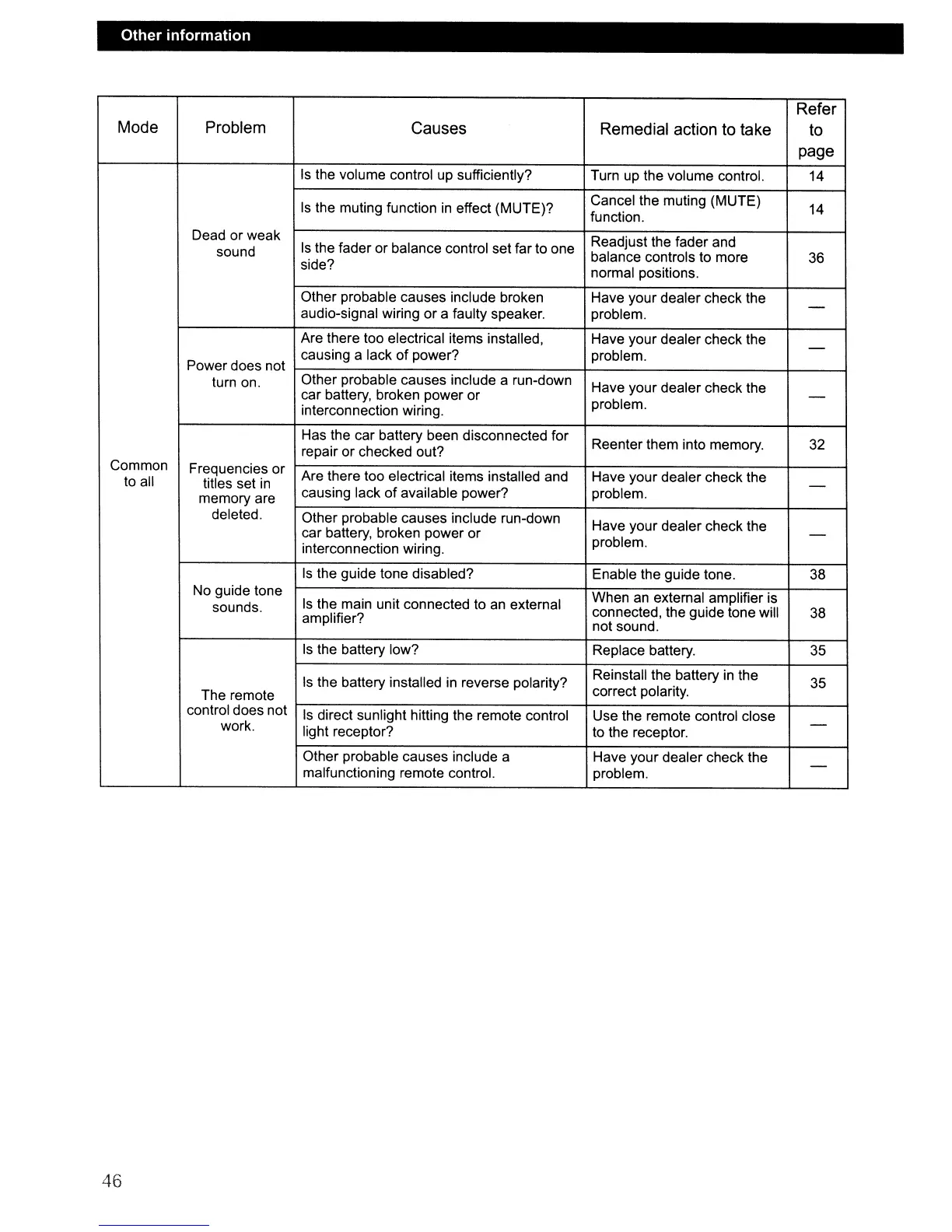
Mode Problem Causes Remedial action to take
to
page
Is
the volume control
up
sufficiently? Turn
up
the volume control. 14
Is
the muting function
in
effect (MUTE)?
Cancel the muting (MUTE)
14
function.
Dead or weak
Readjust the fader and
sound
Is
the fader or balance control set far to one
balance controls to more
36
side?
normal positions.
Other probable causes include broken Have your dealer check the
-
audio-signal wiring or a faulty speaker. problem.
Are there too electrical items installed, Have your dealer check the
-
Power does not
causing a lack
of
power? problem.
turn on.
Other probable causes include a run-down
Have your dealer check the
car battery, broken power
or
-
interconnection wiring.
problem.
Has the car battery been disconnected for
Reenter them into memory.
32
repair
or
checked out?
Common
Frequencies or
Are there too electrical items installed and
Have your dealer check the
to all
titles set
in
causing lack
of
available power? problem.
-
memory are
deleted.
Other probable causes include run-down
Have your dealer check the
car battery, broken power
or
problem.
-
interconnection wiring.
Is
the guide tone disabled?
Enable the guide tone.
38
No guide tone
Is
the main unit connected to an external
When
an
external amplifier is
sounds.
connected, the guide tone will
38
amplifier?
not sound.
Is the battery low? Replace battery.
35
Is
the battery installed
in
reverse polarity?
Reinstall the battery
in
the
35
The remote
correct polarity.
control does not
Is
direct sunlight hitting the remote control Use the remote control close
work.
light receptor?
to the receptor.
-
Other probable causes include a
Have your dealer check the
-
malfunctioning remote control. problem.
46



 To Next Page