•
System
connection
example
/
Ejemplo
de
conexi6n
del
sistema
/
Exemple
de connexion du
systeme
English
~
Tip-------------...
•
Install
and
connect
all
of
the
peripheral
units
before
connecting
them
to
the
main
unit.
•
Do
not
remove
any
of
the
protective
caps
(RCA,
etc.)
unless
the
connectors
are
in
use.
•
Be
sure
to
wrap
the
connection
wires
with
tape (PVC tape)
to
insulate
them.
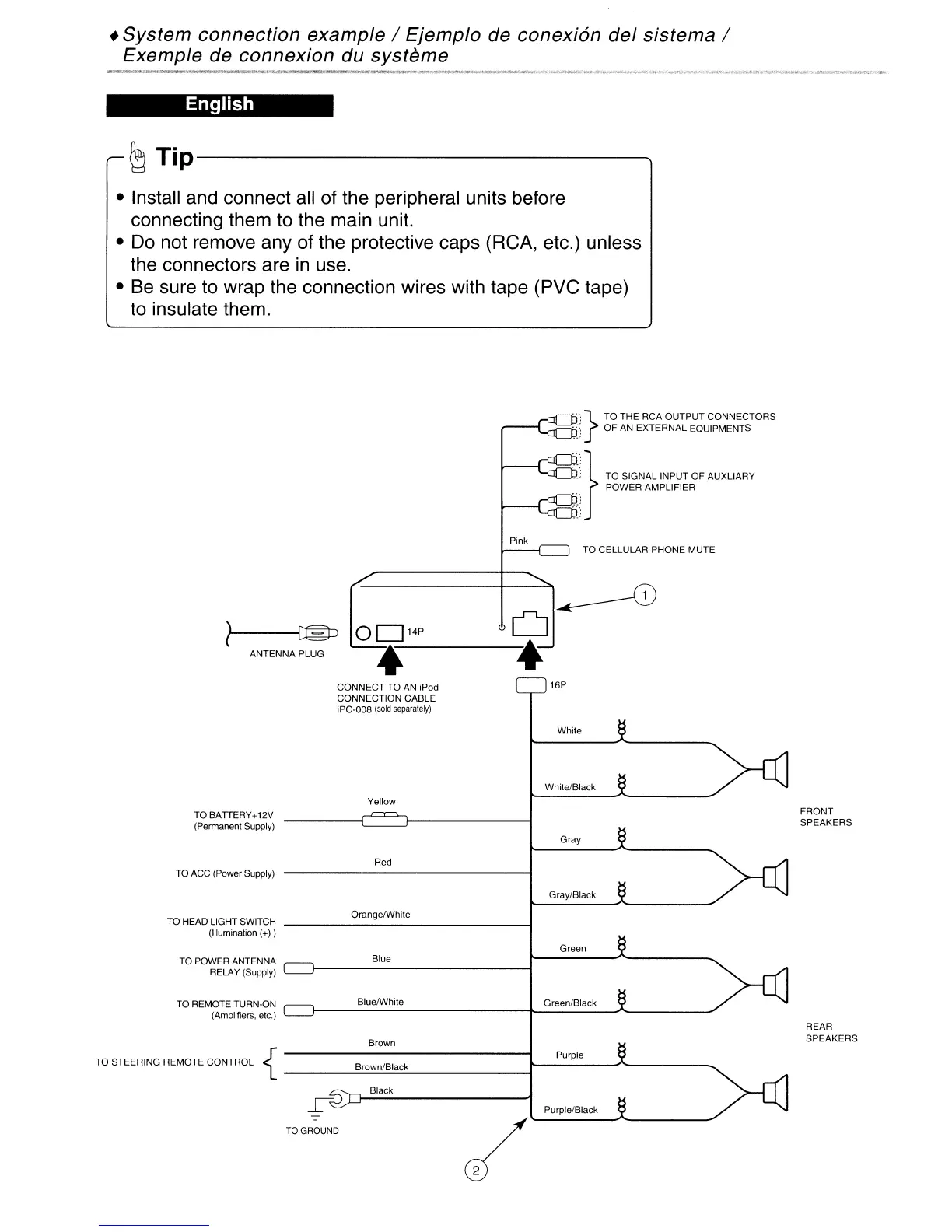
"'}
TO THE RCA OUTPUT
CONNECTORS
':'; OF AN EXTERNAL EQUIPMENTS
:::~}
TO SIGNAL INPUT OF AUXLlARY
POWER AMPLIFIER
TO CELLULAR PHONE MUTE
ANTENNA PLUG
..--0
OD14P
U
4--*
CONNECT
TO
AN iPod
CONNECTION CABLE
iPC,008
(sold
separately)
16P
White
Yellow
White/Btack
TO BATIERY+12V
(Permanent Supply)
FRONT
SPEAKERS
Gray
TO ACC (Power Supply)
Red
Gray/Black
TO HEAD LIGHT SWITCH
(Illumination (+))
OrangelWhite
Green
TO POWER ANTENNA
RELAY (Supply)
TO REMOTE TURN-ON
(Amplifiers, etc.)
Blue
BluelWhite
Brown
Green/Black
REAR
SPEAKERS
Black
TO
GROUND
Purple/Black
{
Purple
TO STEERING REMOTE CONTROL
JB~ro~w~n/~B~la£!:ck:..._
...r_----~"-------
•
System
connection
example
/
Ejemplo
de
conexi6n
del
sistema
/
Exemple
de connexion du
systeme
English
~
Tip-------------...
•
Install
and
connect
all
of
the
peripheral
units
before
connecting
them
to
the
main
unit.
•
Do
not
remove
any
of
the
protective
caps
(RCA,
etc.)
unless
the
connectors
are
in
use.
•
Be
sure
to
wrap
the
connection
wires
with
tape (PVC tape)
to
insulate
them.
"'}
TO THE RCA OUTPUT
CONNECTORS
':'; OF AN EXTERNAL EQUIPMENTS
:::~}
TO SIGNAL INPUT OF AUXLlARY
POWER AMPLIFIER
TO CELLULAR PHONE MUTE
ANTENNA PLUG
..--0
OD14P
U
4--*
CONNECT
TO
AN iPod
CONNECTION CABLE
iPC,008
(sold
separately)
16P
White
Yellow
White/Btack
TO BATIERY+12V
(Permanent Supply)
FRONT
SPEAKERS
Gray
TO ACC (Power Supply)
Red
Gray/Black
TO HEAD LIGHT SWITCH
(Illumination (+))
OrangelWhite
Green
TO POWER ANTENNA
RELAY (Supply)
TO REMOTE TURN-ON
(Amplifiers, etc.)
Blue
BluelWhite
Brown
Green/Black
REAR
SPEAKERS
Black
TO
GROUND
Purple/Black
{
Purple
TO STEERING REMOTE CONTROL
JB~ro~w~n/~B~la£!:ck:..._
...r_----~"-------



 To Next Page