78
How to operate the receiver with an optional DSP/EQ unit connected
Fine-tuning EQ functions
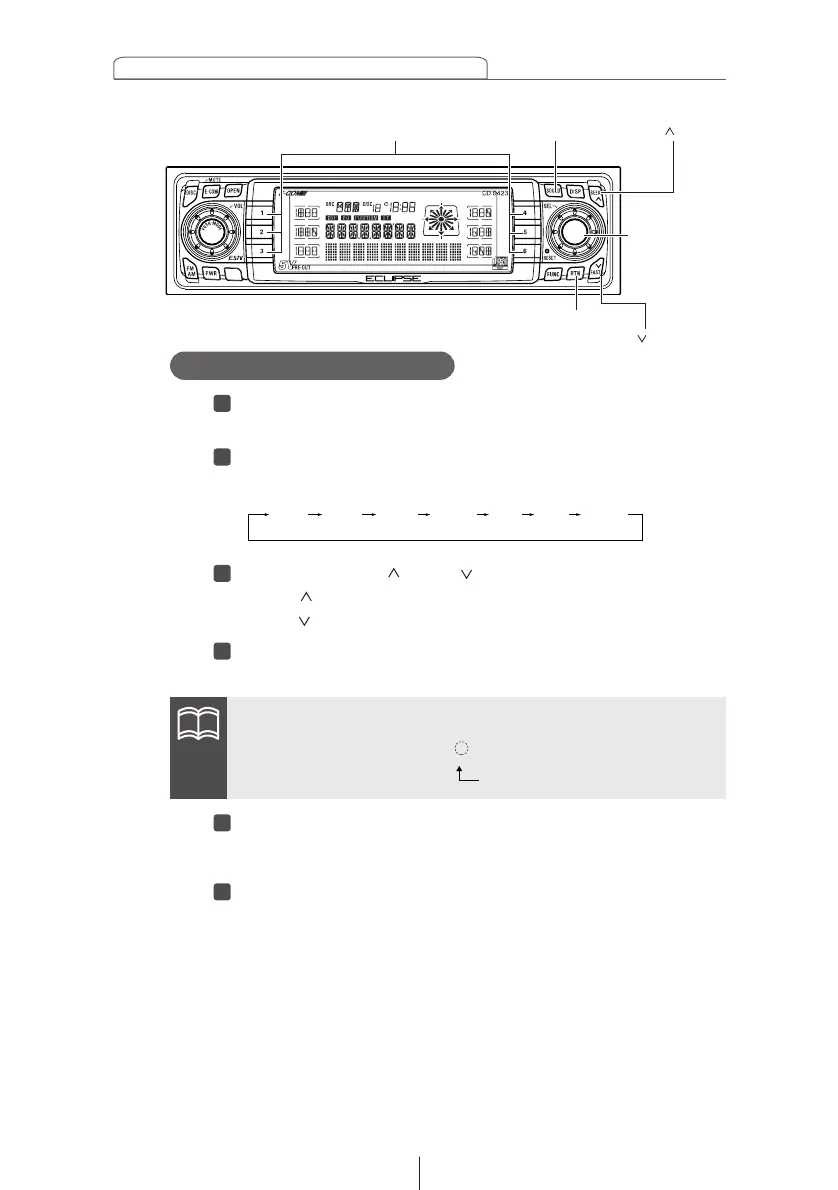
Press the [SEL] button until the desired equalizer mode
is displayed.
Turn the [SEL] button to switch frequencies.
The frequencies will switch in the following sequence:
Press the [SEEK /FAST ] button to adjust the level.
[SEEK ] button: Increases the value.
[FAST ] button: Decreases the value.
Hold down a button, [1] to [6], for more than two
seconds to preset a value.
Press the [RTN] button.
At this time, other adjustments can also be made in Sound
Adjustment Mode.
Press the [SOUND] button to exit Sound Adjustment
Mode.
This cancels the adjustment mode. The selected value will
now take effect.
63Hz 125Hz 250Hz 500Hz 1kHz 4kHz 12kHz
ATTENTION
When the preset value is changed, the display shows as follows:
USER
1~6 (Preset ch No.)
[SOUND] button
[SEEK ] button
Buttons [1] to [6]
[SEL]
button
[FAST ] button
[RTN] button



 To Next Page