59
4.7.2 DCW
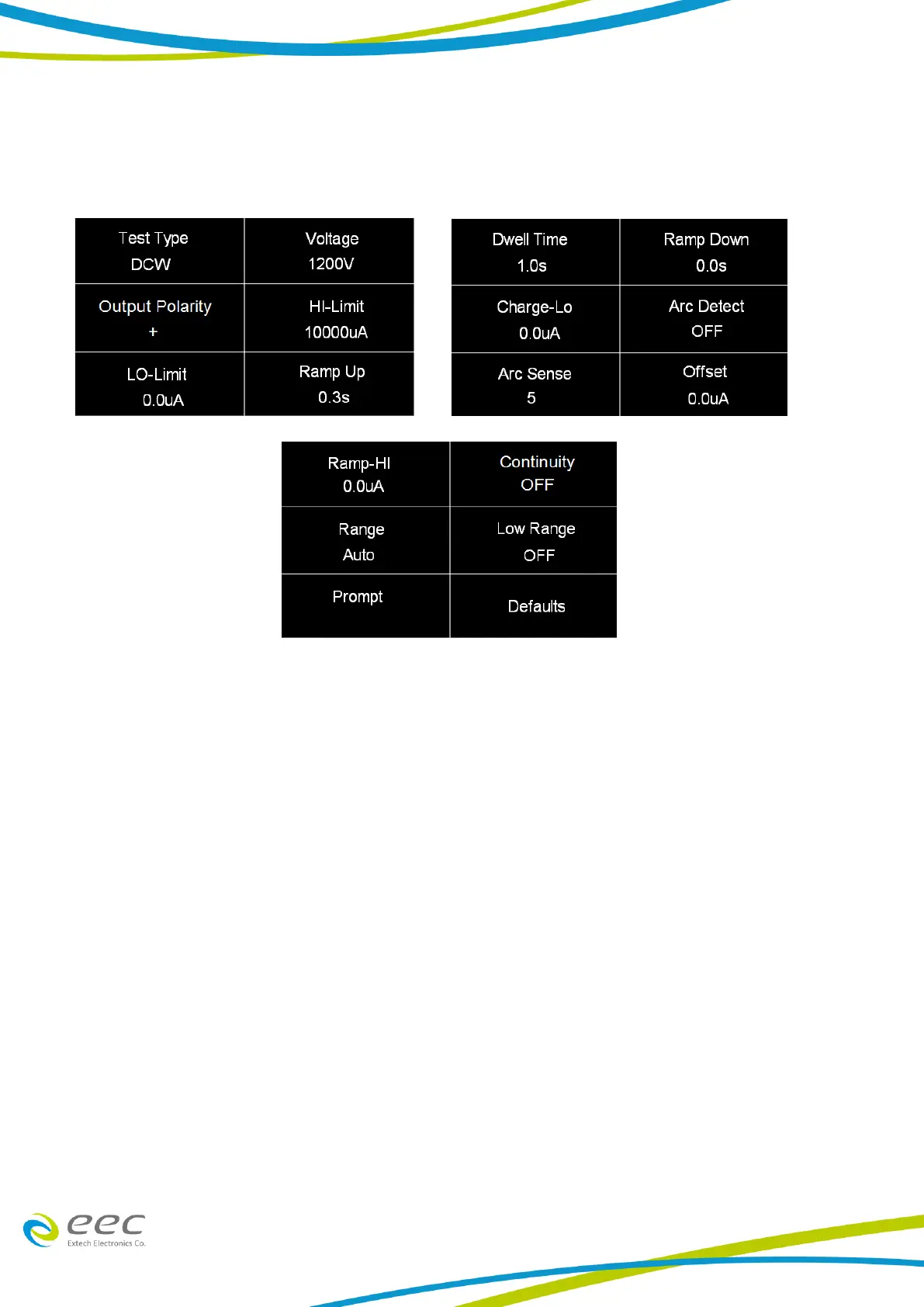
Select DCW for the test type and use the enter key (↵) to save the Test Type and move to the next
test parameter:
Note:
1. Charge-Lo: The parameter can be set automatically or manually. To perform an auto Charge-
Lo, connect the DUT and all the test leads as needed to perform a real test. Press the test
button on the front panel. Reading will be displayed on the screen when the instrument is
performing the auto Charge-Lo. Once the instrument is has finished performing the auto
Charge-Lo the numeric value will be displayed on the screen and will be automatically saved to
be used when the actual test is performed.
2. Offset: To perform an auto offset disconnect the DUT and leave all the test leads open. Press
the test button on the front panel. Reading will be displayed on the screen when the
instrument is performing the auto offset. Once the instrument is has finished performing the
auto offset the numeric value will be displayed on the screen and will be automatically saved
to be used when the actual test is performed



 To Next Page