EasyManua.ls Logo

Egro ONE - Install New App on the Tablet

Egro ONE
62 pages
Print Icon
To Next Page IconTo Next Page
To Previous Page IconTo Previous Page
Loading...
Technical Manual V6.00 49 01.05.2017
7.2. Install new App on the tablet
If the BYO-App is running on a tablet it has to be stopped. Go to the App-menu “Settings” -> “Device Lock” and
select “Exit device lock mode”
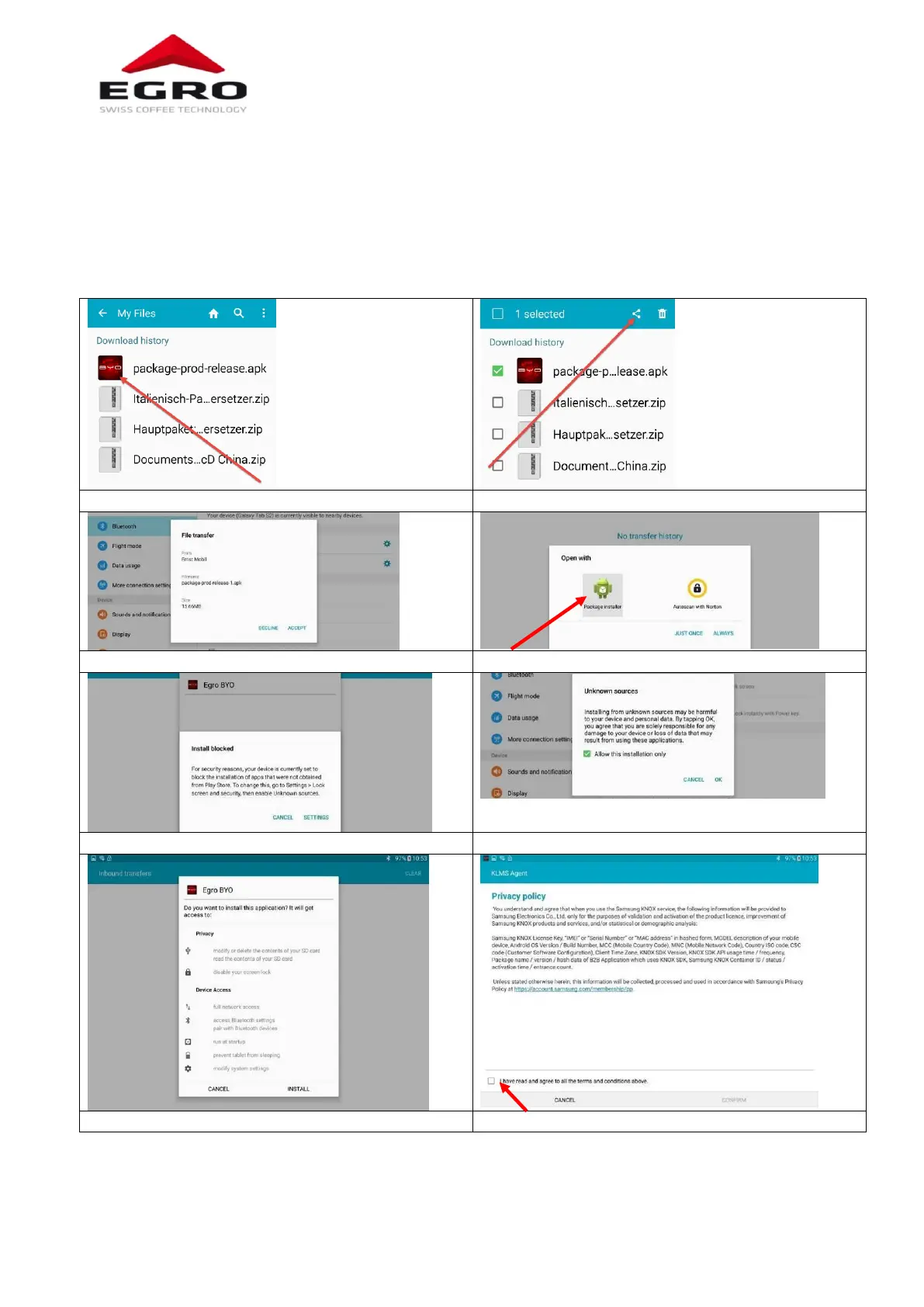
Activate Bluetooth at the Smartphone and the tablet and connect the devices.
Send the App via Bluetooth to a Smartphone.

Download the file to a smartphone
Send the file via Bluetooth to the tablet
«Accept» the file transfer
Press button
Confirm «Settings»
Accept the “Unknown sources” with OK
Select «Install»
Accept the privacy policy

Table of Contents